AI SOP
AI SOP and process automation: Turn departmental SOPs into Skills that AI Agent can execute
After an SOP is written, it often becomes a document that no one reads. An AI SOP turns it into a Skill that AI Agent can follow. AI Agent handles repetitive steps in processes such as quotations, work orders, and payment requests. People remain responsible for steps that require judgment and approval.
Want every employee to have their own AI teammate?
A consultant will be in touch shortly.
SOP digitization often stalls in these three areas
The problem is usually not that the SOP lacks detail. The problem is that it was never connected to daily workflows. After it is written, it stays in a folder.
No one follows the SOP
The document is stored in a shared folder. New employees do not know where it is, while experienced employees think it is faster to use their own methods. Over time, the SOP and actual practices move further apart.
The same work is repeated every day
Tasks such as daily reports, reconciliation, and quotation preparation follow fixed rules, but someone still repeats them manually every day or every week. Time is spent on the same steps.
Cross-department handoffs rely on verbal communication
After sales receives an order, it passes the work to production scheduling, which then passes it to purchasing. Each handoff relies on messages and email. If someone misses a handoff, the problem often goes unnoticed until something goes wrong.
How EgentWrX turns SOPs into AI-powered process automation
Four modules handle different parts of the process. Skills define how work is done. Routines define when it is done. AI Agent handoffs define who handles it. Records make every step traceable afterward.
Generate Skills from an SOP with one click
Paste in an SOP to generate a reusable Skill with one click. You can then adjust the steps and decision criteria as needed. Create it once and share it across the company. Update one version and synchronize it everywhere. The Skill also continues to improve based on user feedback.
Skills
Routine scheduling
For repetitive work such as daily reports, reconciliation, and inventory reminders, set the schedule once. AI Agent will run the task automatically at the scheduled time, report when it is complete, and flag exceptions.
Routines
AI Agent handoffs across departments
When work crosses departments, each department's AI Agent handles its assigned part and then passes the work to the next AI Agent. It can also notify the responsible employee.
AI Agent handoffs
Record every step
Every step is recorded, including model calls, knowledge retrieval, and updates written back to systems. You can review who did what and when.
Audit trail
Example scenario
The same inquiry goes from 8 hours 20 minutes to 28 minutes
Sam in sales receives an inquiry. Before preparing the quotation, he needs cost information from purchasing, the credit limit from finance, and the delivery date from production control. Before implementation, he spends more time waiting for replies than processing the inquiry. The production control employee is traveling that day, so the delivery date is not confirmed until the afternoon. After implementation, digital counterparts for the four roles each search their department's knowledge base and respond within their own access permissions. Sam only needs to give final approval.
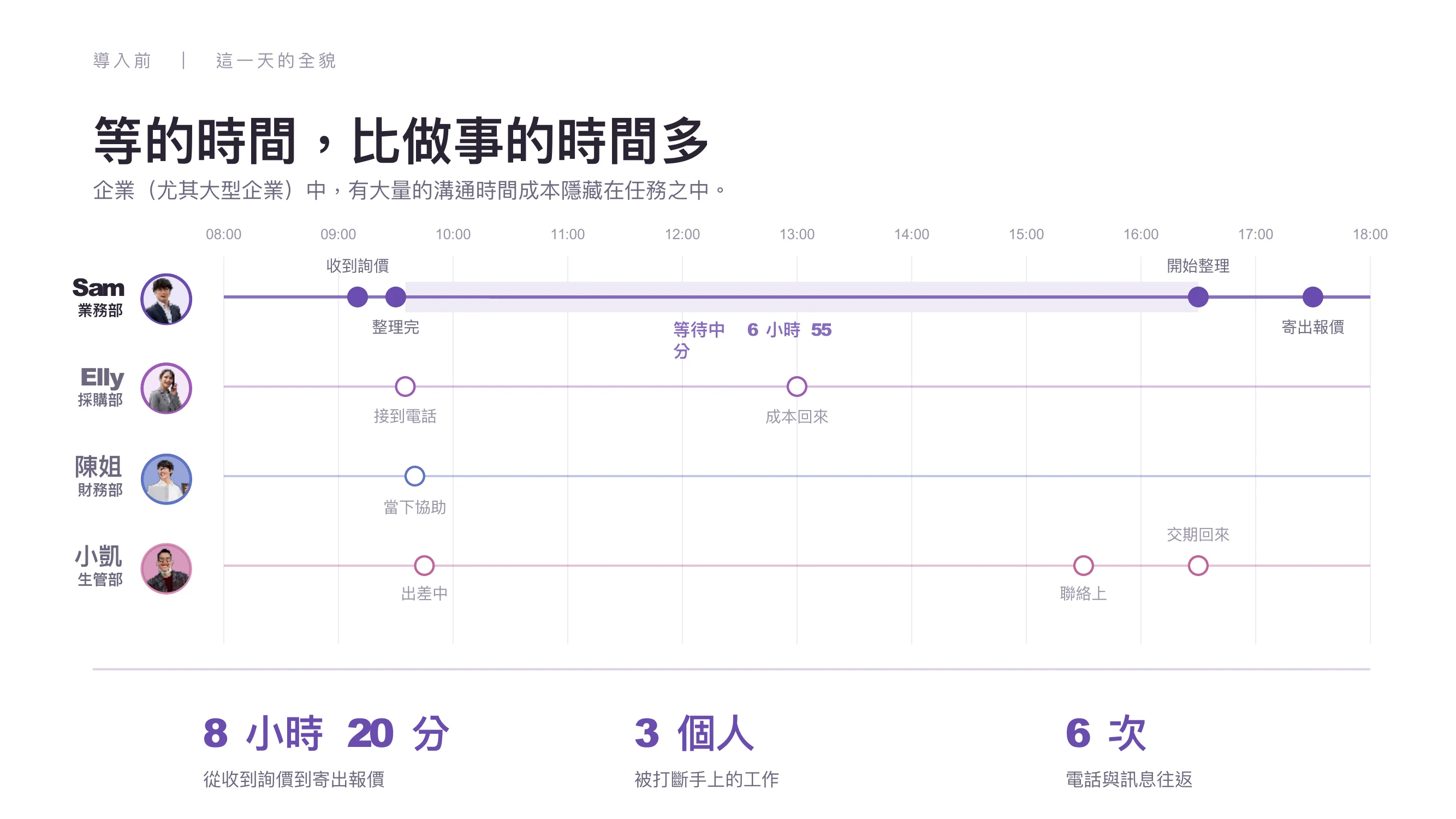
- From receiving the inquiry to sending the quotation
- 8 hours 20 minutes
- Interrupted from their current work
- 3 people
- Phone calls and messages exchanged
- 6 times
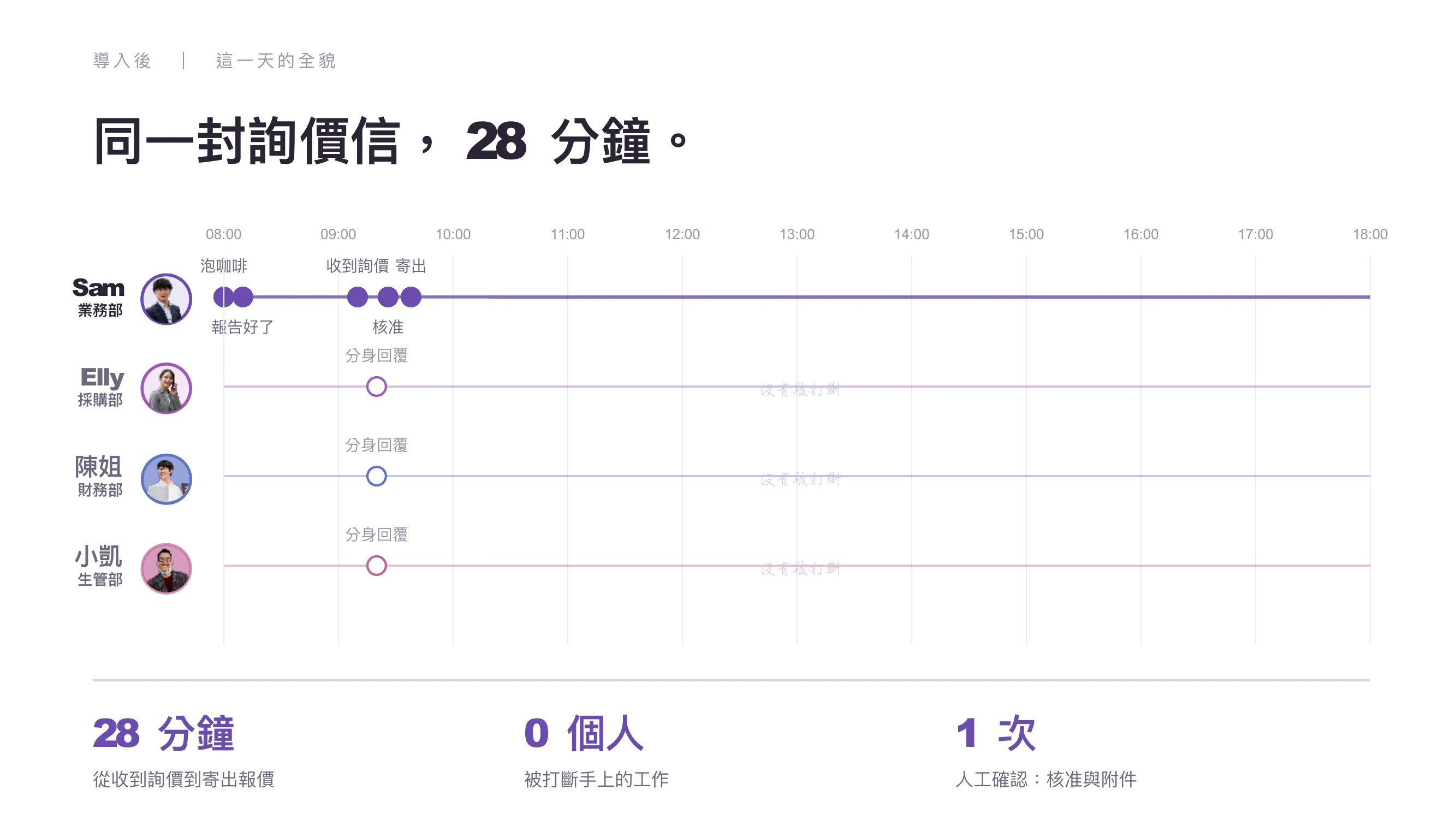
- From receiving the inquiry to sending the quotation
- 28 minutes
- Interrupted from their current work
- 0 people
- Manual check: approval and attachments
- 1 time
| Three tasks on the same day | Before implementation | After implementation |
|---|---|---|
| Industry intelligence | 60 minutes | 10 minutes |
| Inquiry to quotation | 1 day | 28 minutes |
| Initial contract review | 3 days | 3 minutes |
This scenario comes from a demonstration at the September 2026 launch event. It uses an example fastener company and does not represent actual customer results.
Companies preserving their methods as AI SOPs
These companies turned their know-how into Skills that AI Agent can follow. Their methods remain within the company even when personnel change.
Frequently asked questions about AI SOP and process automation
- How is SOP digitization different from RPA?
- RPA repeats fixed clicking steps and stops when a screen or field changes. An AI SOP enables AI Agent to understand rules and decision criteria. It can classify and consolidate documents with different formats, then send exceptions to a person. Both can be used together. Assign fully fixed steps to RPA and assign work that requires understanding and judgment to AI Agent.
- Which processes should be turned into AI SOPs first?
- Start with repetitive, time-consuming processes that follow clear rules, such as standardized quotation and work order processes. The safest starting point is a task with fixed input fields, stable templates, and errors that are easy to identify. AI should first prepare a draft. A person should confirm it before it is posted or sent.
- Do AI SOPs require programming?
- No. Give the AI Agent your usual work steps and SOPs, and it can turn them into Skills. You can also explain your requirements directly to the AI Agent, and it will create the tasks and Skills. IT only needs to assess MCP integration when the AI Agent must read from or write to internal systems such as ERP.
- Who is responsible when AI makes a mistake?
- People remain responsible, so the process must clearly define which steps require manual approval. The most common cause of failure we see at customer sites is assigning recognition, calculation, and approval to the model at the same time. EgentWrX records every step, so you can identify where an error occurred and what information was used to make the decision.
Where to go next
Want every employee to have their own AI teammate?
A consultant will be in touch shortly.