SCENARIO 14·Sales·Content Generation
At the start of each month, the sales team must reorganize last month's sales figures into a report
At the start of each month, the sales team must prepare a report using the previous month's sales figures. They must export the data, create the tables, and write the explanations before submitting the report to the sales manager and management.
The numbers are already in the system. The work lies in organizing them and writing the report. The sales team must use a fixed format, compare results with the previous period, and explain the reasons for growth or shortfalls. The format is the same every month, but the explanations must be rewritten each time. This delays other work at the start of the month.
At a glance
How it was done
- Export the previous month's sales data
- Create tables and calculate period changes
- Explain growth or shortfalls
- Send after manager review
Where it gets stuck
The format is the same every month, but the explanations must be rewritten each time. The report is due at the start of the month, so data issues such as returns and duplicate exports are easy to miss. If a number is wrong, the explanations that follow will also be wrong.
With an AI Agent
- Export the previous month's sales data
- Create tables and calculate period changes
- Explain growth or shortfalls
- Send after manager reviewHuman approval
The AI Agent organizes the numbers and drafts the report in the example format. All totals and comparisons can be traced to the details for verification. The sales manager determines the reasons for growth or shortfalls and verifies the facts before the report is sent.
How it was done
- 01Export the previous month's sales data from the system
- 02Organize the data into report tables and calculate changes from the previous period
- 03Write explanations for growth or shortfalls
- 04Send the report after the sales manager reviews it
| Shipment Date | Order No. | Customer | Product Line | Amount (Excluding Tax) | Sales Notes |
| 2026/08/31 | SO-2608-118 | Example Molds | Lubricating Oil | 28,000 | |
| 2026/09/01 | SO-2609-001 | Example Precision Engineering | Cutting Fluid | 93,000 | Month 2 of annual contract |
| 2026/09/08 | SO-2609-006 | Example Electric | Hydraulic Oil | 52,000 | |
| 2026/09/15 | SO-2609-012 | Example Electric Co., Ltd. | Hydraulic Oil | 40,000 | |
| 2026/09/16 | SO-2609-014 | Example Plastics | Hydraulic Oil | 46,000 | |
| 2026/09/16 | SO-2609-014 | Example Plastics | Hydraulic Oil | 46,000 | |
| 2026/09/17 | SO-2609-015 | Example Automotive | Cutting Fluid | 35,000 | First order from new customer |
| 2026/09/18 | SO-2609-016 | Example Food Machinery | Lubricating Oil | 35,000 | |
| 2026/09/23 | SR-2609-001 | Example Auto Parts | Cutting Fluid | -21,000 | Return: damaged packaging |
| 2026/09/30 | SO-2609-024 | Example Auto Parts | Cutting Fluid | 71,000 |
- Date
- 2026-09-02
| Product Line | August | July | Change |
|---|---|---|---|
| Cutting Fluid | 468,000 | 440,000 | +6.4% |
| Lubricating Oil | 352,000 | 350,000 | +0.6% |
| Hydraulic Oil | 200,000 | 190,000 | +5.3% |
- Sales This Month
- 1,020,000
- Target
- 1,000,000
- Achievement Rate
- 102.0%
With an AI Agent
- 01What it doesOrganize the month's sales figuresStandard appliedInclude shipments with shipment dates in the current month. Count duplicate orders only once. Deduct returns from the original product line and salesperson. Combine different names for the same customer and list them for confirmationOutputValid sales details
- 02What it doesCalculate totals and comparisonsStandard appliedCalculate total sales, product-line results, salesperson results, the top five customers, and the achievement rate according to the rules. Every number must be traceable to the details for verification. Use the previous month's report for period comparisons. Round percentages to one decimal placeOutputFigures for the monthly report
- 03What it doesDraft the report in the example formatStandard appliedUse the same sections and table fields as the previous month's report. In the explanations, include only facts from the sales notes and cite their sources. If growth or decline exceeds 10% and the notes do not state a reason, write "Reason to be provided by the sales manager"OutputMonthly report draft with a confirmation list at the end
- 04What it doesSend the draft to the sales manager for reviewStandard appliedLeave next month's target blank. Do not infer reasons for the sales managerOutputSend the report only after the sales manager adds their judgment and verifies the facts
- Human approval
- Step 4 remains with the sales manager. The AI Agent produces a draft. The sales manager must determine the reasons for growth or shortfalls, and the report is sent only after the facts are verified.
- Platform modules used
- Skills, Routines, Integrations
For content generation tasks, we recommend providing existing examples, a terminology list, prohibited wording, and clear review responsibility. The deliverable should be treated as a draft. At client sites, the most common failures occur when users provide only a vague instruction or skip fact-checking to save time. For the numbers in the report, follow the data interpretation process: every number must be traceable to the system details for verification.
Screenshots show the Traditional Chinese interface.
01Upload Sales Details and the Previous Report
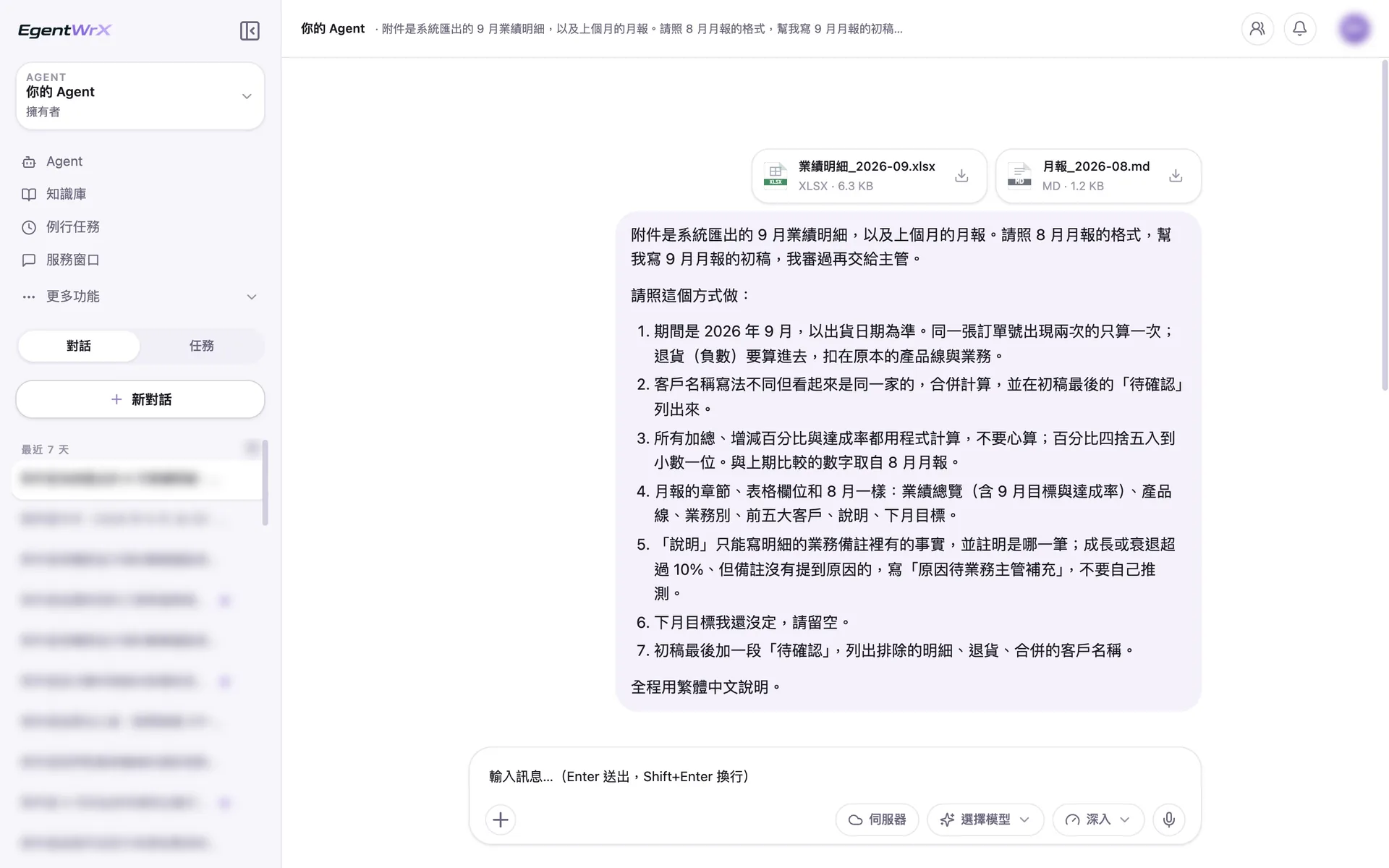
- 1Upload the system-exported September sales details and the previous month's report.
- 2Use the shipment date, count duplicate orders only once, and deduct returns.
- 3Calculate all totals and percentages under the same rules.
- 4Include only facts from the sales notes. Mark entries without a stated reason as "To be provided."
02Execution Process
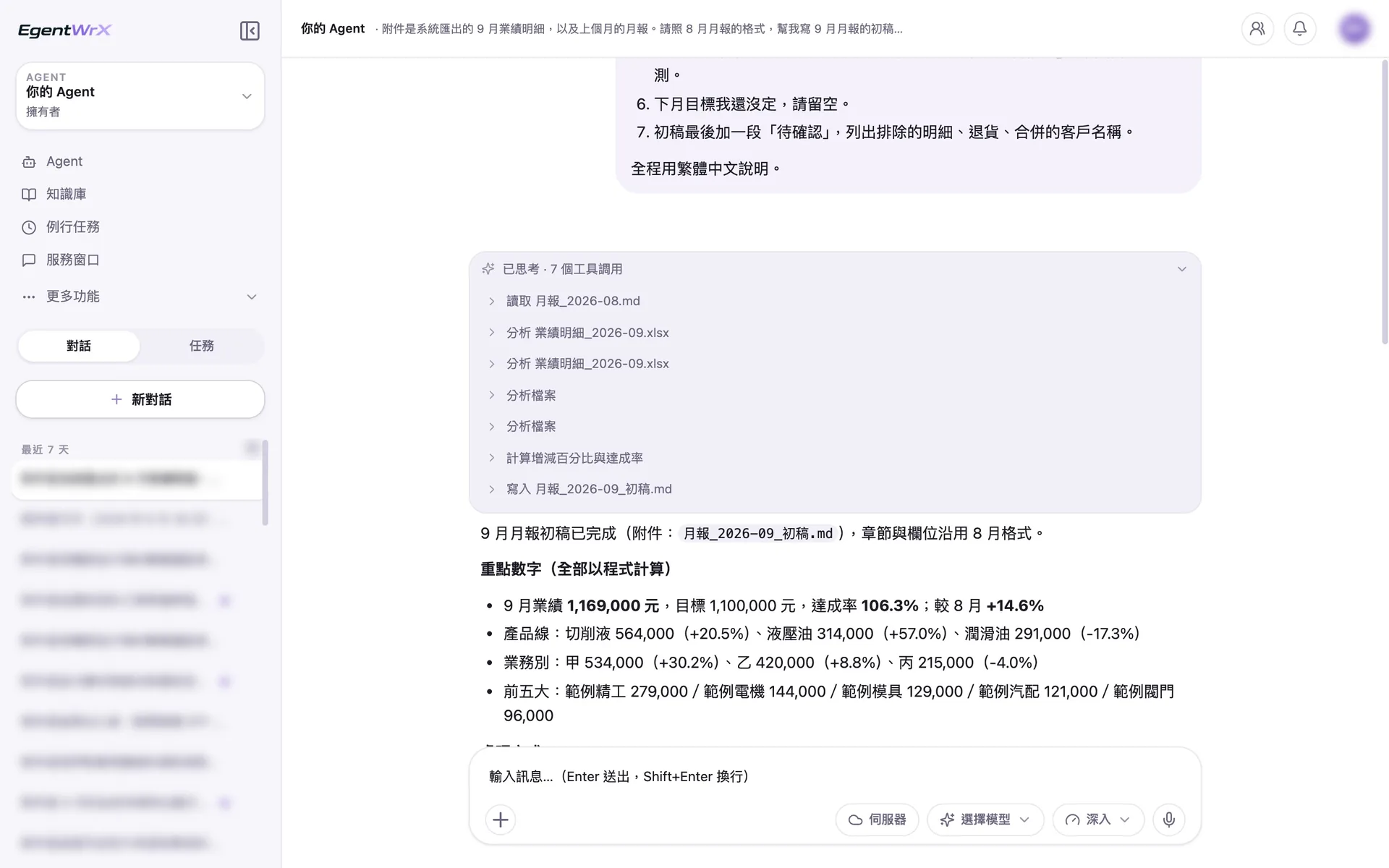
- 1Read the August report first and reuse the same format.
- 2Analyze the details, calculate percentage changes and the achievement rate, and write them into the September report draft.
- 3Key figures: sales, achievement rate, and changes by product line and salesperson.
03Key Figures and Processing
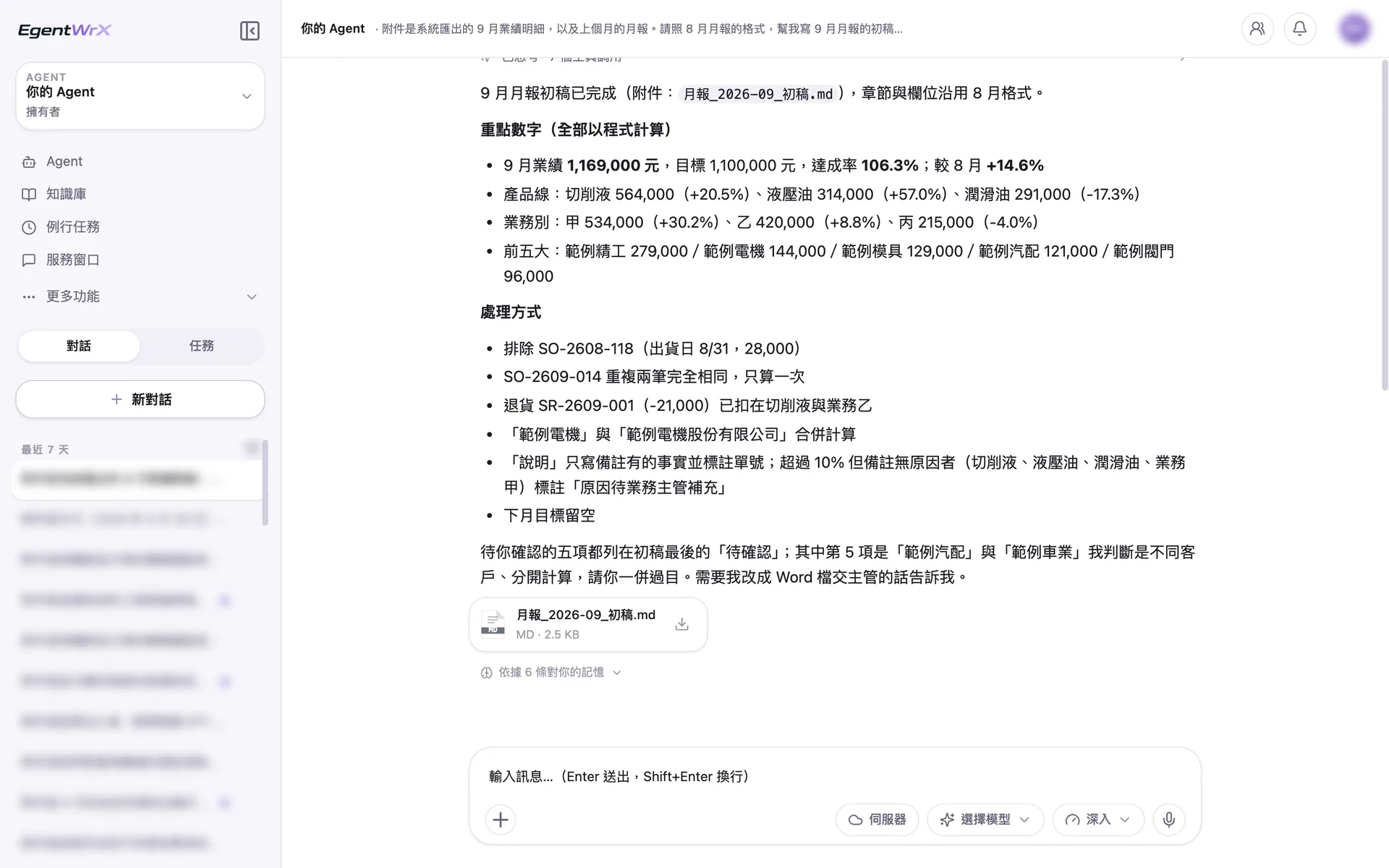
- 1September sales were 1,169,000 yuan, with an achievement rate of 106.3%, up 14.6% from August.
- 2Exclude shipments from late August and duplicate orders. Deduct returns from the original product line and salesperson.
- 3For changes without a reason in the notes, mark "Reason to be provided by the sales manager."
- 4List items requiring confirmation at the end of the draft for the sales manager to review.
Numbers
Estimated monthly savings of 2 to 8 hours
Source: An unnamed automotive parts manufacturer advised by us
FAQ
- Can we trust the numbers in the report?
- Each item can be verified. Every total and percentage can be traced to the details exported from the system. The AI Agent turns the numbers into written explanations, but the sales manager must still verify the facts before sending the report. If a number is in question, check it against the system data.
- Can it use our existing report format?
- Yes. Organize your existing report examples, formats, and standard terminology into Skills. The AI Agent will then use the same setup every month. The format will remain consistent when responsibility changes, and new staff members can continue using it when they take over the report.
- Can we use the AI Agent's explanation of the reasons without review?
- We do not recommend it. The AI Agent can identify changes in the numbers, but the sales manager, who understands the customers and market, must determine the actual reasons for growth or shortfalls. The draft saves time on organization and writing, but people remain responsible for judgment.
Where to go next
Want every employee to have their own AI teammate?
A consultant will be in touch shortly.