SCENARIO 19·Finance·Standardized task
Every billing amount must be calculated by rule and checked again
Before submitting a billing request, finance must calculate the amount according to established rules. Staff organize quantities and unit prices, apply the agreed conditions, calculate the amount to bill, and attach the calculation details.
The rules are fixed, but every item must be recalculated and then checked again. If a number is wrong, staff must follow up with the other party and reconcile the accounts again. The main problem with this work is that repetition makes it easy to lose focus.
At a glance
How it was done
- Organize quantities and unit prices
- Calculate in Excel under agreed terms
- Attach details and check again
- Confirm and submit billing request
Where it gets stuck
The rules are fixed, but every item must be recalculated and then checked again. The repetition makes it easy to lose focus. If a number is wrong, staff must follow up with the other party and reconcile the accounts again.
With an AI Agent
- Organize quantities and unit prices
- Calculate in Excel under agreed terms
- Attach details and check again
- Confirm and submit billing requestHuman approval
The AI Agent organizes quantities, unit prices, and conditions according to the rules and produces calculation details. It includes a formula for every amount and separately flags rule violations. The billing request is submitted only after finance confirms it.
How it was done
- 01Organize the quantities and unit prices for this billing request
- 02Calculate the billing amount in Excel based on the agreed conditions
- 03Attach the calculation details and check them again
- 04Submit the billing request after confirmation
- No.
- EX-SC-2026-003
| Clause | Item | Rule |
|---|---|---|
| 1 | Billing period | Billing occurs once a month and covers only shipments with a customer acceptance date from the 1st through the last day of that month |
| !2 | Acceptance number | Every shipment must have a customer acceptance number before it can be billed. Shipments without an acceptance number cannot be billed in the current period and must be included in the next period after the customer provides one |
| 3 | Billing quantity | Calculate by subtracting the returned quantity from the accepted quantity |
| 4 | Unit price | Use the contract unit price in the appendix, in New Taiwan dollars, excluding tax |
| !5 | Volume discount | When the monthly billing quantity for the same part number reaches 10,000 units or more, calculate that part number's monthly amount at 98% of the standard amount. Calculate the cumulative quantity after deducting returns |
| 6 | Amount calculation | Amount per item = billing quantity × unit price, rounded to the nearest dollar. Business tax is 5%, calculated from the discounted total excluding tax and rounded to the nearest dollar |
| 7 | Calculation details | The billing request must include calculations for each item and subtotals by part number for customer verification |
| Part number | Item name | Unit price (dollars) |
|---|---|---|
| HB-M8-30 | Hex socket bolt M8×30 | 2.85 |
| HB-M10-40 | Hex socket bolt M10×40 | 4.60 |
| NT-M8 | Hex nut M8 | 0.62 |
| FW-M8 | Flat washer M8 | 0.28 |
| FB-M10-30 | Flange bolt M10×30 | 3.65 |
| TR-M10-1000 | Fully threaded rod M10×1000 | 38.00 |
| Shipment number | Shipment date | Part number | Customer acceptance number | Acceptance date | Accepted quantity | Returned quantity |
|---|---|---|---|---|---|---|
| DN-2609-001 | 2026-09-02 | HB-M8-30 | RC-2609201 | 2026-09-03 | 4,000 | 0 |
| DN-2609-002 | 2026-09-02 | NT-M8 | RC-2609202 | 2026-09-03 | 5,000 | 0 |
| DN-2609-003 | 2026-09-04 | FW-M8 | RC-2609203 | 2026-09-05 | 6,000 | 0 |
| DN-2609-005 | 2026-09-09 | HB-M8-30 | RC-2609205 | 2026-09-10 | 3,000 | 0 |
| !DN-2609-006 | 2026-09-10 | NT-M8 | RC-2609206 | 2026-09-11 | 5,200 | 500 |
| DN-2609-008 | 2026-09-15 | TR-M10-1000 | RC-2609208 | 2026-09-16 | 200 | 0 |
| !DN-2609-009 | 2026-09-16 | HB-M8-30 | RC-2609209 | 2026-09-17 | 3,000 | 0 |
| ≠DN-2609-010 | 2026-09-17 | FW-M8 | (blank) | (blank) | 5,000 | 0 |
| DN-2609-013 | 2026-09-24 | FW-M8 | RC-2609213 | 2026-09-25 | 3,900 | 0 |
| ≠DN-2609-014 | 2026-09-29 | TR-M10-1000 | RC-2610001 | 2026-10-01 | 150 | 0 |
| DN-2609-015 | 2026-09-26 | NT-M8 | RC-2609215 | 2026-09-28 | 200 | 0 |
With an AI Agent
- 01What it doesCheck each item against the rulesStandard appliedThe acceptance date must be within the current month, and every item must have an acceptance number. List noncompliant items separately, state which clause they violate and which period they should enter, and exclude them from the current period's amountOutputBillable details and rule violation list
- 02What it doesCalculate each amountStandard appliedBilling quantity = accepted quantity − returned quantity. Amount = billing quantity × contract unit price, rounded to the nearest dollar. Show the formula for every itemOutputItemized calculation details
- 03What it doesApply volume discounts by part numberStandard appliedApply the discount only when the monthly cumulative quantity for the same part number reaches the threshold after deducting returns and excluding noncompliant shipments. Show formulas for the discount and tax so finance can verify them directlyOutputPart-number subtotals, discounted total excluding tax, tax, and grand total
- 04What it doesSend to finance for confirmationStandard appliedFinance decides whether to first confirm the noncompliant item with the other partyOutputSubmit the billing request only after finance confirms the calculation details
- Human approval
- Step 4 remains with finance. The AI Agent includes a formula for every amount calculated under the rules, so finance can verify it directly. The billing request is submitted only after finance confirms the calculation results.
- Platform modules used
- Skills
This task is different from invoice matching and document recognition and data entry. Invoice matching compares invoices with goods receipt details in the ERP. Document recognition and data entry enter document data into the system. This task calculates billing amounts according to rules. We recommend not assigning recognition, calculation, and approval to the model in one step. Separate them so each stage remains clear.
Screenshots show the Traditional Chinese interface.
01Upload Billing Rules and Shipment Details
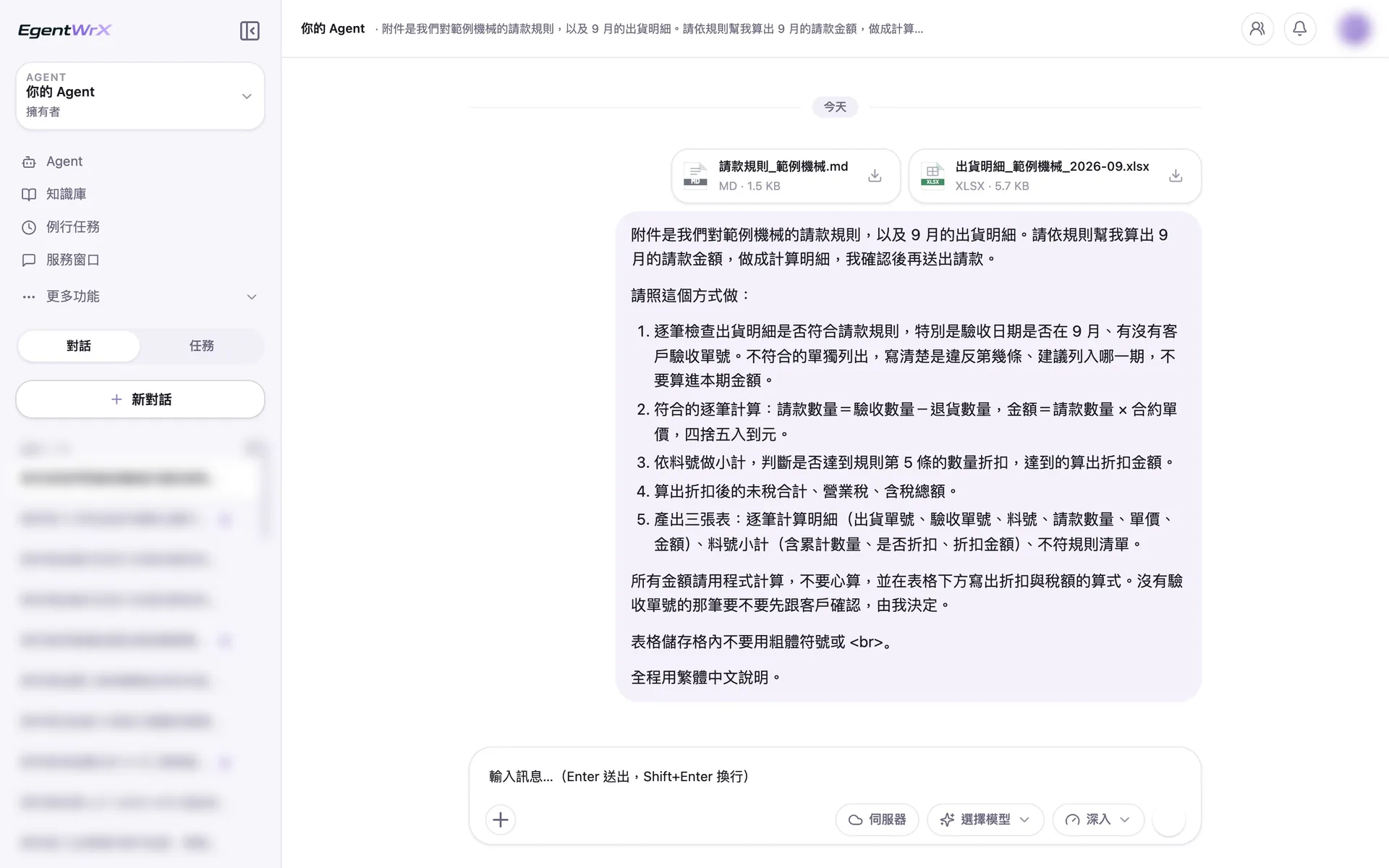
- 1Upload the billing rules and September shipment details.
- 2Check the acceptance date and acceptance number for each item. List noncompliant items separately and exclude them from the current period.
- 3The billing quantity equals the accepted quantity minus the returned quantity.
- 4Show the formula for every amount, including the discount and tax formulas.
02Processing
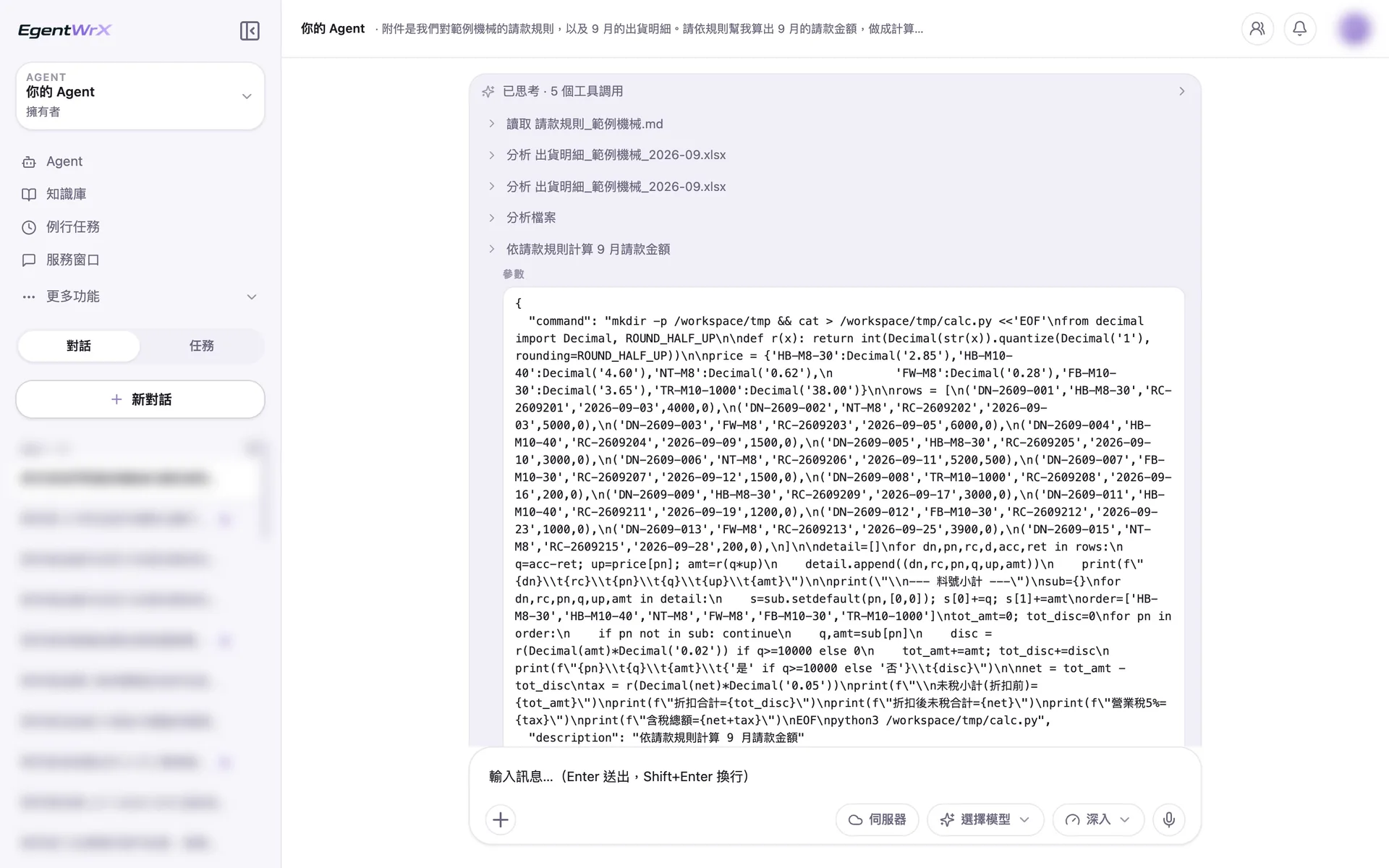
- 1Read the rules and analyze the shipment details in 5 steps.
- 2Apply contract unit prices and round to the nearest dollar.
- 3Include only the 13 compliant items in the calculation. First exclude the item without an acceptance number and the item accepted in October.
- 4Apply the 98% rate only when the cumulative quantity for the same part number reaches 10,000 units.
03Part-Number Subtotals and Rule Violations
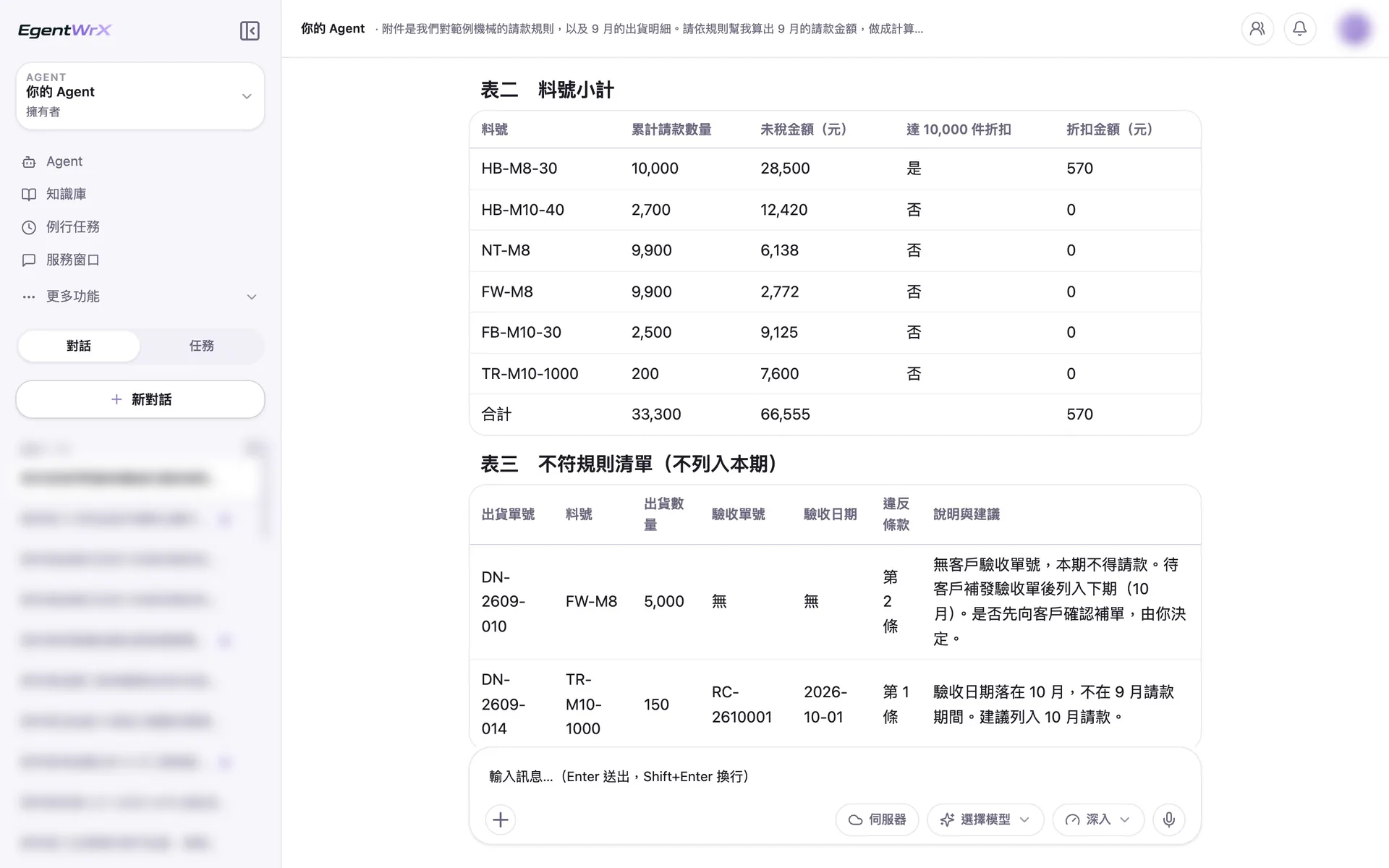
- 1The cumulative quantity is exactly 10,000 units. Under the rule's inclusive threshold, it qualifies for a discount of 570 dollars.
- 2After excluding the item without an acceptance number, the total is 9,900 units, so no discount applies.
- 3Under Clause 2, the shipment without an acceptance number cannot be billed. A person decides whether to confirm it with the customer first.
- 4Under Clause 1, the shipment accepted in October is included in October.
04Amount Settlement and Formulas
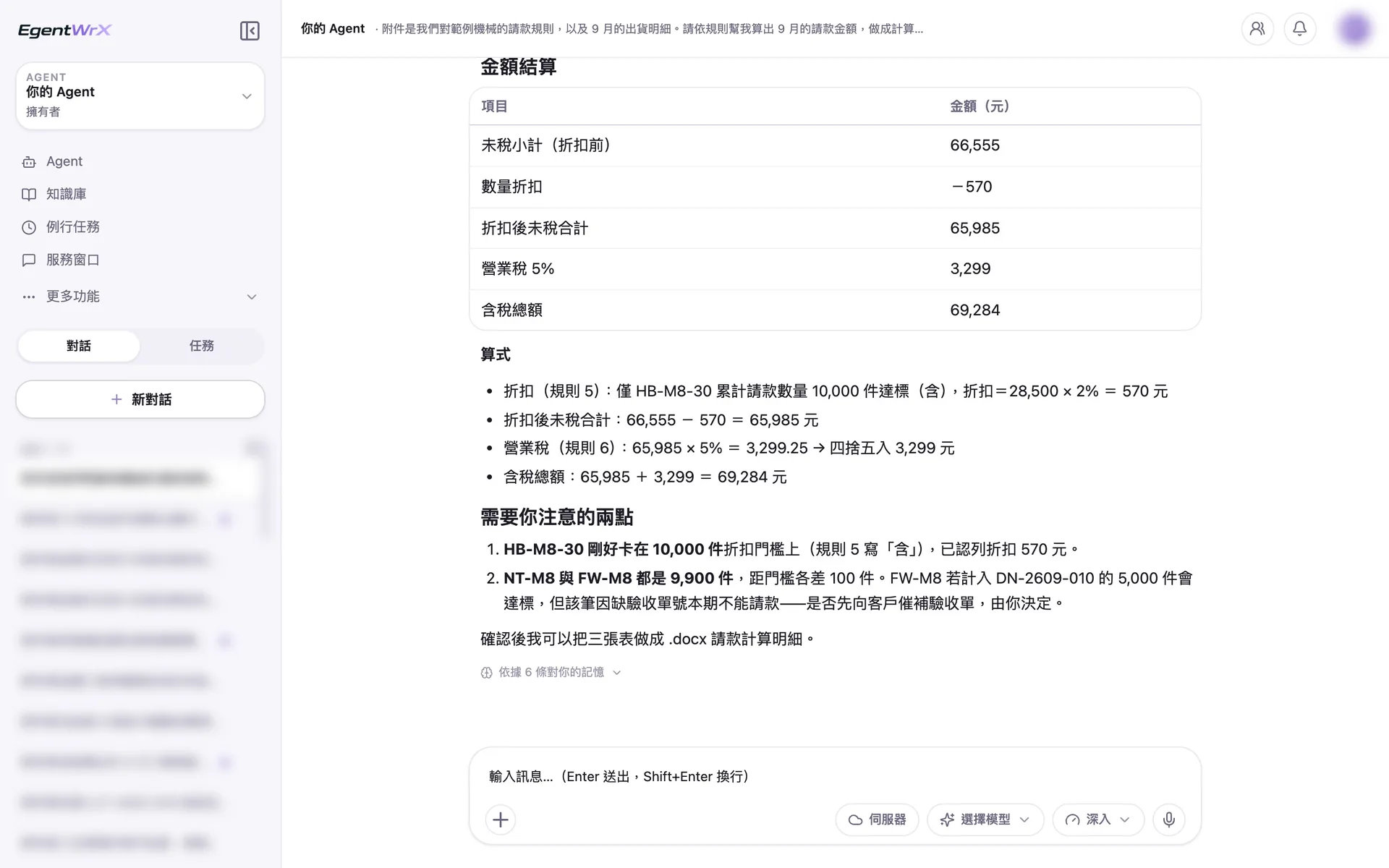
- 1The discounted total excluding tax is 65,985 dollars.
- 2The total including tax is 69,284 dollars.
- 3Calculate the business tax to a decimal value before rounding. The formula appears below the table.
- 4List the two items requiring human attention. A person decides whether to request the missing acceptance number.
Numbers
Estimated monthly time savings after routine adoption: 0.5 to 1 hour
Source: An unnamed automotive parts manufacturer advised by Intellicon Solutions
FAQ
- How is this different from invoice matching and document recognition and data entry?
- Each task covers a different step. Invoice matching compares invoices with goods receipt details in the ERP. Document recognition and data entry enter document data into the system. This task calculates billing amounts according to established rules. The three tasks can run in sequence or be used separately.
- Could the AI calculate the amount incorrectly?
- Yes. That is why every amount includes a formula that finance can verify directly. If the rules are incorrect, the calculated amounts will also be incorrect. Finance must therefore confirm the billing rules first, and the billing request is submitted only after finance confirms the calculation details.
- What if each customer has different billing terms?
- Organize each customer's terms as rules in the AI SOP and apply the appropriate rules during calculation. If a situation is not covered by the rules, the AI Agent flags it for finance to decide. It does not apply the closest rule on its own.
Where to go next
Want every employee to have their own AI teammate?
A consultant will be in touch shortly.