AI Gateway
AI Gateway: Manage Every AI App and Call on One Platform
As departments begin using AI, credentials and subscriptions for AI services such as GPT, Claude, and Gemini become scattered among different employees. There is also no central platform for managing costs. Companies often see the spending only after a quota is exhausted or a billing report arrives. An AI Gateway addresses these issues. EgentWrX includes this management layer. Administrators can use one management console to configure and review which provider's model employees and AI Agents use, which company credentials they use, and how much of the budget they spend.
Want every employee to have their own AI teammate?
A consultant will be in touch shortly.
ISO/IEC 27001:2022 Certified ISMSWhy Enterprises Need an AI Gateway
When AI use expands from a small pilot group to the entire company, models, credentials, costs, and usage records can become scattered across departments. IT teams may want central control but not know where to start.
AI Service Credentials Are Scattered Across Departments
Each team creates its own accounts, API keys, and subscriptions with different AI providers. When an employee leaves or transfers, no one can clearly identify which credentials are still in use or who should revoke them.
Costs Are Difficult to Control
There is no central record of AI usage across departments. Companies often discover spending only after a quota is exhausted or a billing report arrives. To find which department or task incurred the cost, they must ask each department individually.
Usage Records Must Be Searchable
The company must be able to check who used AI, when they used it, what they did, and where the data was sent. Complete records provide evidence for information security audits and later investigations.
How the EgentWrX AI Gateway Works
Every model call made by an employee or AI Agent first passes through the EgentWrX AI Gateway management layer. It determines which model and credentials to use, whether enough budget remains, and whether the content can be sent. It also records the call.
Multiple Models, One Access Point
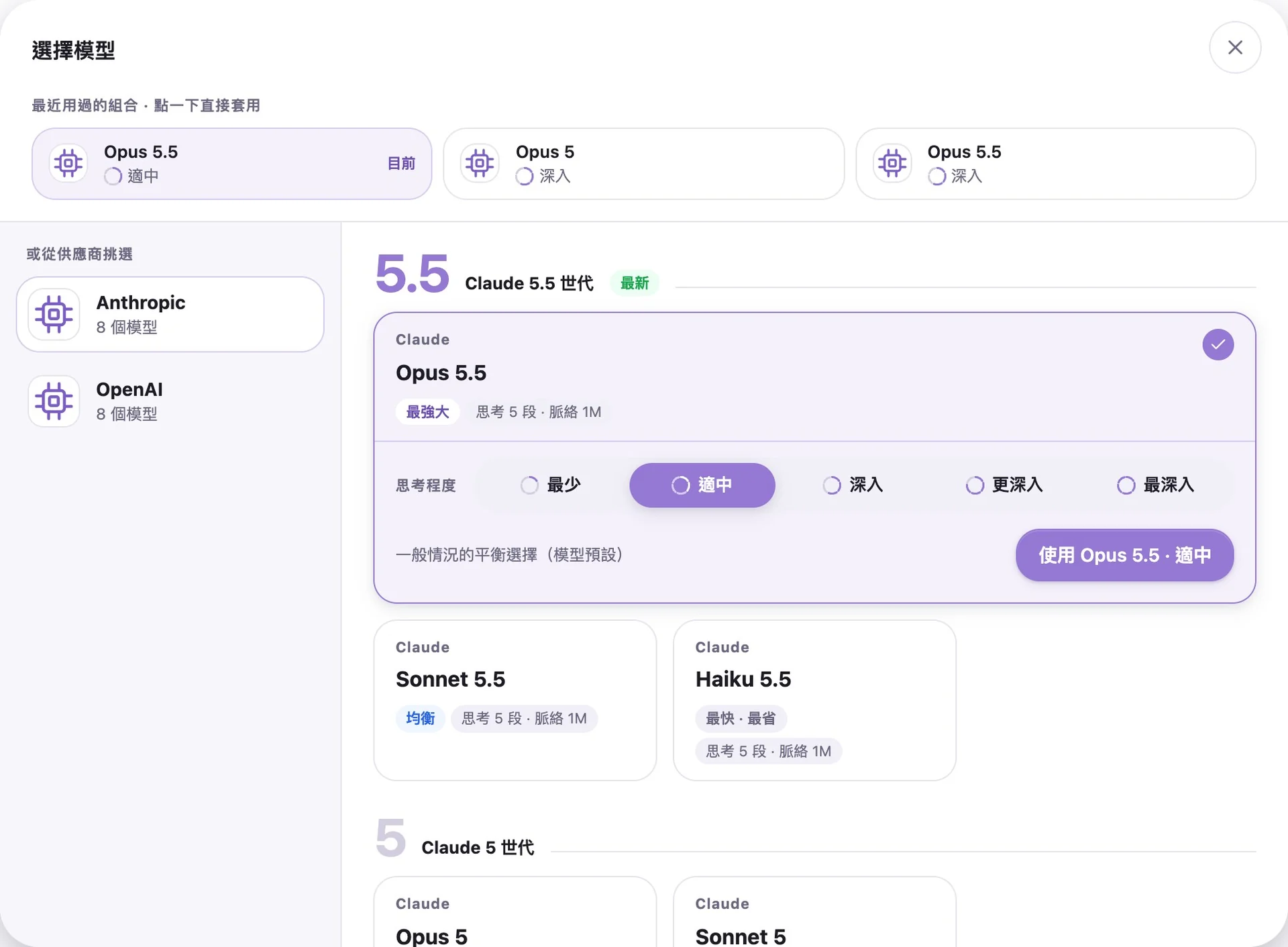
Employees can select cloud models from Anthropic, OpenAI, Google, and other providers, or choose on-premises models, all within the same chat window. They can switch models for each message. Administrators can also set a default model for each AI Agent. When a model is updated, existing AI Agents and Skills do not need to be rebuilt.
Select Models
The Company Centrally Assigns Credentials
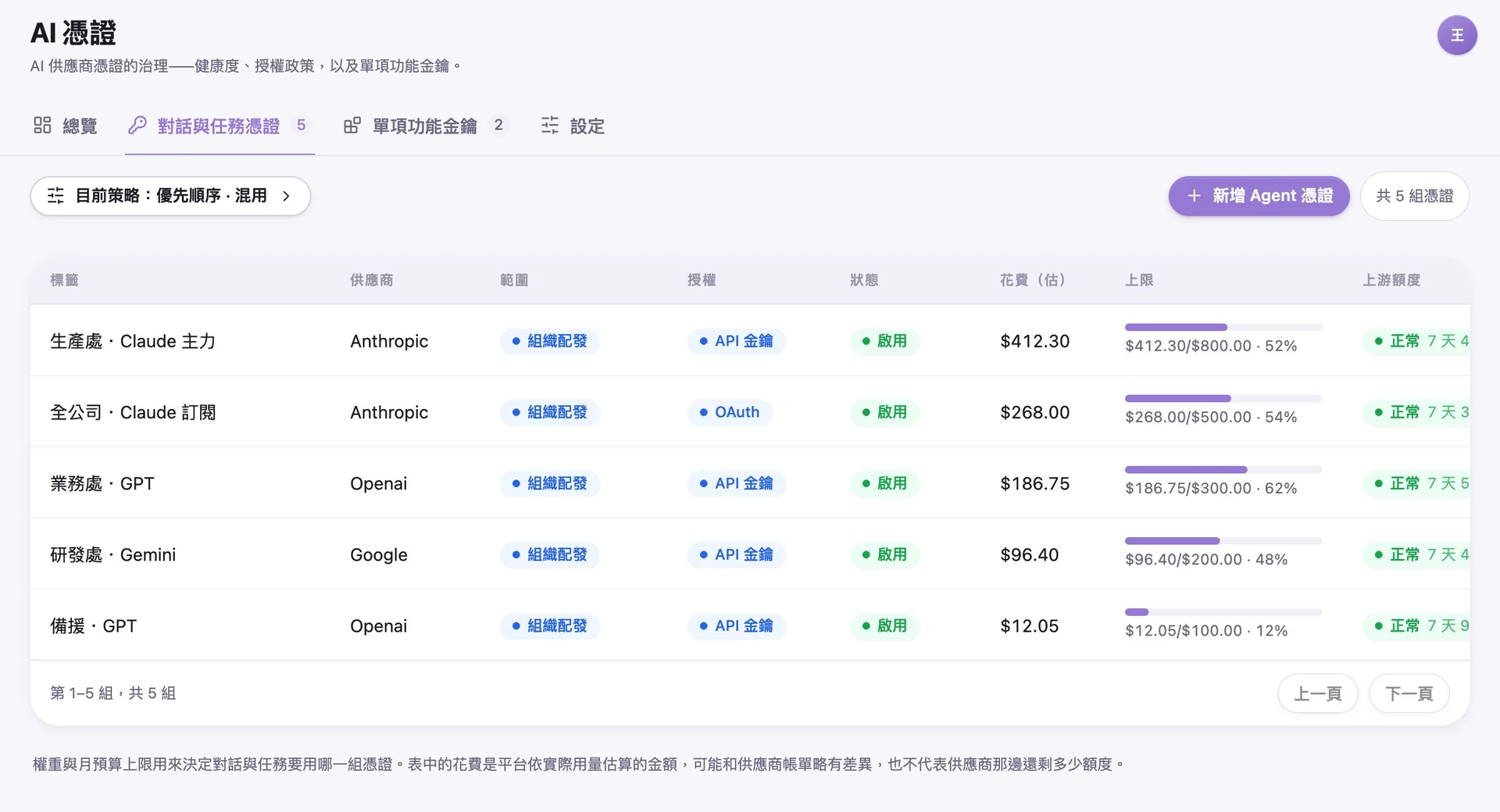
Administrators centrally register API keys and subscription access for AI providers. Employees never access the credentials directly. When multiple credentials are available, their weights determine which set is used first. If the highest-priority set is temporarily unavailable or reaches its monthly limit, the system uses the next set. The company also decides whether employees may use their own credentials.
Manage Credentials
Token Budgets Stop Spending Before It Occurs
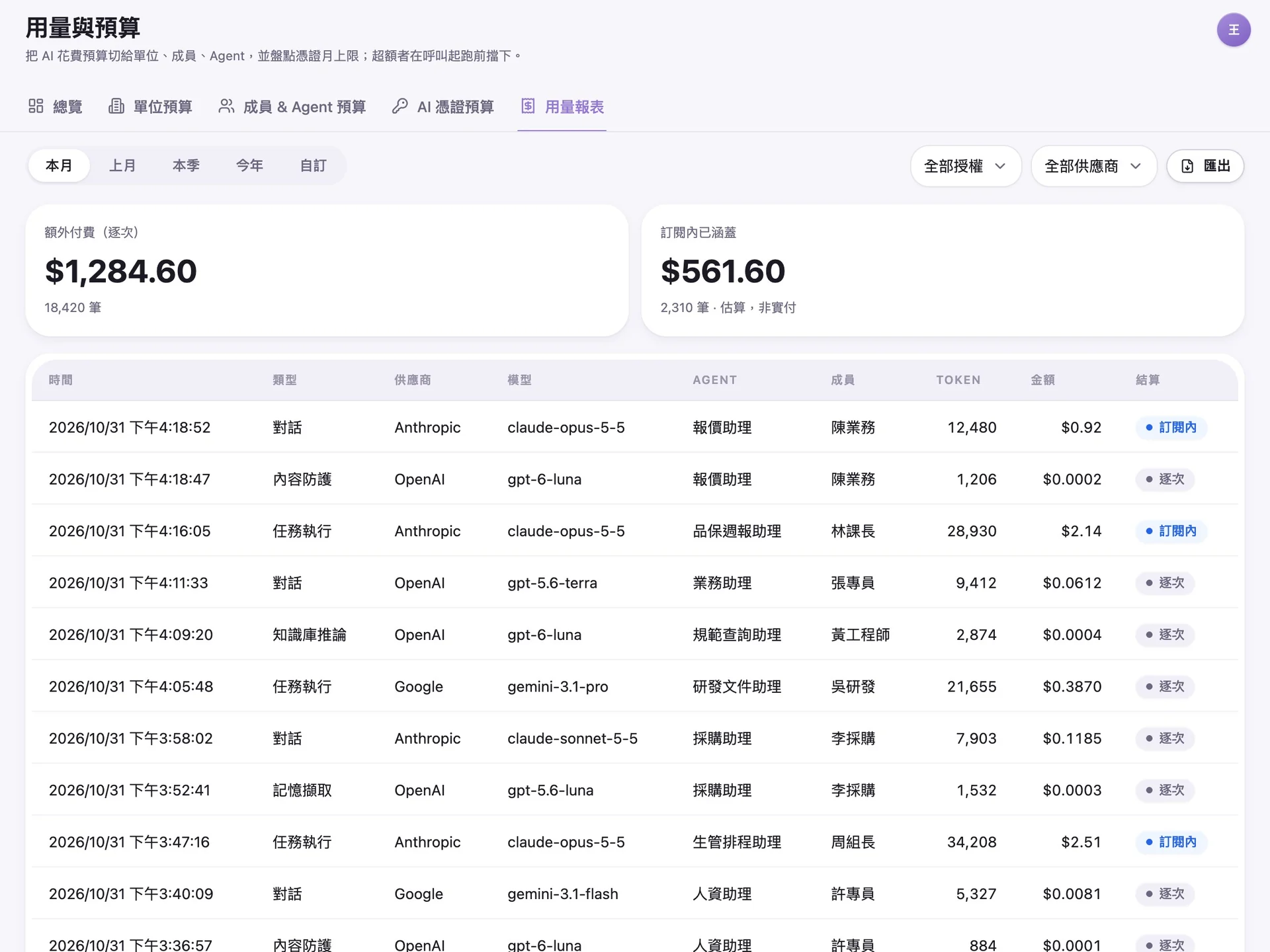
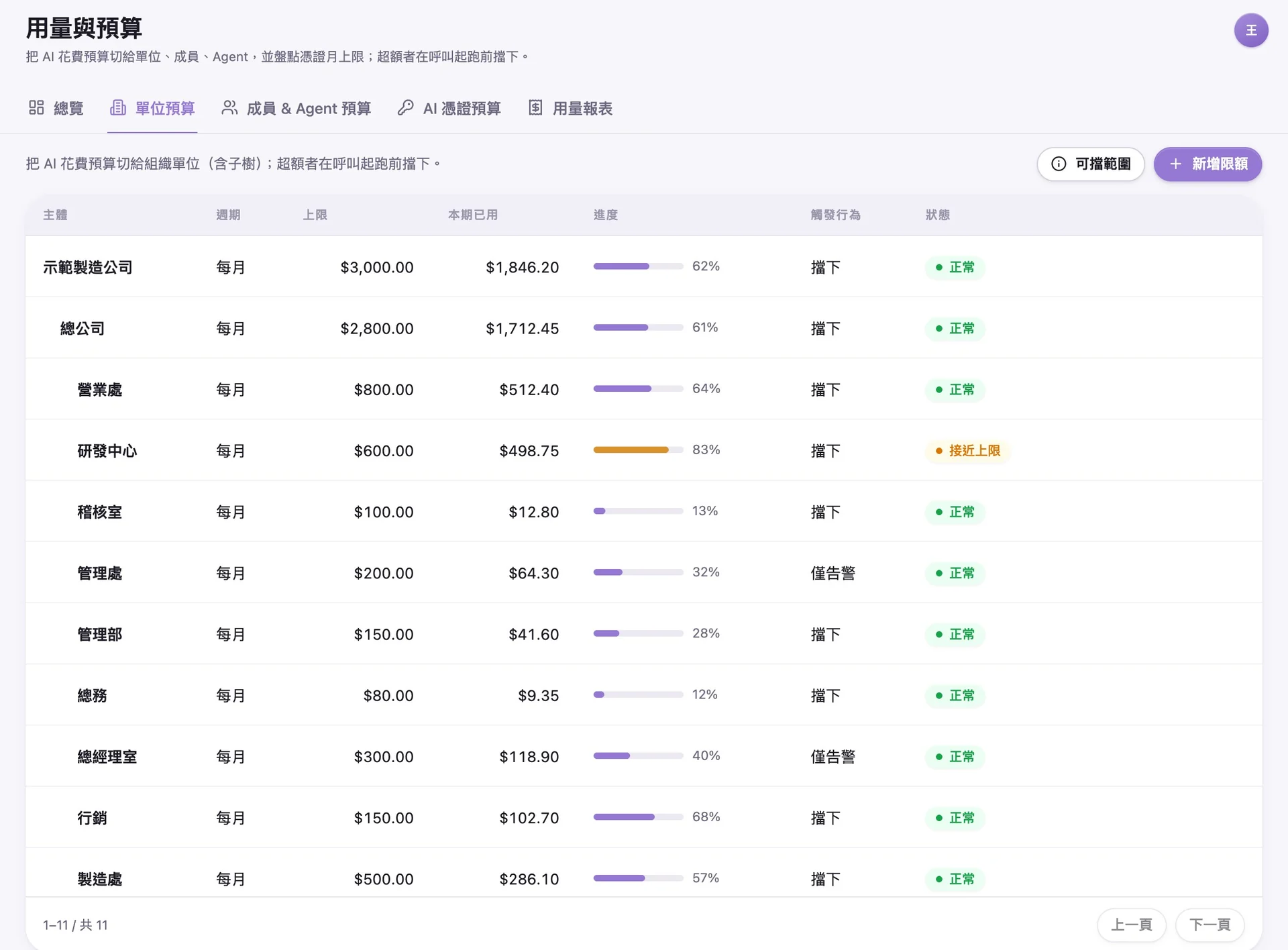
Administrators can set separate token budget limits for the company, each department, each member, and each AI Agent. Before sending a request, the system checks the available budget at every level. If any level has reached its limit, the system pauses requests within that scope or notifies the administrator, depending on the settings. Usage reports show actual costs by provider, model, and AI Agent and can be used directly for financial reconciliation.
Control Costs
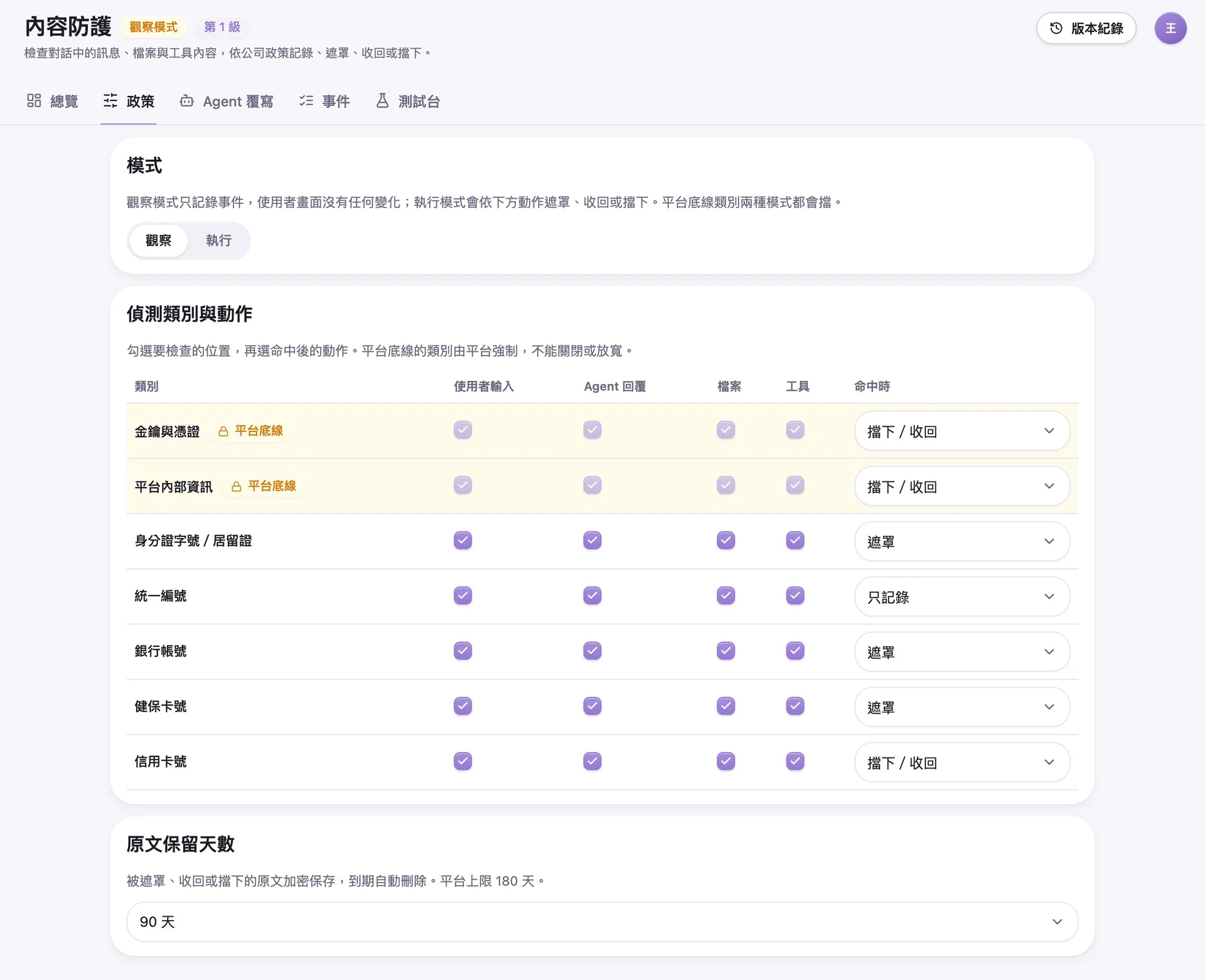
Check Personal Data and Credentials Before Sending
The system checks messages and files submitted by employees, AI Agent responses, and content retrieved from websites and the knowledge base for personal data, such as national ID numbers, business registration numbers, bank account numbers, and credit card numbers, based on company policy. For each data category, the company can choose to log, warn, mask, or block detected content. The platform always blocks keys and credentials, and the company cannot disable this check.
Prevent Data Leaks
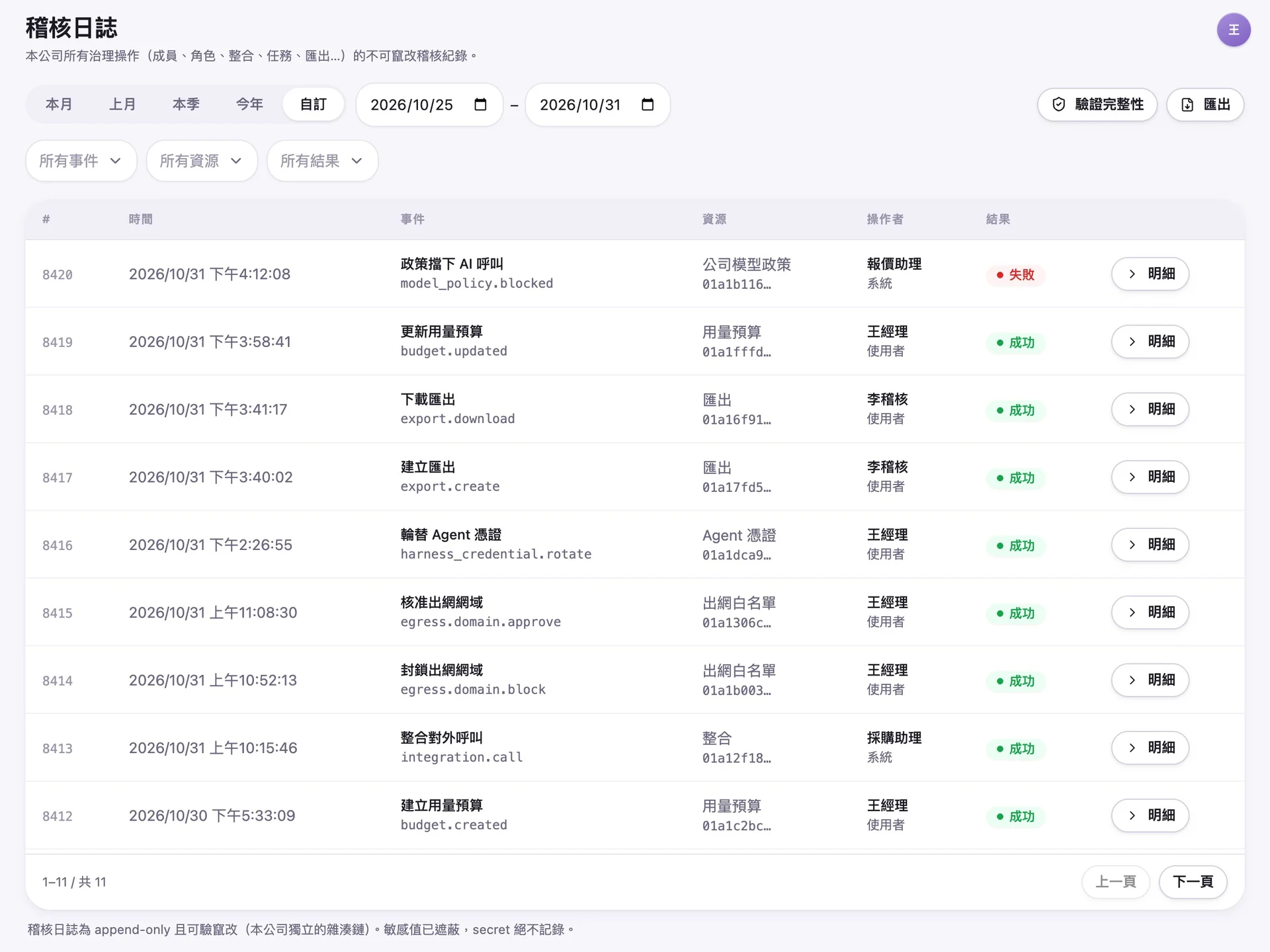
Every Call Is Recorded
Every action involving members, permissions, credentials, budgets, integrations, and exports is recorded in the audit log. Records are linked through a hash chain, allowing administrators to verify their integrity at any time and confirm that they have not been altered. Administrators also approve each external website that AI Agents can access. AI Agents cannot connect to unapproved websites.
Auditable
Companies Using EgentWrX to Operate Their AI Agent Platforms



AI Gateway FAQ
- What Is an AI Gateway?
- An AI Gateway is a management layer between an enterprise and AI models. Every model call passes through it. The gateway selects the model and credentials, enforces budget limits, and records the call. EgentWrX includes this management layer, so each AI Agent in the enterprise does not need a separate integration with model providers.
- Which Calls Can the EgentWrX AI Gateway Manage?
- Chats, tasks, routines, and workflows running on EgentWrX all use the same controls for credentials, budgets, and audits. During consultation, your team and the consultant can plan how to integrate your existing enterprise systems.
- What Happens When a Token Budget Is Exceeded?
- If the action is set to "Block," calls within that scope are blocked as soon as the budget is exhausted. The company does not need to wait for the monthly bill to discover the overage. If the action is set to "Alert Only," calls continue normally, and administrators are notified when usage reaches the alert threshold (80% by default).
- Can the AI Gateway Prevent Personal Data from Being Sent to AI Models?
- Yes. EgentWrX content protection checks employee messages and files according to company policy. It recognizes common Taiwanese personal data formats, including national ID numbers, business registration numbers, and National Health Insurance card numbers. It masks or blocks matching content. Blocked original content is stored in encrypted form and automatically deleted when the retention period expires. Administrators must verify their identity again to view or release it, and every action is recorded in the audit log.
- Can We Use Only On-Premises Models to Keep Data Inside the Company?
- Yes. EgentWrX supports on-premises and hybrid cloud deployment. You can use on-premises models to keep sensitive data within the company. When stronger reasoning capabilities are needed, you can assign a cloud model to a specific AI Agent.
- Can EgentWrX Connect to Our Existing SSO?
- Yes. EgentWrX supports OIDC single sign-on and uses SCIM to let the company's identity system automatically provision and deactivate accounts. Groups can also map to roles and business units in EgentWrX. When an employee leaves, their permission to use AI is revoked the same day.
Where to go next


Want every employee to have their own AI teammate?
A consultant will be in touch shortly.
ISO/IEC 27001:2022 Certified ISMS