SCENARIO 04·Production & QA·Standardized operation
During stocktake month, someone must re-enter every handwritten sheet into Excel
During stocktake, workers record part numbers, storage locations, and physical counts on paper stocktake sheets. Afterward, someone must enter each sheet into Excel before comparing the results with book inventory.
The workload is concentrated in the few days around stocktake. Workers must interpret messy handwriting, edits, and missing fields as they enter the data. One incorrectly entered number creates another variance between book and physical inventory that must be investigated.
At a glance
How it was done
- Handwrite stocktake sheets onsite
- Enter each sheet into Excel
- Review incorrect and missing entries
- Compare with book inventory
Where it gets stuck
In the days after stocktake, workers must interpret a stack of handwritten sheets. Messy handwriting, edits, and missing fields require manual review. One incorrectly entered number creates another variance between book and physical inventory that must be investigated.
With an AI Agent
- Handwrite stocktake sheets onsite
- Enter each sheet into Excel
- Review incorrect and missing entriesHuman approval
- Compare with book inventory
The AI Agent recognizes handwritten stocktake sheets and organizes the data into Excel. It separately flags edited, blank, and unclear fields. Workers confirm them before using the Excel file to compare book and physical inventory.
How it was done
- 01Record part numbers, storage locations, and physical counts on paper stocktake sheets
- 02Collect all stocktake sheets after the stocktake
- 03Enter each sheet into Excel manually
- 04Review incorrect or missing entries, then compare them with book inventory
| Item | Part No. | Product | Location | Unit | Physical Count | Notes |
|---|---|---|---|---|---|---|
| 1 | HB-M6-20 | Socket head cap screw M6×20 | B-01-1 | PCS | 3,000 | |
| 2 | HB-M8-30 | Socket head cap screw M8×30 | B-01-2 | PCS | 2,480 | |
| 3 | HB-M10-40 | Socket head cap screw M10×40 | B-01-3 | PCS | 1,520 | |
| 4 | HX-M12-50 | Hex bolt M12×50 | B-01-4 | PCS | 760 | |
| !5 | HX-M16-60 | Hex bolt M16×60 | B-02-1 | PCS | ||
| 6 | NT-M8 | Hex nut M8 | B-02-2 | PCS | 5,200 | |
| 7 | NT-M10 | Hex nut M10 | B-02-3 | PCS | 3,950 | |
| 8 | NT-M12 | Hex nut M12 | B-02-4 | PCS | 2,500 | |
| !9 | NL-M8 | Nylon lock nut M8 | B-03-1 | PCS | ||
| 10 | NL-M10 | Nylon lock nut M10 | B-03-2 | PCS | 1,480 |
| Item | Part No. | Product | Location | Unit | Physical Count | Notes |
|---|---|---|---|---|---|---|
| 3 | SW-M10 | Spring washer M10 | B-04-3 | PCS | 2,960 | |
| !4 | CS-M5-16 | Countersunk screw M5×16 | B-04-4 | PCS | ||
| 5 | CS-M6-20 | Countersunk screw M6×20 | B-05-1 | PCS | 2,500 | |
| 6 | FB-M8-25 | Flange bolt M8×25 | B-05-2 | PCS | 1,990 | |
| ≠7 | FB-M10-30 | Flange bolt M10×30 | B-05-3 | PCS | 3 boxes | Full box, unopened |
| 8 | FN-M8 | Flange nut M8 | B-05-4 | PCS | 3,000 | |
| 9 | TS-42-19 | Self-tapping screw ST4.2×19 | B-06-1 | PCS | 5,100 | |
| 10 | TS-48-25 | Self-tapping screw ST4.8×25 | B-06-2 | PCS | 3,960 | |
| !11 | WN-M10 | Wing nut M10 | B-06-3 | PCS | 180 | Added outside the form |
| !12 | TB-M10-40 | T-bolt M10×40 | B-06-4 | PCS | 64 | Added outside the form |
With an AI Agent
- 01What it doesRecognize handwritten stocktake sheetsStandard appliedRead the part number, storage location, unit, and physical count from each row. Record physical counts using Arabic numerals onlyOutputCombine two pages into one table
- 02What it doesFlag recognition statusStandard appliedClassify each entry as normal, edited, blank, or unclear. For edited entries, enter the revised number and note the original number. Leave blank and unclear entries empty instead of guessing a number that appears reasonableOutputRecognition status for every row
- 03What it doesHandle unit mismatches and unlisted itemsStandard appliedIf the handwritten unit differs from the form, such as PCS on the form and boxes in handwriting, leave the quantity blank and copy the handwritten entry without converting it. Include handwritten items that were not preprinted on the form and mark them as "Added outside the form"OutputList of items requiring human review
- 04What it doesProduce an Excel file for human reviewStandard appliedAttach the Excel file. For each item on the review list, state the page, item number, part number, and issueOutputWorkers add the confirmed numbers before comparing them with book inventory
- Human approval
- Step 4 remains a human task. The AI Agent produces a draft and does not guess unclear handwriting. Workers confirm the flagged fields before using the Excel file to compare book and physical inventory.
- Platform modules used
- Skills
For standardized operations, we recommend fixed input fields, stable templates, and errors that are easy to identify. AI should produce the first draft, and workers should confirm it before posting. One of the most common causes of failure we see at client sites is that the entire task stops working after the layout changes. Stocktake sheet formats should therefore be standardized first.
Screenshots show the Traditional Chinese interface.
01Upload Stocktake Sheets and Instructions
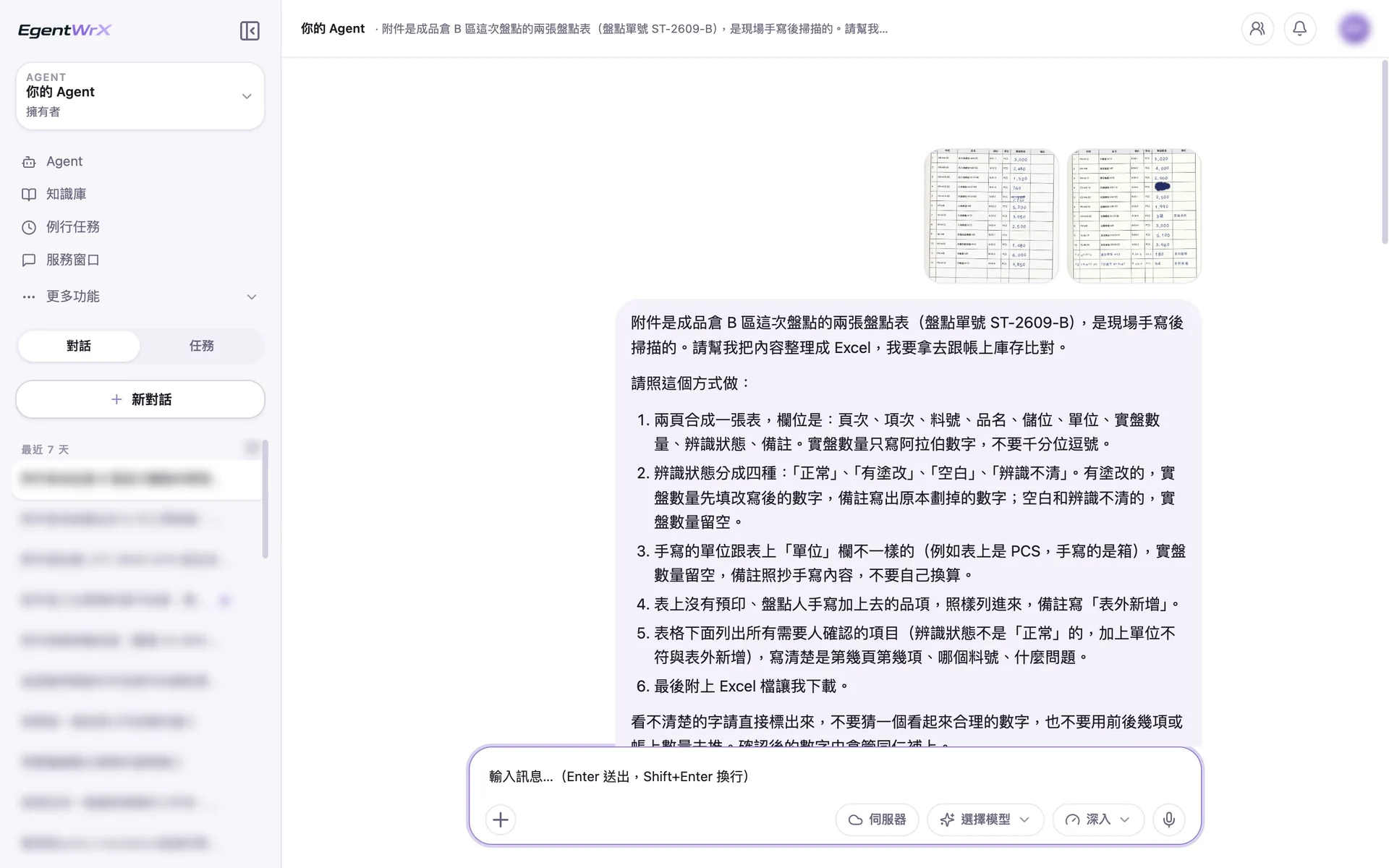
- 1Upload scans of two handwritten stocktake sheet pages.
- 2The instructions define four recognition statuses, prohibit conversion when units do not match, and require unlisted additions to be included.
02Processing
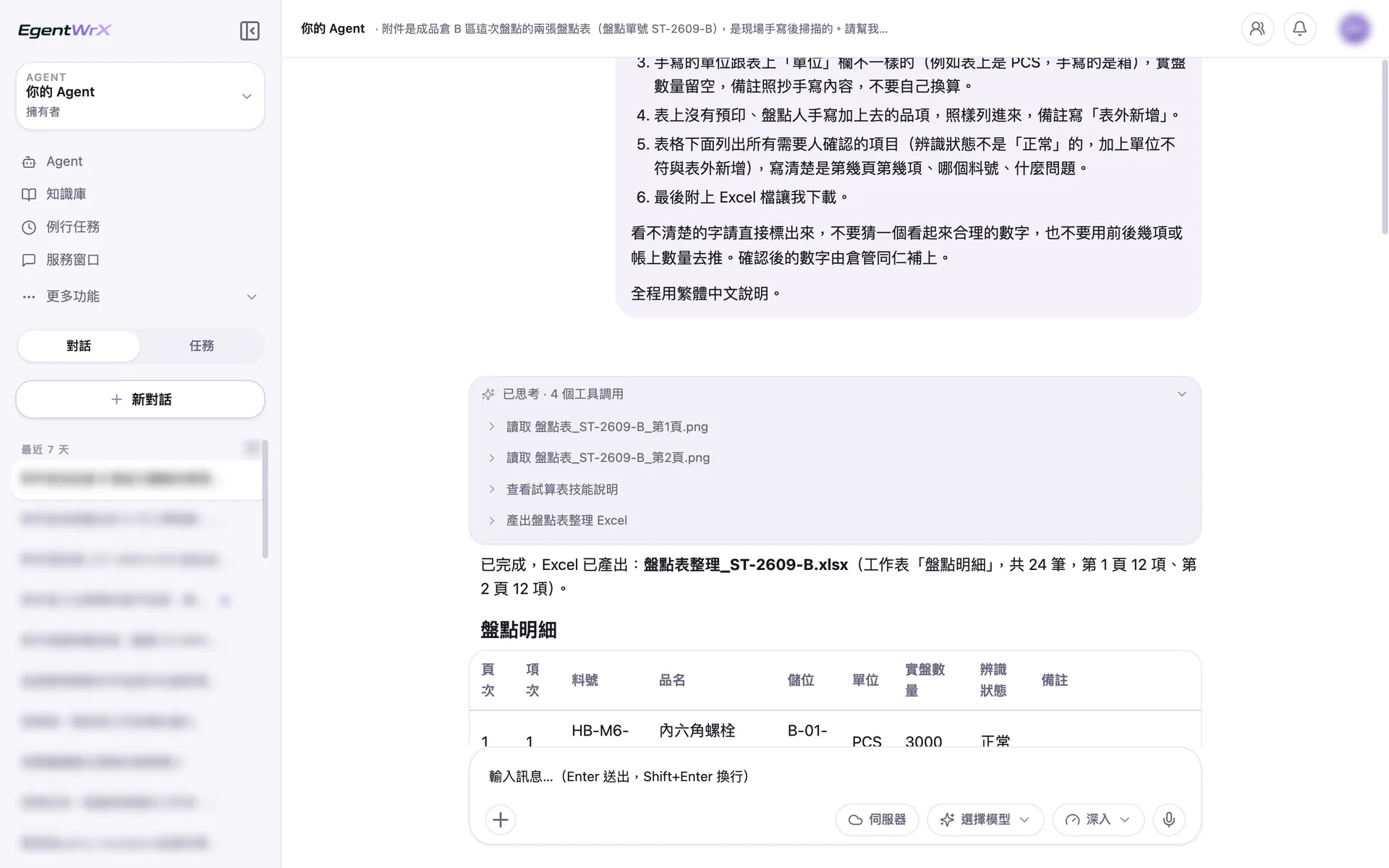
- 1Read the two scanned images page by page.
- 2Produce the Excel file immediately after organizing the data.
03Items Requiring Human Review
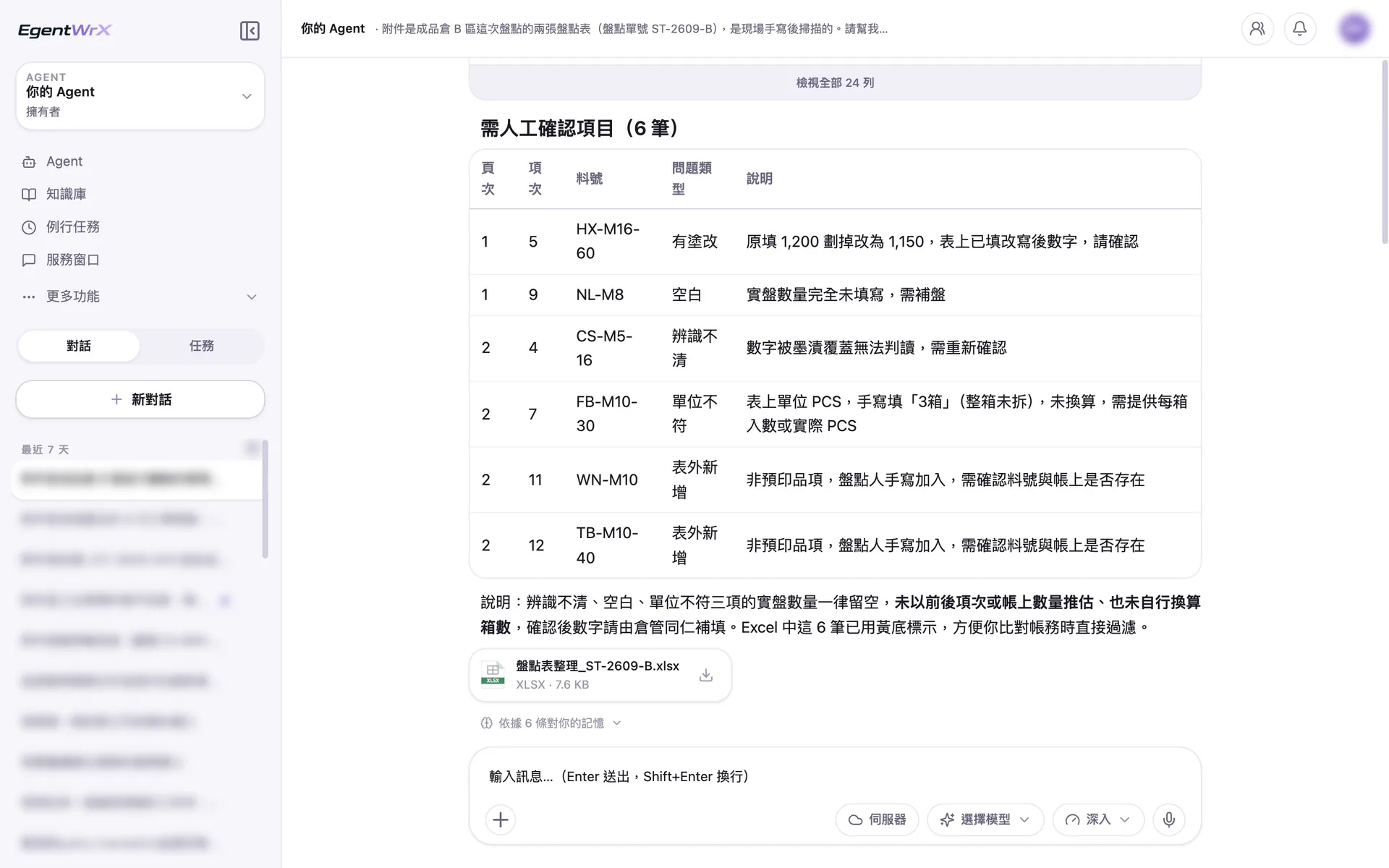
- 1List the 6 items requiring human review separately, with the page, item number, and issue.
- 2Leave quantities blank for unclear entries, blank fields, and unit mismatches. Do not estimate them from nearby items or book quantities.
- 3Download the Excel file. Warehouse staff add the confirmed numbers before comparing it with book inventory.
Numbers
Estimated savings of 1 to 4 hours per stocktake month
Source: An unnamed auto parts manufacturer supported by Intellicon Solutions
FAQ
- Can the AI Agent recognize handwritten stocktake sheets?
- It can transfer clearly written fields directly into Excel. The AI Agent separately flags unclear, edited, or blank fields for human review. It does not fill in a number that merely appears reasonable.
- Can it handle different stocktake sheet formats across warehouses?
- Yes, but we recommend a phased approach. Start with the one or two most common layouts and have workers process the rest. Over time, standardizing stocktake sheet fields and layouts will improve recognition stability and reduce failures caused by layout changes.
- Is it worthwhile if we only conduct stocktakes a few times a year?
- Yes. Based on our observations at client sites, periodic tasks such as month-end closing or stocktakes provide value even when usage is low. Stocktake work is concentrated in a few days, so the time savings occur during the busiest period.
Where to go next
Want every employee to have their own AI teammate?
A consultant will be in touch shortly.