SCENARIO 13·Purchasing·Data Interpretation
Checking a Part Number's List Price Requires Opening Several Price Lists or Waiting for an Experienced Colleague to Reply
To confirm the list price of an item or part number, purchasing staff must search several price lists. The price lists use different formats and have multiple versions. If they cannot find the price, they ask an experienced colleague.
Each lookup takes little time, but the requests are frequent and fragmented. The requester must wait for a reply, and the person answering is interrupted. Worse, the price may come from an outdated version, and the error may not be found until later.
At a glance
How it was done
- Receive the part number for a list price lookup
- Search several price lists
- Ask a colleague if the version is unclear
- Confirm the price and use it in a quotation
Where it gets stuck
The price lists use different formats and have multiple versions. The requester must wait for a reply, and the person answering is interrupted. Worse, an outdated price may be used, and the error may not be found until later.
With an AI Agent
- Receive the part number for a list price lookup
- Search several price lists
- Ask a colleague if the version is unclear
- Confirm the price and use it in a quotationHuman approval
The AI Agent handles list price lookups. Every price comes from the price list and includes the revision and effective date. If no result is found, it says so. Before using the price for a quotation or purchasing decision, the responsible employee confirms the price and version.
How it was done
- 01Receive or identify an item or part number that requires a list price lookup
- 02Open the relevant price lists and search them one by one
- 03Ask an experienced colleague if the price cannot be found or the version is unclear
- 04Use the price in the original task
| Example Precision Fasteners Co., Ltd. Price List Revision: 2026-01 | |||||
| Effective Date: 2026-01-01 | |||||
| Currency: New Taiwan dollars, excluding tax; quantity tier based on the quantity per order | |||||
| Part Number | Item | Unit | Unit Price (1–999) | Unit Price (1,000 or More) | Notes |
| HB-M8-30 | Socket head cap screw M8×30 | PCS | 2.84 | 2.57 | |
| HB-M10-40 | Socket head cap screw M10×40 | PCS | 4.62 | 4.20 | |
| HX-M12-50 | Hex bolt M12×50 | PCS | 7.88 | 7.25 | |
| NT-M8 | Hex nut M8 | PCS | 0.63 | 0.57 | |
| NT-M10 | Hex nut M10 | PCS | 0.95 | 0.86 | |
| FW-M8 | Flat washer M8 | PCS | 0.28 | 0.25 | |
| FW-M10 | Flat washer M10 | PCS | 0.37 | 0.33 | |
| CS-M6-20 | Hex socket countersunk screw M6×20 | PCS | Price subject to negotiation due to raw material fluctuations | ||
| FB-M10-30 | Flange bolt M10×30 | PCS | 3.68 | 3.36 | |
| ST-M12-80 | Stud bolt M12×80 | PCS | 9.45 | 8.72 | |
| Example Precision Fasteners Co., Ltd. Price List Revision: 2025-07 | |||||
| Effective Date: 2025-07-01 (superseded by the 2026-01 revision) | |||||
| Currency: New Taiwan dollars, excluding tax; quantity tier based on the quantity per order | |||||
| Part Number | Item | Unit | Unit Price (1–999) | Unit Price (1,000 or More) | Notes |
| HB-M8-30 | Socket head cap screw M8×30 | PCS | 2.70 | 2.45 | |
| HB-M10-40 | Socket head cap screw M10×40 | PCS | 4.40 | 4.00 | |
| HX-M12-50 | Hex bolt M12×50 | PCS | 7.50 | 6.90 | |
| NT-M8 | Hex nut M8 | PCS | 0.60 | 0.54 | |
| NT-M10 | Hex nut M10 | PCS | 0.90 | 0.82 | |
| FW-M8 | Flat washer M8 | PCS | 0.27 | 0.24 | |
| FW-M10 | Flat washer M10 | PCS | 0.35 | 0.31 | |
| SW-M12 | Spring washer M12 | PCS | 0.58 | 0.52 | |
| CS-M6-20 | Hex socket countersunk screw M6×20 | PCS | 1.30 | 1.18 | |
| FB-M10-30 | Flange bolt M10×30 | PCS | 3.50 | 3.20 | |
With an AI Agent
- 01What it doesFind three price lists in the knowledge baseStandard appliedAll three price lists are stored as tables in the knowledge base. Use the revision effective today. If the question concerns a future date, use the revision effective on that date and state that it is not yet effectiveOutputPrice list revision used for each question
- 02What it doesRetrieve prices from the price listsStandard appliedAlways read prices from the price list table rather than answering from memory. If a quantity is provided, apply the tier for the quantity per order. Show the calculation when one is requiredOutputAnswer table: price, source revision and effective date, and notes
- 03What it doesSay when no result is foundStandard appliedIf a part number is not in the current revision, answer "not found." State whether it appeared in another revision or is absent from all three revisions. Do not substitute an old price or a similar part number. If the price list says "subject to negotiation," report that as writtenOutputItems not found and explanations
- 04What it doesFlag upcoming price changesStandard appliedFor items with price changes starting October 1, include the change date and new price in the notes. Do not decide which price employees should useOutputUse the price for a quotation or order only after the responsible employee confirms the price and applicable date
- Human approval
- Step 4 remains with the responsible employee. The AI Agent notes which items will have price changes starting October 1, but the responsible employee must confirm the applicable date before deciding which price to use for today's order or which version to use for a quotation.
- Platform modules used
- Knowledge base, Integrations
For data interpretation tasks, we recommend separating language understanding from calculations. AI should understand what the user wants to find, while SQL or a program retrieves the data. In this case, every price must come from the price list rather than the language model's memory. The price list should also show effective dates and have a designated person responsible for updates.
Screenshots show the Traditional Chinese interface.
01Add Price Lists to the Knowledge Base
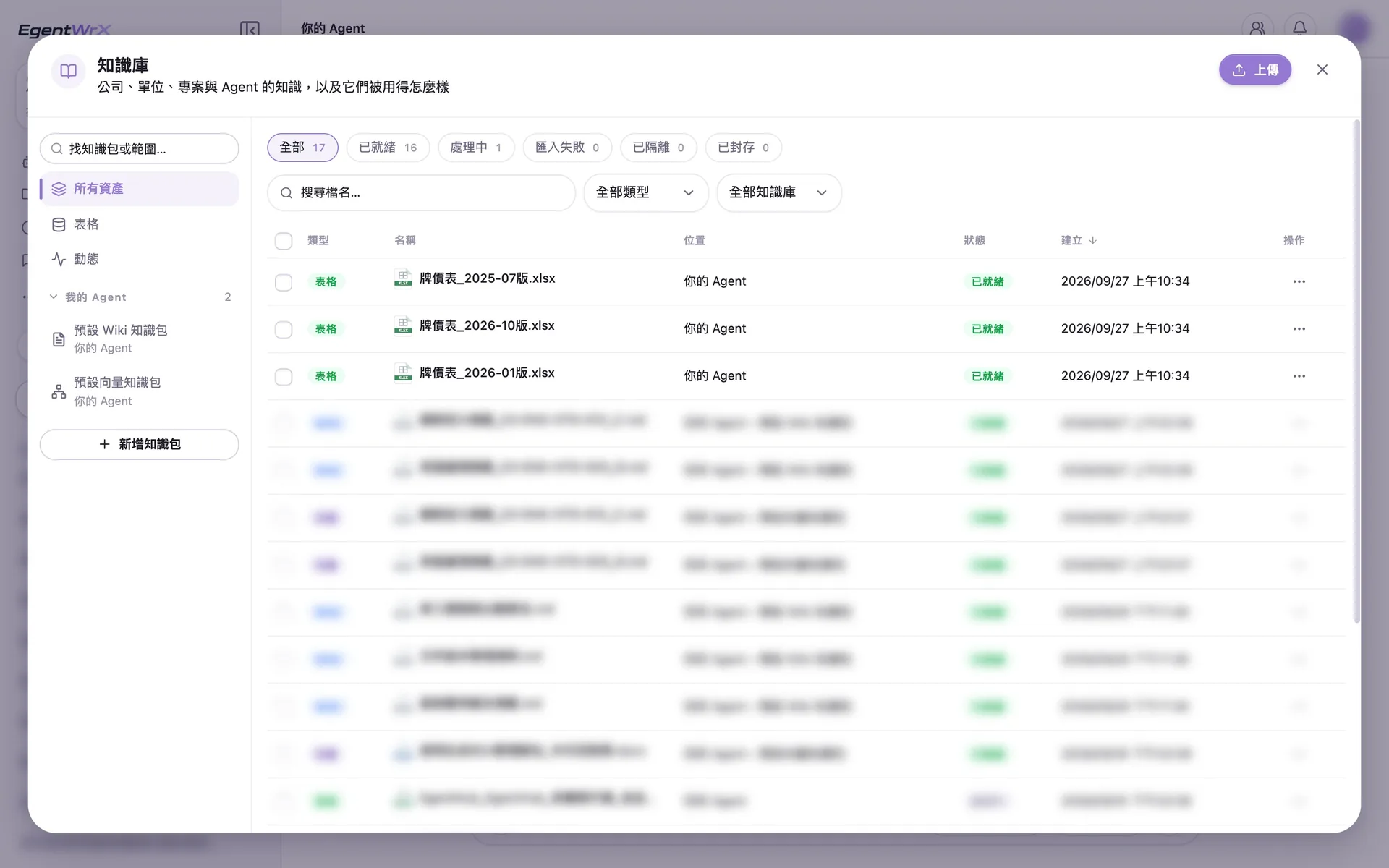
- 1Upload the three price lists to the knowledge base.
- 2Store all three price list revisions as tables and retrieve prices from the tables.
- 3Start asking questions only after all revisions have Ready status.
02Upload List Price Questions and Instructions
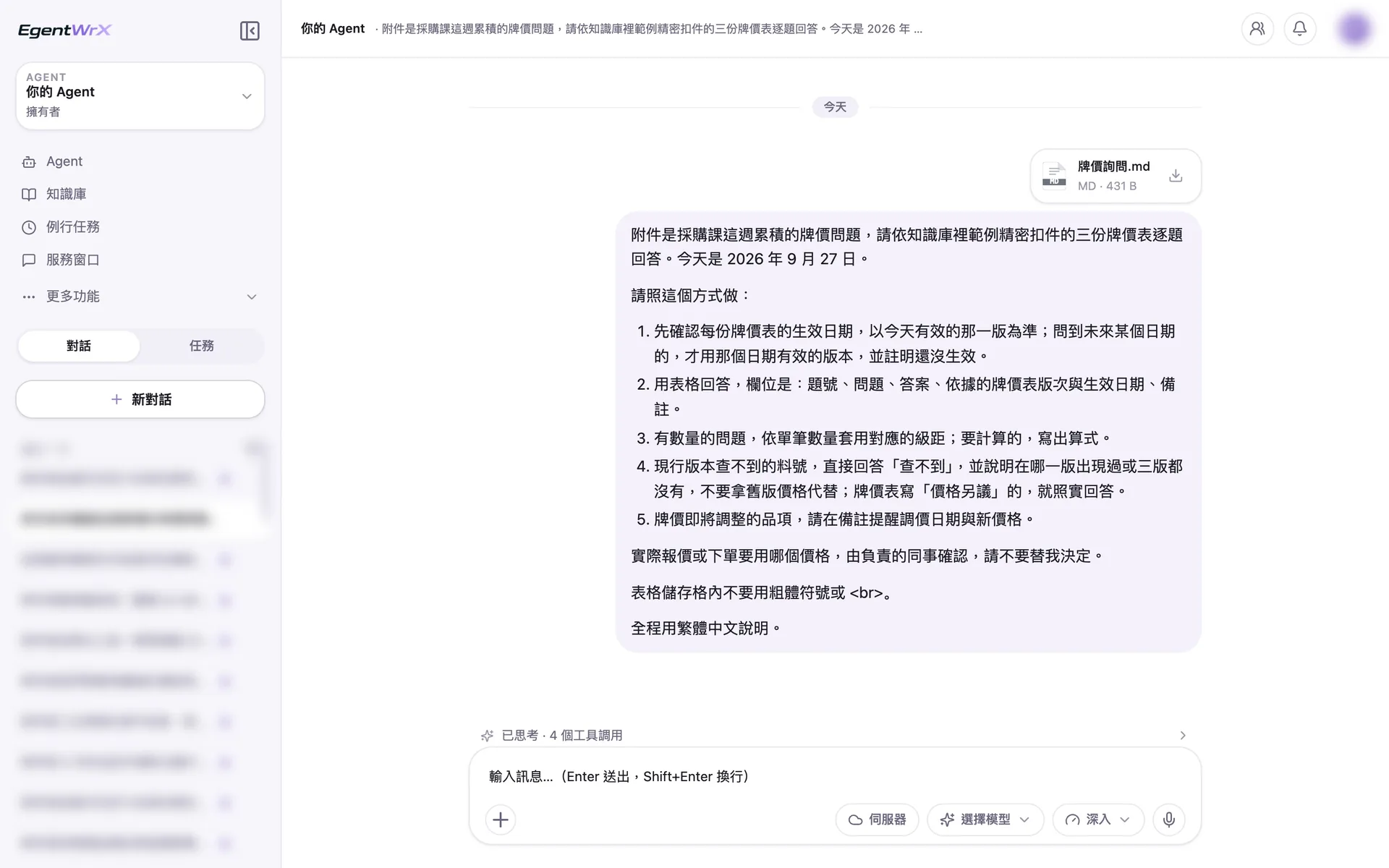
- 1Upload the Purchasing Department's accumulated list price questions for this week as an attachment.
- 2First confirm the effective date of each price list and use the revision effective today.
- 3If a part number is not in the current revision, answer that it was not found. Do not substitute an old price.
- 4The responsible employee confirms which price to use for the quotation or order.
03Execution Process
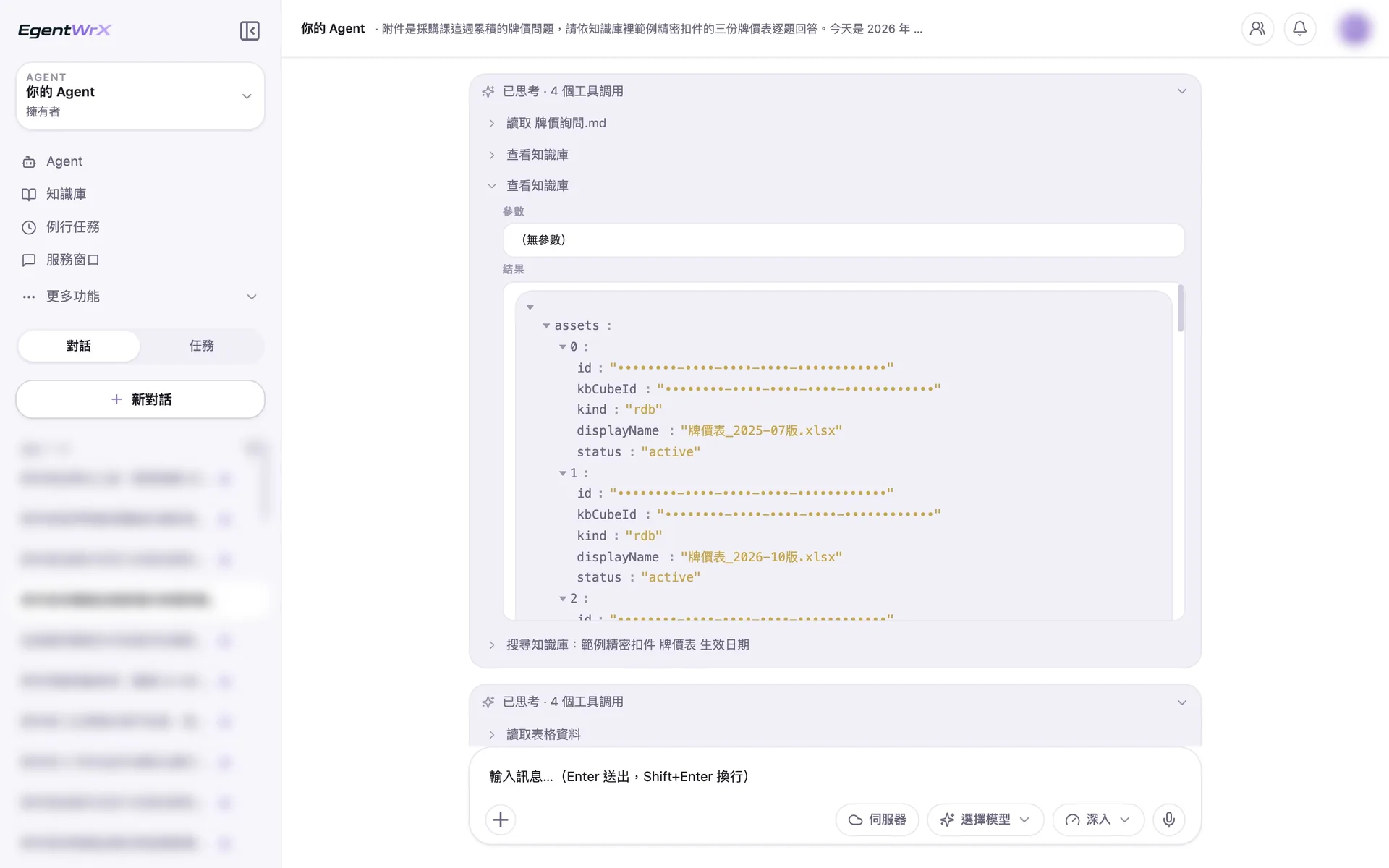
- 1First check what data is available in the knowledge base.
- 2Find three price lists, all stored as searchable tables.
- 3Search for the effective dates of the price lists.
- 4Read the table data from each revision and retrieve prices from the tables.
04Answer Table
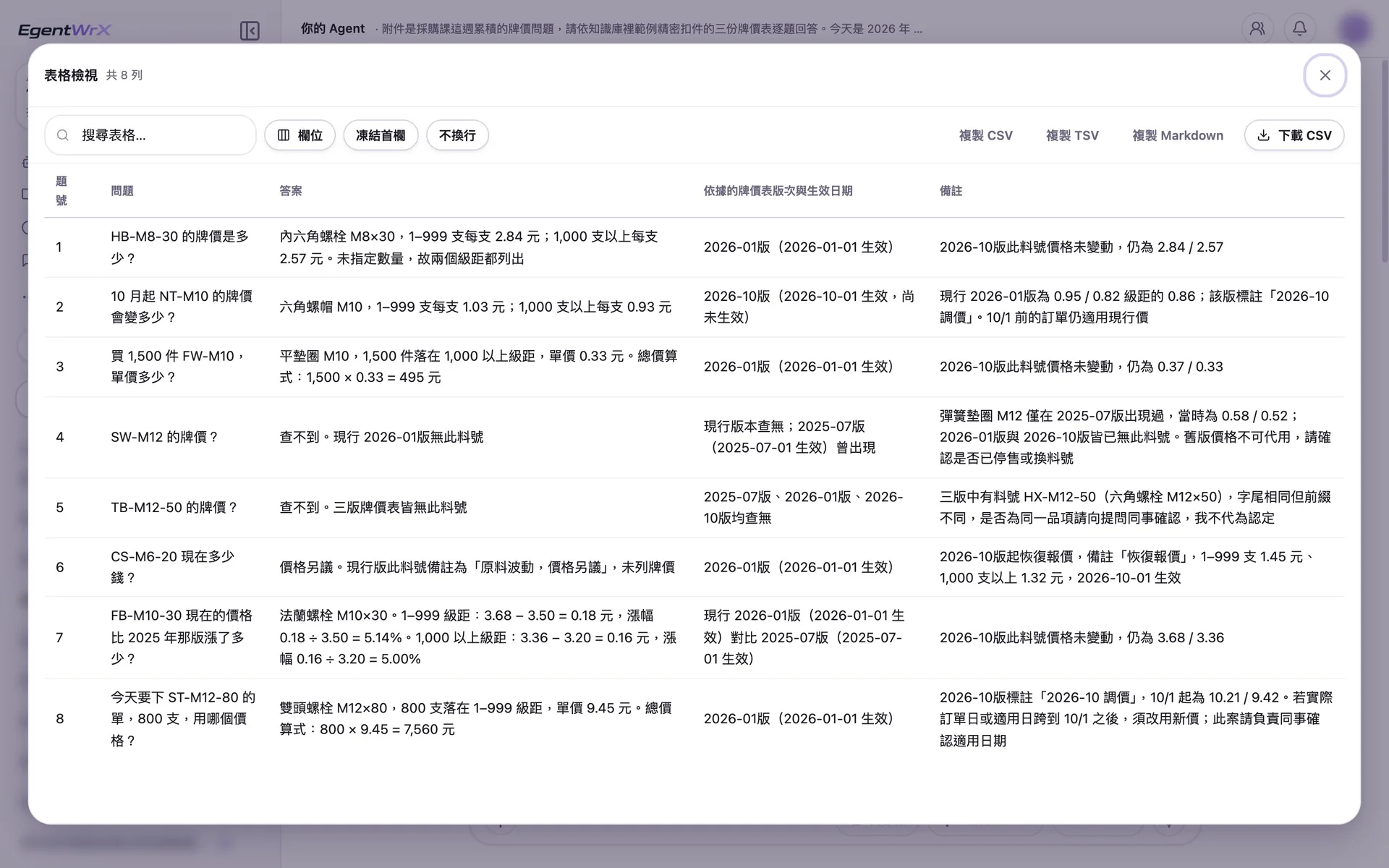
- 1Show the source revision and effective date for every answer.
- 2Part numbers that appear only in an old revision are marked as not found. The old price is not used as a substitute.
- 3If the current revision says "subject to negotiation," report that as written.
- 4Use the current price for an order placed today and note the new price starting October 1.
05Final Reminders
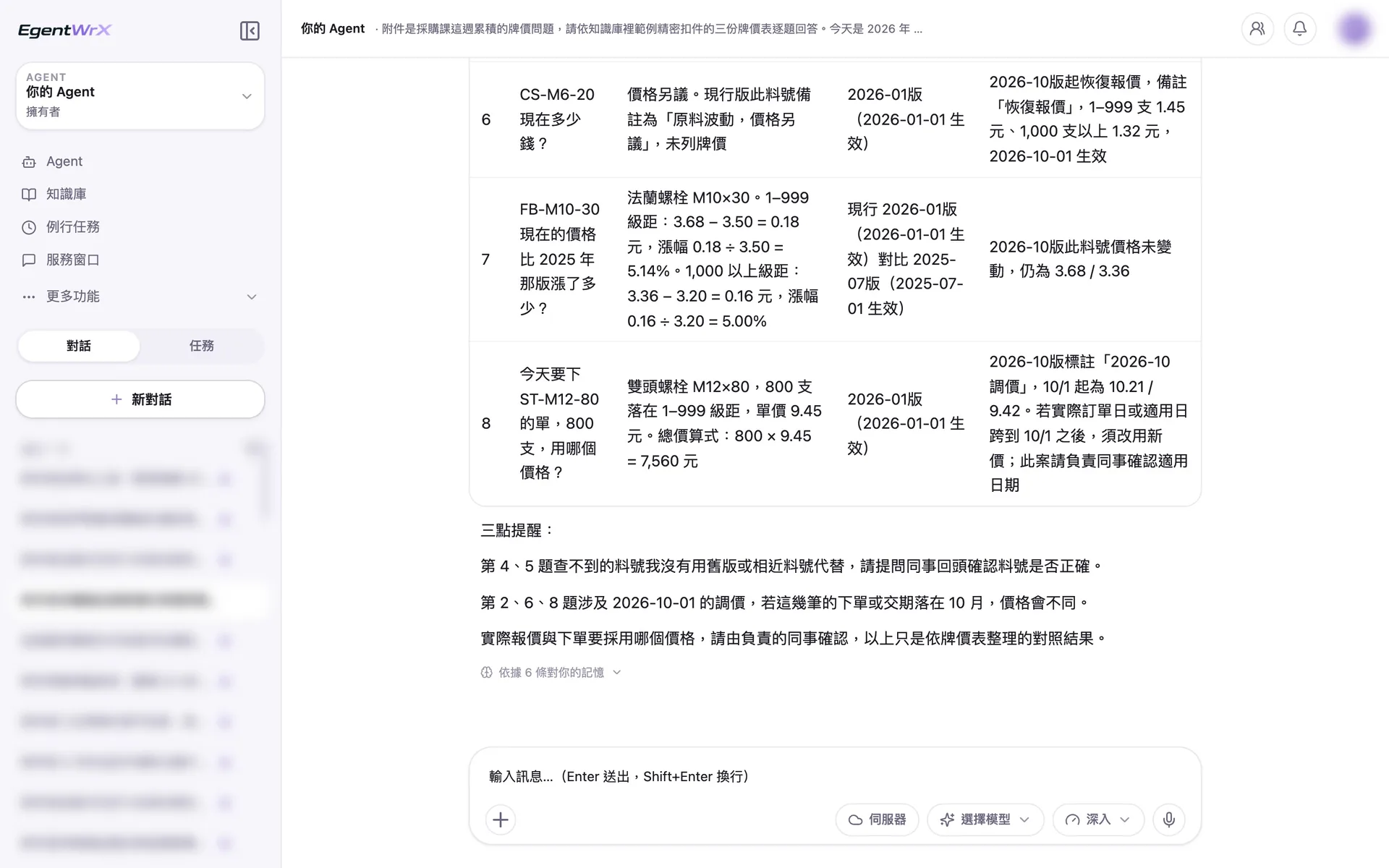
- 1Do not replace part numbers that were not found with old or similar part numbers. Ask an employee to verify the part number.
- 2List the questions involving price changes starting October 1.
- 3The responsible employee confirms which price to use for the actual quotation or order.
Numbers
Estimated monthly savings of 2 to 5 hours
Source: An unnamed automotive parts manufacturer advised by Intellicon Solutions
FAQ
- Where does the price provided by the AI Agent come from?
- It comes from the price list. The AI Agent does not answer price questions from the language model's memory. It cites the source and version in its answer. If no result is found, it says so rather than estimating a number that seems reasonable.
- What happens when the list prices are updated?
- Update the price list and specify its effective date. We recommend assigning one person to maintain it. Whether old prices are removed or retained, clearly mark their effective periods so lookups do not return expired prices.
- Can we use an Excel price list?
- Yes. You can start with your existing Excel price lists. Standardize the fields to make them searchable. If prices are already in your ERP, we recommend connecting to a SQL MCP Server so the AI Agent can retrieve current list prices directly. The connection method depends on your ERP and deployment architecture. You can schedule a free consultation to discuss your requirements.
Where to go next
Want every employee to have their own AI teammate?
A consultant will be in touch shortly.