SCENARIO 06·HR·Review and matching, standardized work
Every month, each overtime request must be matched against punch records
At month-end, HR must match every overtime request against punch records, confirm that the time period and hours agree, and then compile overtime statistics by department for managers and payroll processing.
Mismatches are common. An employee may submit a request but have no punch record, the punch time may differ from the requested period, or the overtime may cross midnight. HR must investigate every item and ask the manager or employee to confirm any discrepancy. As the workforce grows, these few days at month-end become increasingly demanding.
At a glance
How it was done
- Export overtime requests and punch records
- Match each time period
- Review discrepancies with managers
- Compile overtime statistics by department
Where it gets stuck
A request without a punch, a clock-out earlier than the requested end time, and overnight overtime all require individual investigation. With more employees, the month-end closing period becomes especially demanding.
With an AI Agent
- Export overtime requests and punch records
- Match each time period
- Review discrepancies with managersHuman approval
- Compile overtime statistics by department
AI Agent handles item-by-item matching and statistical compilation, with formulas showing eligible hours. HR and managers decide whether discrepancies are recognized, and HR must review the report before sending it for payroll processing.
How it was done
- 01Export the month's overtime requests and attendance records
- 02Match each requested period against the actual punch times
- 03Flag mismatches and ask the manager or employee to confirm them
- 04Compile the confirmed hours into an overtime report by department
| Request No. | Employee ID | Overtime Date | Requested Start | Requested End | Requested Hours |
|---|---|---|---|---|---|
| OT-2609-005 | E2303 | 2026-09-04 | 18:00 | 20:00 | 2 |
| OT-2609-008 | E2301 | 2026-09-08 | 18:00 | 21:00 | 3 |
| OT-2609-011 | E2304 | 2026-09-10 | 18:00 | 20:00 | 2 |
| OT-2609-012 | E2304 | 2026-09-10 | 18:00 | 20:00 | 2 |
| ≠OT-2609-019 | E2305 | 2026-09-18 | 18:00 | 20:00 | 2 |
| ≠OT-2609-021 | E2303 | 2026-09-22 | 18:00 | 21:00 | 3 |
| ≠(No request) | |||||
| OT-2609-024 | E2301 | 2026-09-25 | 19:00 | 01:00 (next day) | 6 |
| OT-2609-025 | E2306 | 2026-09-29 | 18:00 | 20:00 | 2 |
| Employee ID | Date | Clock-In | Clock-Out |
|---|---|---|---|
| E2303 | 2026-09-04 | 07:54 | 19:52 |
| E2301 | 2026-09-08 | 07:57 | 21:02 |
| E2304 | 2026-09-10 | 07:55 | 20:12 |
| (Same as previous row) | |||
| ≠E2305 | 2026-09-18 | 07:52 | |
| ≠E2303 | 2026-09-22 | 07:58 | 19:40 |
| ≠E2306 | 2026-09-22 | 07:57 | 21:10 |
| E2301 | 2026-09-25 | 07:56 | 01:08 (next day) |
| E2306 | 2026-09-29 | 07:59 | 20:04 |
With an AI Agent
- 01What it doesMatch each request to punch recordsStandard appliedUse the employee ID and date to match each overtime request to that day's clock-out. For overnight overtime, treat the next day's time as a continuation of the same dayOutputPunch time matched to each request
- 02What it doesClassify records using the matching rulesStandard appliedA clock-out less than 15 minutes before the requested end time is a match. A clock-out more than 15 minutes early is a discrepancy; calculate eligible hours from the punch time in half-hour increments and flag the item for review. A request without a punch or a punch without a request is a missing record. If the same employee has two or more requests for the same time period on the same day, flag all of them as duplicate requests and leave the recognition decision to a personOutputFour categories: matches, discrepancies, missing records, and duplicate requests. List each nonmatching item with the reason
- 03What it doesCompile overtime statistics by departmentStandard appliedTotal only hours classified as "matches." List the number of items awaiting review separately. Do not include items with calculated eligible hours until they are confirmed. Include the formula for eligible hours so HR can verify it directlyOutputOvertime statistics by department and a matching Excel file
- 04What it doesSend to HR for reviewStandard appliedHR and department managers decide whether to recognize discrepancies, missing records, and duplicate requests. Add the hours only after confirmationOutputSend the statistics for payroll processing only after HR review
- Human approval
- Step 3 remains a human task. HR and department managers decide whether to recognize discrepancies, missing records, and duplicate requests. HR must also review the statistics compiled by AI Agent before sending them for payroll processing.
- Platform modules used
- Skills, Integrations
For review and matching tasks, we recommend defining clear matching criteria, listing only discrepancies and exceptions in the output, and having someone familiar with the work perform the final review. Do not treat AI discrepancy assessments as approval decisions. When compiling hours, each item should also show the requested and punched times and how the eligible hours were calculated so HR can verify them directly.
Screenshots show the Traditional Chinese interface.
01Upload Requests and Punch Records
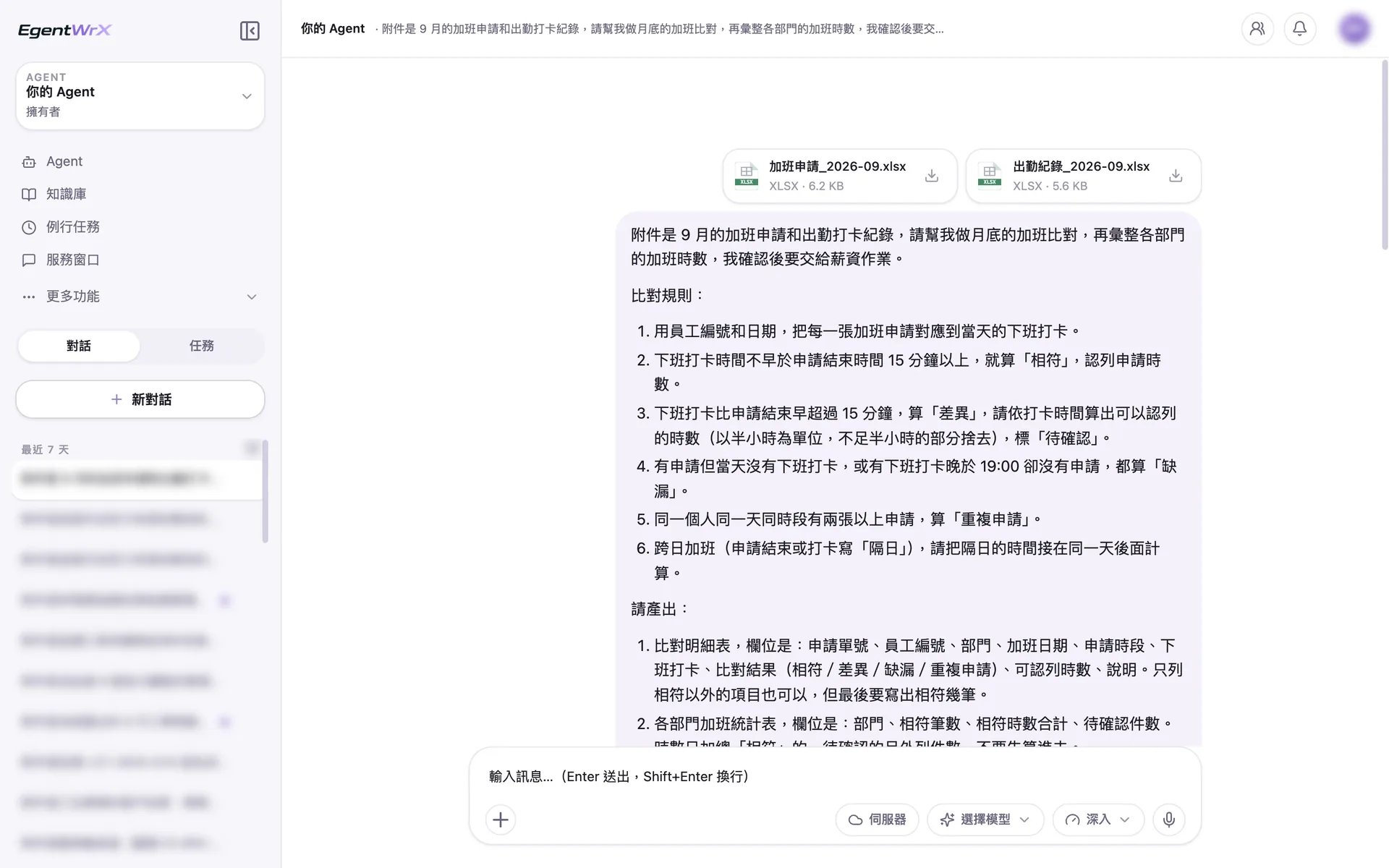
- 1Upload the overtime request and attendance punch records together.
- 2A clock-out more than 15 minutes early is a discrepancy. Calculate eligible hours from the punch time in half-hour increments.
- 3For overnight overtime, treat the next day's time as a continuation of the same day.
02Processing
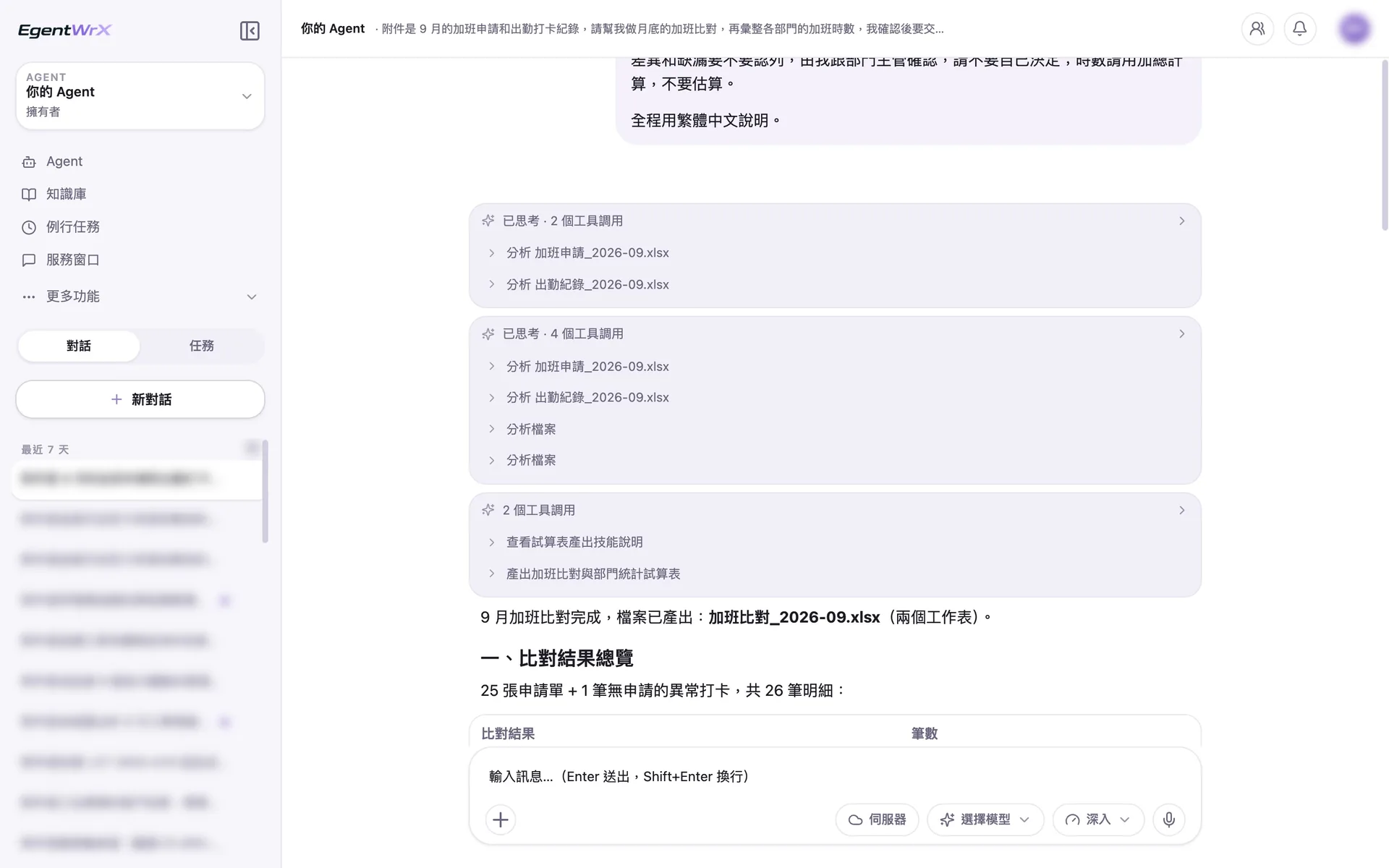
- 1Read and analyze overtime requests and attendance records separately.
- 2Apply the rules to each item and calculate its eligible hours.
- 3Produce spreadsheets for overtime matching and department statistics.
035 Items Requiring Review
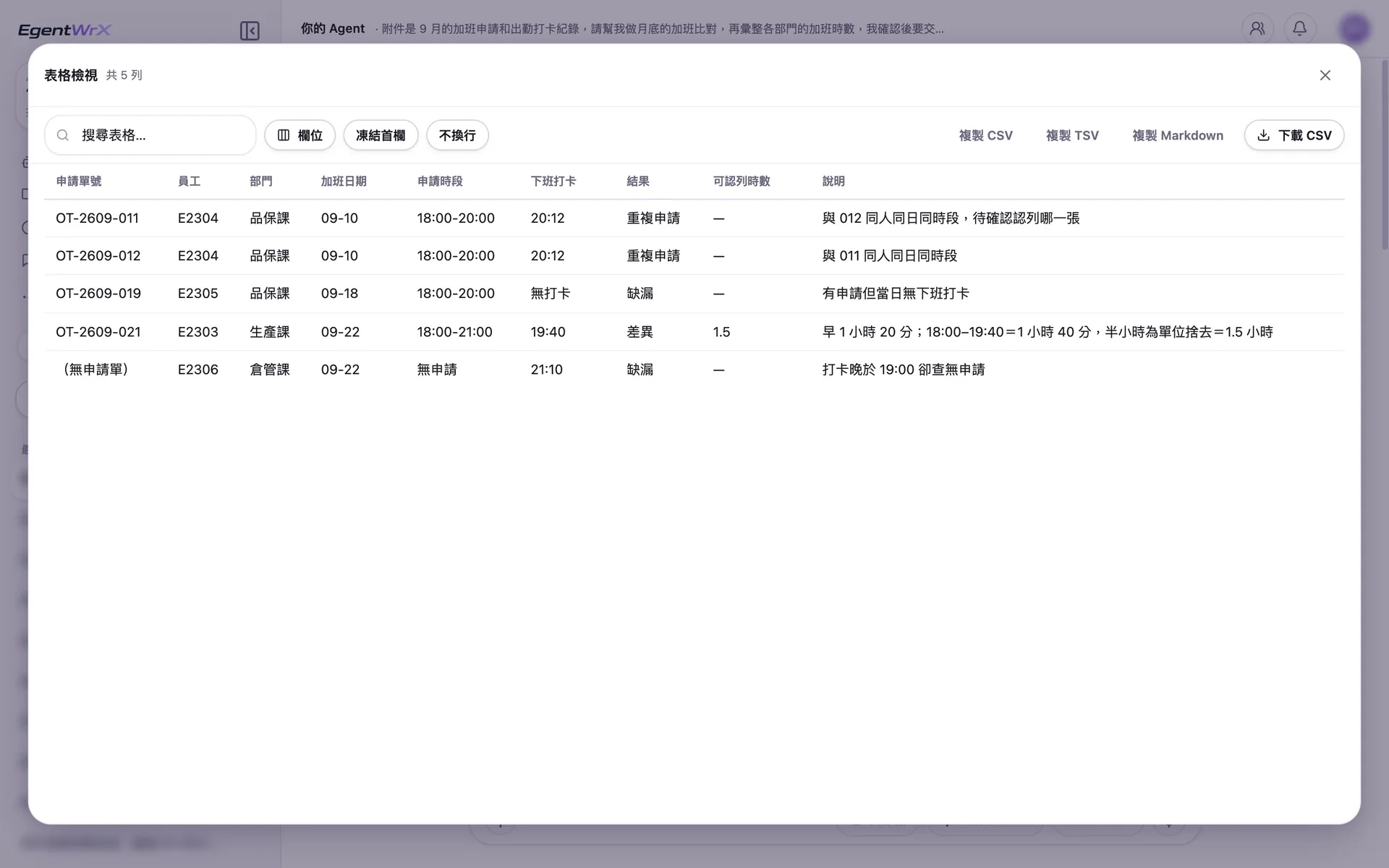
- 1Flag both requests for the same employee and time period on the same day as duplicates. A person decides which one to recognize.
- 2The employee clocked out 1 hour 20 minutes early. Based on the punch record, 1.5 hours are eligible. The formula appears in the notes field.
- 3The employee clocked out at 21:10 but submitted no overtime request. List this as a missing record.
04Department Statistics and Overnight Overtime
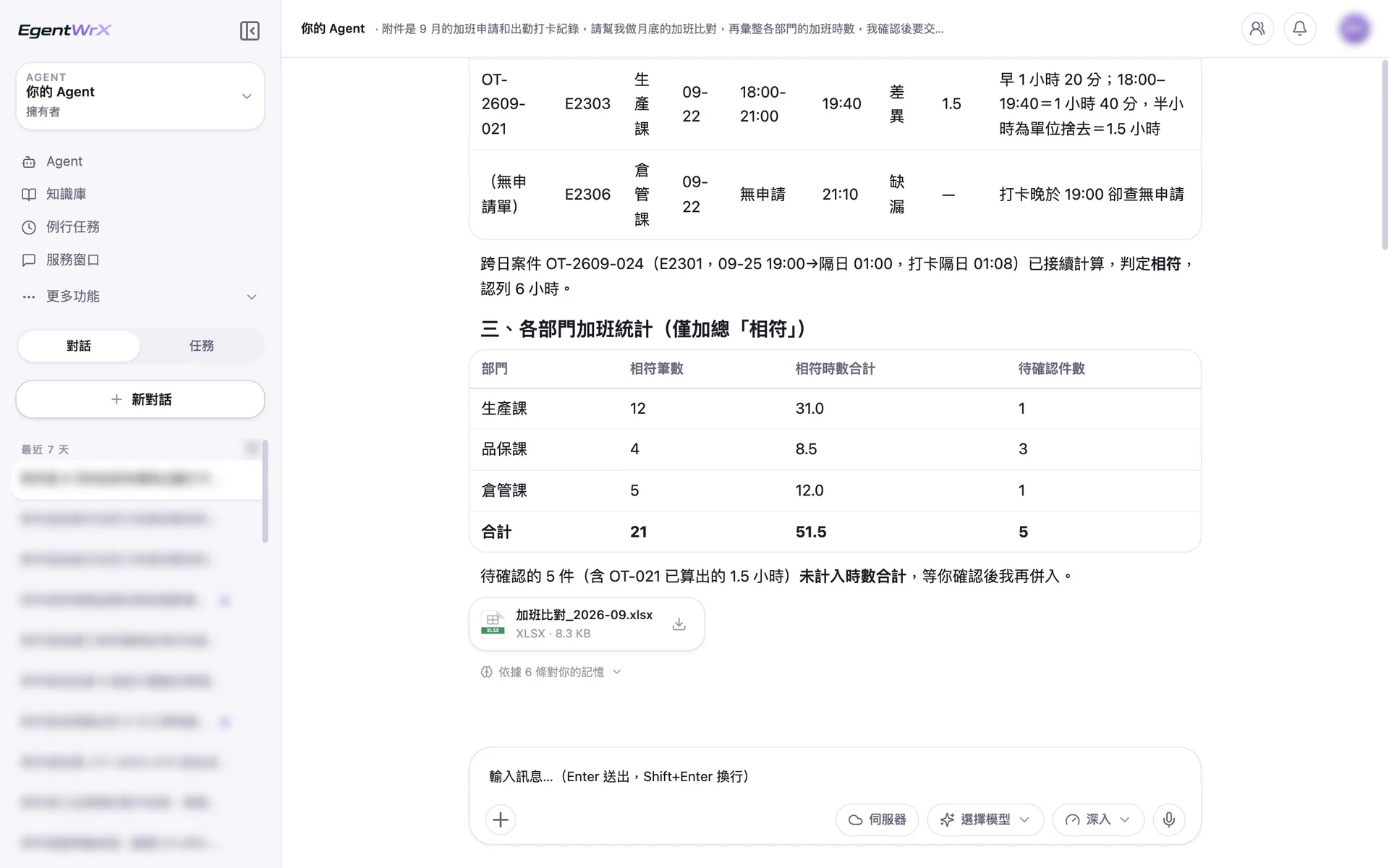
- 1Calculate overnight overtime continuously, classify it as a match, and recognize 6 hours.
- 2Department statistics total only hours classified as "matches" and list the number awaiting review separately.
- 3Exclude the 5 items awaiting review from the total. Add them only after HR confirms them.
Numbers
Estimated monthly savings of 9 to 20 hours for overtime detail matching and 6 to 15 hours for overtime compilation
Source: An unnamed automotive parts manufacturer advised by Intellicon
FAQ
- Every company has different overtime rules. How does AI Agent know which rules to use?
- First, clearly define the company's matching rules, such as the allowed difference between punch times and requested periods and how to calculate overnight overtime. Add these rules to the AI SOP as the matching criteria. AI Agent then applies them. The clearer the criteria, the more reliable the listed discrepancies.
- Can AI Agent calculate overtime pay directly?
- No. This process only compiles overtime hours. Each item shows the requested and punched times so HR can verify it directly. Payroll calculates overtime pay according to company policy. HR must review the report before sending it to the next step.
- Is integration with the attendance system required?
- Not necessarily. This process compares time clock records and overtime requests in the attendance system. We recommend connecting an SQL MCP Server so the AI Agent can query real-time data directly. Before the connection is set up, you can use files exported from the system, as shown in the example above. The connection method depends on your attendance and HR systems and deployment architecture. You can schedule a free consultation for an assessment.
Where to go next
Want every employee to have their own AI teammate?
A consultant will be in touch shortly.