SCENARIO 11·Production & QA·Data analysis
Every month, staff export detailed records from the system and recalculate the development part ratio in Excel
Every month, staff calculate the number and ratio of development parts so managers can review trends. They first export detailed records from the system, filter and categorize development parts based on defined rules, calculate the ratio in Excel, and prepare a report.
The steps are the same every month, but staff must repeat them each time. The filter criteria also exist only in the responsible person's memory, so another person may calculate different figures. If a formula is copied to the wrong cell, the ratio will also be wrong, while the report still looks organized and the error is difficult to spot.
At a glance
How it was done
- Export work order details from the system
- Filter development parts by rule
- Calculate ratios and prepare the report in Excel
- Check the figures and submit them to the manager
Where it gets stuck
The filter criteria exist only in the responsible person's memory, so another person may calculate different figures. If a formula is copied to the wrong cell, the ratio will also be wrong, while the report still looks organized.
With an AI Agent
- Export work order details from the system
- Filter development parts by rule
- Calculate ratios and prepare the report in Excel
- Check the figures and submit them to the managerHuman approval
The AI Agent handles filtering, categorization, and ratio calculations. Each ratio includes its formula, and the responsible person spot-checks the original records before issuing the report.
How it was done
- 01Export the relevant detailed records for the month from the system
- 02Filter development parts according to the rules and categorize them as needed
- 03Calculate quantities and ratios in Excel and prepare the report
- 04Check the figures and submit the report to the manager
| Work Order No. | Part No. | Product Line | Part Stage | Work Order Status | Completion Date |
| WO-2609-011 | BRK-N210 | Bearing housing | Completed | 2026-09-10 | |
| WO-2609-012 | GBX-310 | Gearbox | Mass production | Completed | 2026-09-11 |
| WO-2609-013 | FLG-N150 | Flange | Development | Completed | 2026-09-14 |
| WO-2609-014 | BRK-A150 | Bearing housing | Mass production | Completed | 2026-09-14 |
| WO-2609-014 | BRK-A150 | Bearing housing | Mass production | Completed | 2026-09-14 |
| WO-2609-015 | GBX-N410 | Gearbox | Trial production | Completed | 2026-09-15 |
| WO-2609-016 | FLG-080 | Flange | Mass production | Completed | 2026-09-16 |
| WO-2609-017 | BRK-A120 | Bearing housing | Mass production | Canceled | |
| WO-2609-018 | GBX-330 | Gearbox | Mass production | Completed | 2026-09-17 |
| WO-2609-019 | BRK-N220 | Bearing housing | DEV | Completed | 2026-09-18 |
With an AI Agent
- 01What it doesConfirm the reporting scopeStandard appliedInclude work orders with a completion date in the current month. Exclude canceled work orders. If the same work order number appears twice, count it only onceOutputValid work order list
- 02What it doesCategorize by ruleStandard appliedIdentify development parts and mass-production parts using the company's defined categorization rules. Do not categorize records with a blank part stage or a stage name not covered by the rules. Exclude and list them first, and also show what the ratio would be if they were actually development partsOutputDevelopment part and exclusion lists, with uncategorized items for production control to confirm
- 03What it doesCalculate the ratiosStandard appliedDivide the number of development part work orders by the number of valid work orders. Calculate the ratio for each product line and compare it with the previous month in percentage points. Show the formula for every ratio so it can be verified directlyOutputSummary and product line tables with calculation methods
- 04What it doesDescribe the changesStandard appliedDescribe only the changes in the figures without speculating about the causesOutputDraft report, issued only after the responsible person spot-checks the original records
- Human approval
- A person must review the report before it is issued. The figures must be checked against the original records, and production control must confirm uncategorized work orders before the report is finalized. The AI Agent organizes and explains the data but does not guarantee the accuracy of the figures.
- Platform modules used
- Skills, Integrations
For data analysis tasks, we recommend separating interpretation from calculation. The AI should understand what the user wants to query, then retrieve and calculate the data using fixed rules. Data field definitions must also be consistent. The most common failures we see at client sites are giving figures directly in a long conversation, not showing the formulas, and not checking the analysis against the original detailed records.
Screenshots show the Traditional Chinese interface.
01Upload Work Order Details and Instructions

- 1Upload the current month's work order details exported from the system.
- 2Specify the reporting rules: period, categorization method, and comparison with the previous month.
02Summary and Product Line Breakdown
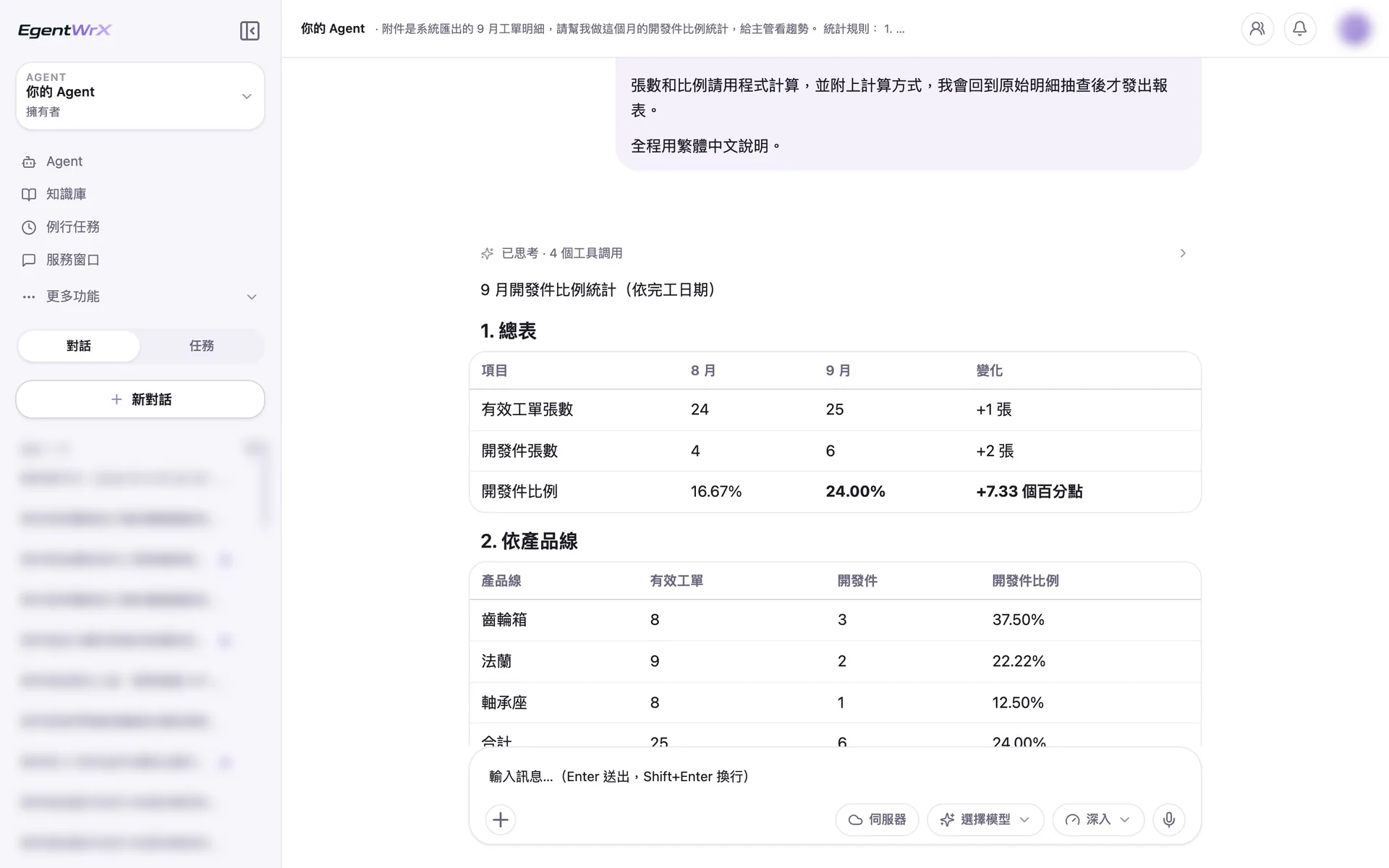
- 1The AI Agent calculates the numbers and ratios of valid work orders and development parts according to the rules.
- 225 valid work orders and 6 development parts, for a ratio of 24.00%, an increase of 7.33 percentage points from the previous month.
- 3Calculate the ratio for each product line and cross-check the total against the summary.
03Exclusion List and Calculation Method
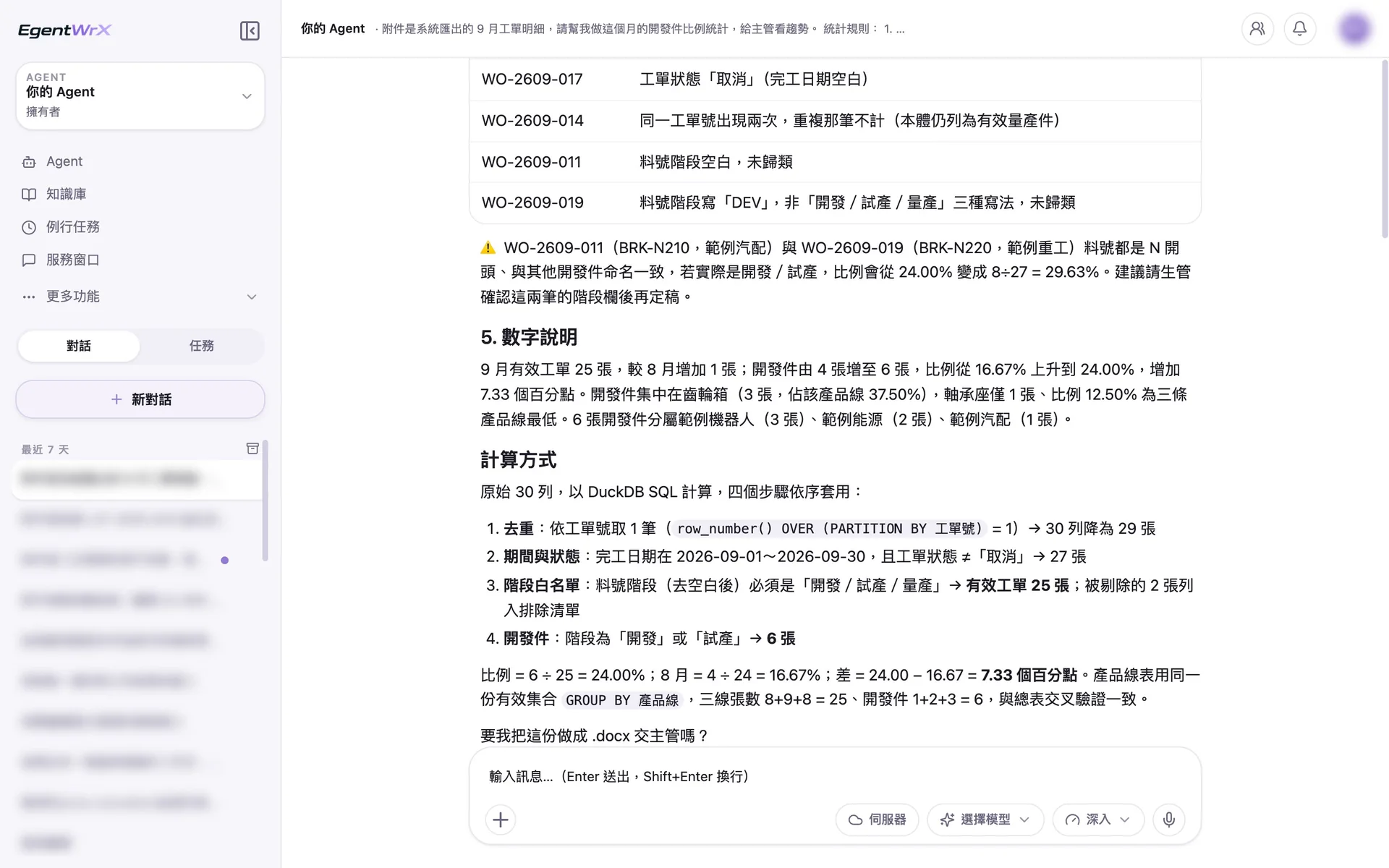
- 1The work order with the stage entered as "DEV" is marked as uncategorized and is not categorized automatically.
- 2Show how the ratio would change if these two records were actually development parts, and recommend confirmation by production control before finalization.
- 3Include the four-step calculation method so the figures can be checked against the original records.
Numbers
Estimated monthly savings of 7 to 15 hours
Source: An automotive parts manufacturer supported by Intellicon Solutions, not named
FAQ
- Can I trust the ratios calculated by the AI Agent?
- Yes, and you can verify them yourself. Every ratio includes its formula, and valid work orders, development parts, and excluded work orders are listed separately. You can check each work order against the detailed records. Before the report is issued, the responsible person must still spot-check the original records.
- How does the AI Agent determine which items are development parts?
- It uses the company's defined decision rules. These rules must be clearly documented in the AI SOP, and the field definitions must be consistent. Once the rules are defined, the same criteria are used every month, so the figures remain consistent when another person handles the task.
- Does it have to connect to the ERP?
- Not necessarily. This analysis uses the work order details in your ERP as its source. We recommend connecting an SQL MCP Server so the AI Agent can query real-time data directly. Before the connection is set up, you can use a detail file exported from the system, as shown in the example above. During this period, you can also verify that the decision rules meet your actual needs. The connection method must be assessed based on your ERP and deployment architecture. You can start by scheduling a free consultation.
Where to go next
Want every employee to have their own AI teammate?
A consultant will be in touch shortly.