SCENARIO 16·Production & QA·Batch Data Review
Staff Must Review and Classify a Large Batch of Molded Part Colors One by One
A large batch of molded part color data must be reviewed and classified one record at a time for downstream work. This is a large one-off task, not a daily routine.
The review requires experience, but a high record count turns it into an endurance task. Standards can drift during long reviews, and different reviewers may classify the same data differently. Hiring staff specifically for a one-off task is difficult, so employees must complete it gradually between their regular duties.
At a glance
How it was done
- Compile the full batch of color data
- Review each record and classify it by the standard
- Send uncertain items to senior staff
- Compile results for the downstream process
Where it gets stuck
Staff must review a large one-off data set one record at a time. Standards may drift during long reviews, and different reviewers may classify the same data differently. Records at the thresholds are the most likely to be classified incorrectly.
With an AI Agent
- Compile the full batch of color data
- Review each record and classify it by the standard
- Send uncertain items to senior staffHuman approval
- Compile results for the downstream process
The AI Agent reviews the batch against the color code standards and compiles the results. It flags boundary cases and items it cannot determine separately. Staff visually recheck these items and sample-check the full batch before sending it to the downstream process.
How it was done
- 01Compile the batch of molded part data that requires review
- 02Have experienced staff review each color and classify it according to the standard
- 03Ask senior staff to help confirm uncertain items
- 04Compile the results after reviewing the full batch and send them to the downstream process
| Part No. | Color Code | L* | a* | b* | Measurement Time | AddedΔE*ab | AddedResult |
| P001 | EX-GY-01 | 71.85 | -0.32 | 1.31 | 08:00 | 0.30 | Pass |
| P005 | EX-GY-01 | 71.97 | -1.15 | 1.96 | 08:20 | 0.80 | Pass |
| P007 | EX-GY-01 | 72.36 | -1.44 | 2.24 | 08:30 | 1.25 | Borderline |
| P010 | EX-GY-01 | 73.80 | -1.12 | 2.38 | 08:45 | 2.10 | Fail |
| P021 | EX-BL-03 | 44.08 | -4.43 | -28.85 | 09:40 | 1.90 | Fail |
| P026 | EX-GY-01 | 72.60 | 0.30 | 1.50 | 10:05 | 1.00 | ? |
| P027 | EX-BK-02 | 24.10 | 0.20 | 0.40 | 10:10 | 1.50 | ? |
| P028 | EX-BL-03 | 45.31 | -2.84 | (blank) | 10:15 | - | |
| P029 | EX-RD-04 | 42.10 | 48.30 | 26.70 | 10:20 | (no standard) | |
| P005 | EX-GY-01 | 73.37 | -1.15 | 1.96 | 10:25 | 1.58 | Fail |
- No.
- EX-QA-COLOR-003 (Revision B)
- Date
- 2026-06-01
| Color Code | Name | L* | a* | b* |
|---|---|---|---|---|
| EX-GY-01 | Light Gray | 72.00 | -0.50 | 1.50 |
| EX-BK-02 | Matte Black | 25.00 | 0.20 | -0.80 |
| EX-BL-03 | Dark Blue | 45.00 | -3.00 | -28.00 |
| Class | Condition | Action |
|---|---|---|
| Pass | ΔE*ab ≤ 1.00 | |
| Borderline | 1.00 < ΔE*ab ≤ 1.50 | Quality staff visually recheck it against the color standard in a standard light booth |
| Fail | ΔE*ab > 1.50 | |
| Cannot Determine | Measurement values are missing, or the color code is not covered by this standard | Send to the quality manager |
| Remeasurement Required | The same part number has two or more measurement records | Do not select one result |
With an AI Agent
- 01What it doesCalculate color difference against the color code standardStandard appliedFor each record, find the target values for its color code and calculate ΔE*ab, the color difference from the standard color, using the formula. Round the result to two decimal places. Show both the measured and target values so staff can verify the calculation directlyOutputColor difference value for each part
- 02What it doesClassify results according to the standardStandard applied1.00 or less is pass, over 1.00 through 1.50 is borderline, and over 1.50 is fail. A value exactly at a threshold follows the standard's "or less" ruleOutputRecord-by-record review table
- 03What it doesFlag items that cannot be determinedStandard appliedDo not determine results when measurement values are missing or the color code is not covered by the standard. If the same part number was measured twice, mark both records as "Remeasurement Required" instead of selecting oneOutputList of items requiring staff action
- 04What it doesSend the results to quality staffStandard appliedBorderline items require a visual recheck in a standard light booth. The quality manager decides how to handle failed parts. The AI Agent does not make the final decisionOutputCounts by result, sent to the downstream process only after quality staff recheck and sample-check the results
- Human approval
- Step 4 remains with staff. The AI Agent reviews the large data set according to the rules, while staff decide boundary cases and exceptions. The batch moves forward only after it passes a sample check.
- Platform modules used
- Skills
Our general recommendation for all task types is to define the inputs, decision rules, outputs, and human responsibilities clearly. This improves the task's long-term viability. It is especially important for one-off batch tasks: clear rules in Step 1 are required for consistent results later.
Screenshots show the Traditional Chinese interface.
01Upload Measurement Data and Color Code Standards
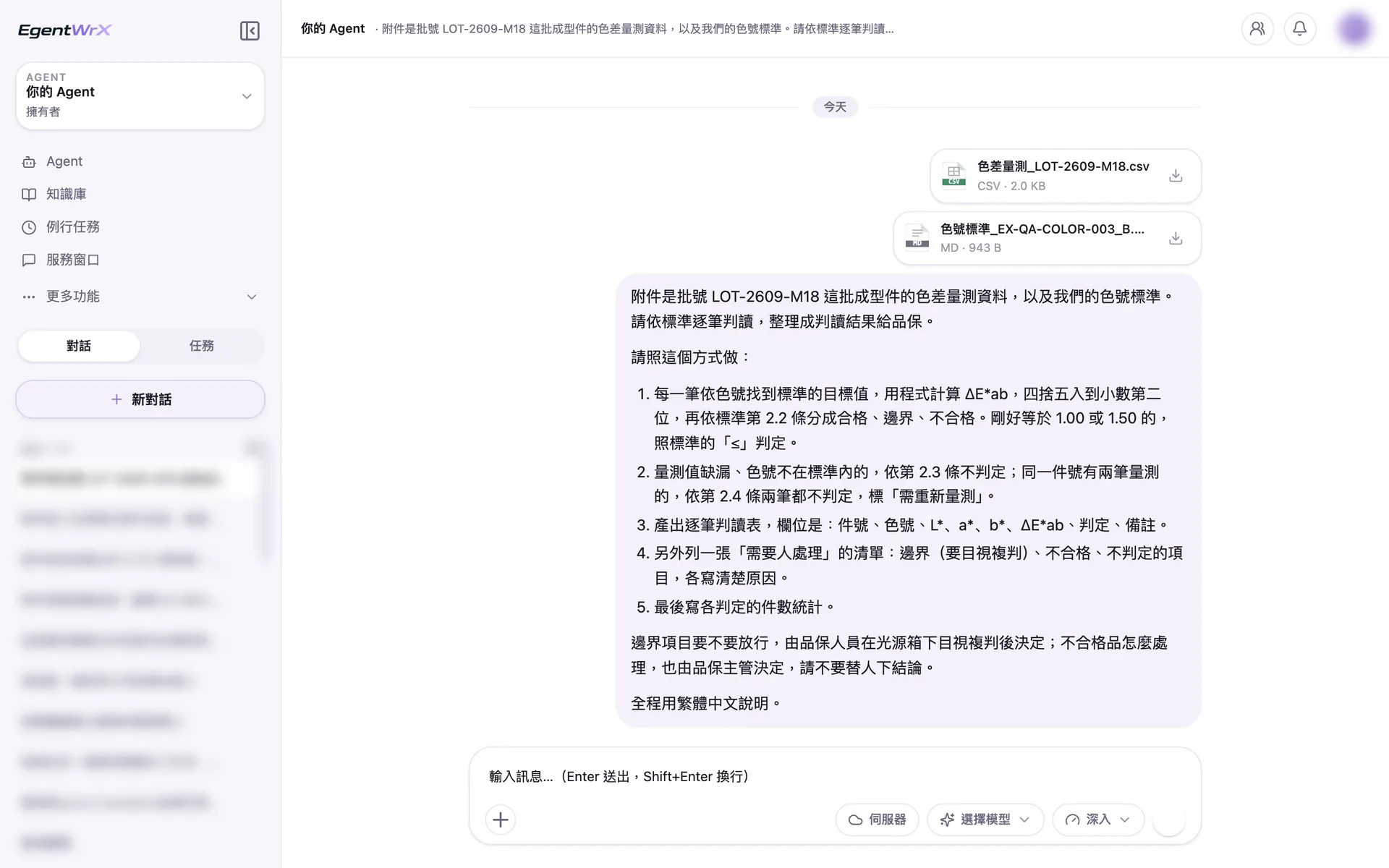
- 1Upload the color difference measurement data and the company's color code standards.
- 2Calculate color difference using the formula in the standard. Apply the "or less" rule when the value is exactly 1.00 or 1.50.
- 3Do not determine records with missing values, color codes not covered by the standard, or duplicate measurements.
- 4Quality staff decide whether to release borderline parts and how to handle failed parts.
02Execution Process
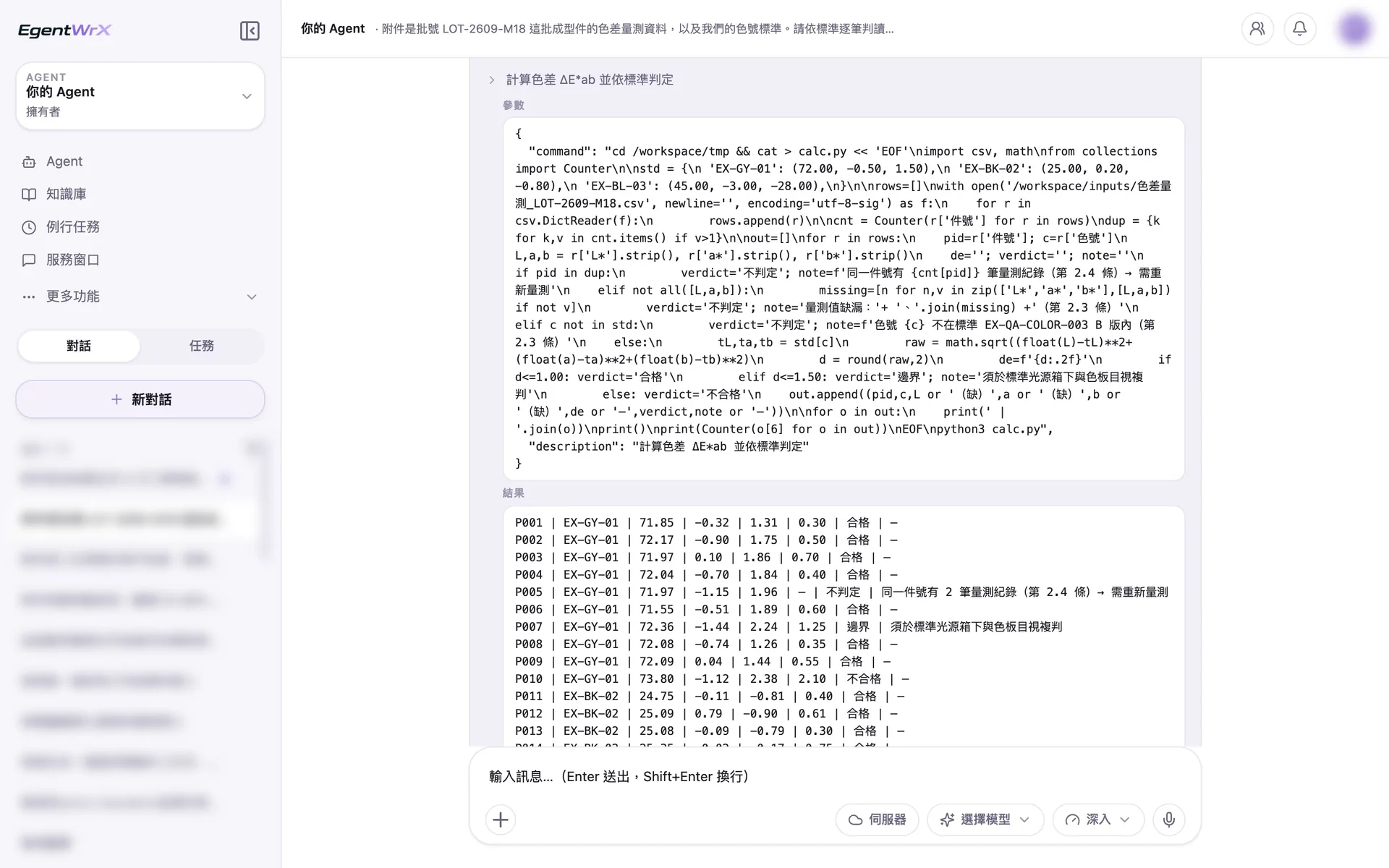
- 1First load the standard target values for the three color codes.
- 2Round to two decimal places, then classify using 1.00 as the pass threshold and 1.50 as the borderline threshold.
- 3The same part number was measured twice. Mark both records as cannot determine and require remeasurement.
03Items Requiring Staff Action
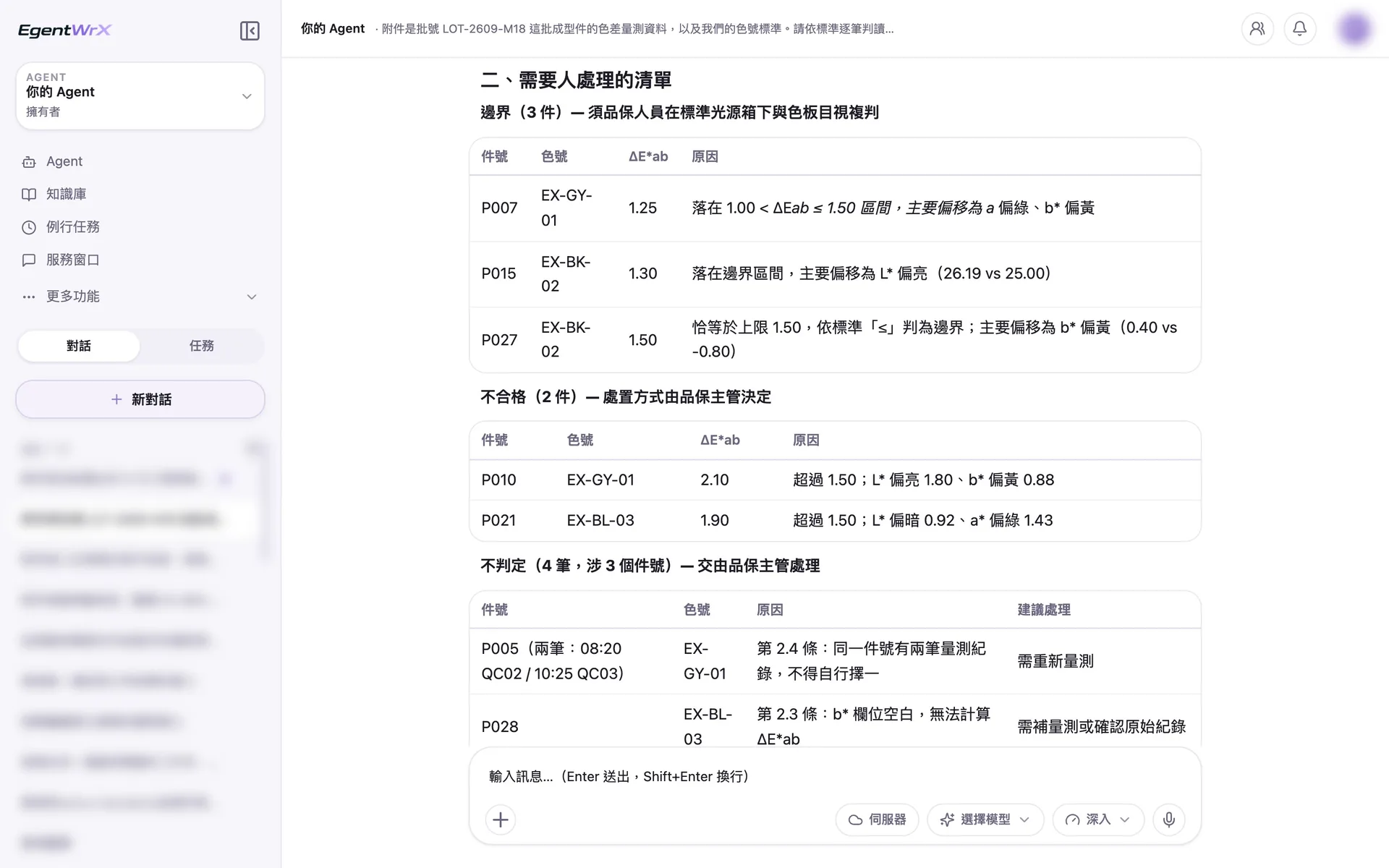
- 1The color difference is exactly 1.50, so the standard classifies it as borderline.
- 2The quality manager decides how to handle failed parts.
- 3Do not select one of the two measurements for the same part number. Flag both for remeasurement.
04Part Counts and Additional Notes
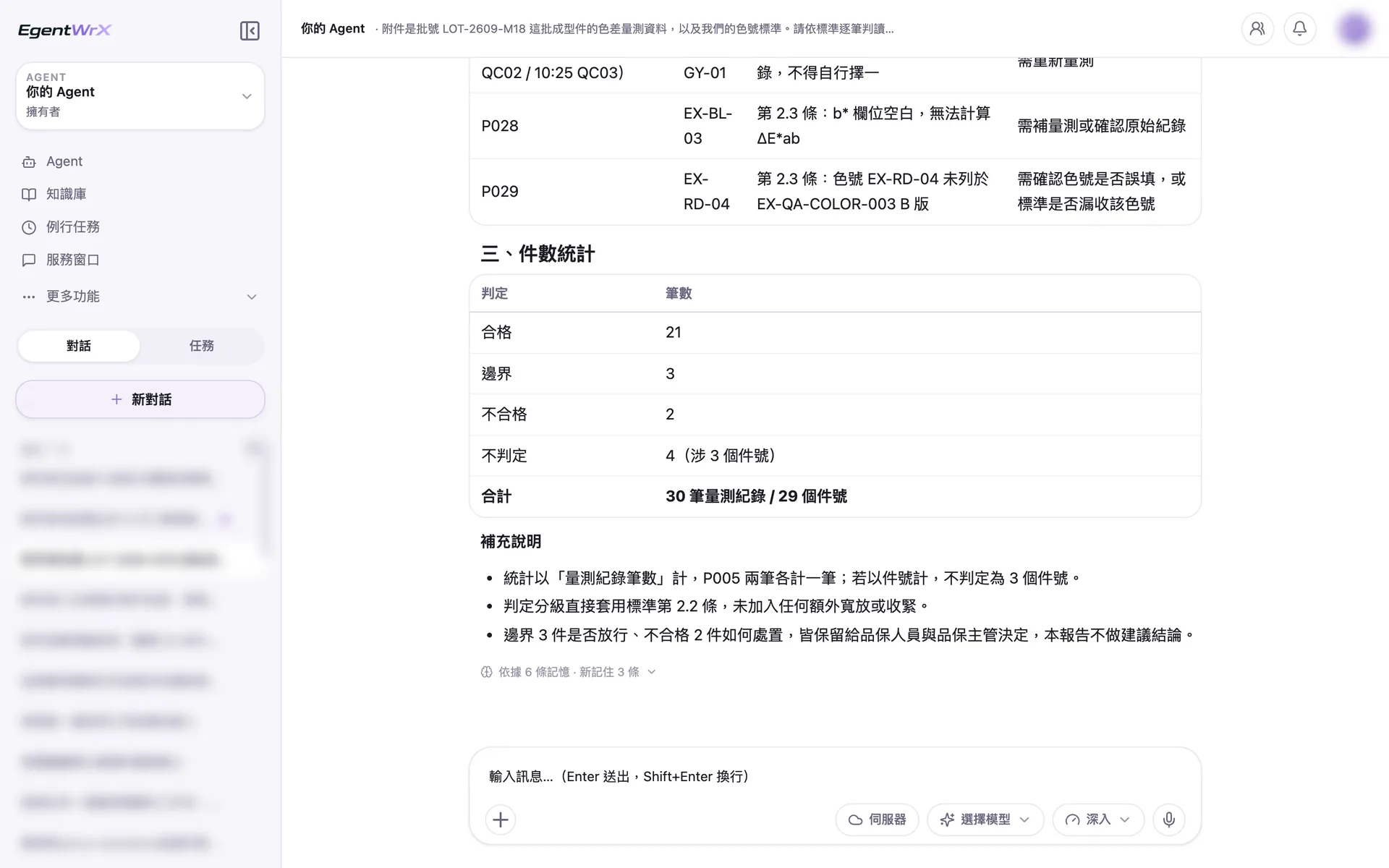
- 1One part has a color code not covered by the standard. Mark it as cannot determine and ask staff to confirm whether the code is incorrect or missing from the standard.
- 221 parts passed, 3 are borderline, 2 failed, and 4 cannot be determined.
- 3Quality staff retain responsibility for release and disposition decisions.
Numbers
One-off task, estimated savings of 220 to 440 hours
Source: An unnamed auto parts manufacturer advised by Intellicon Solutions
FAQ
- Why are the estimated time savings one-off?
- This task processes a large data set in one batch. The estimated savings in the client case are therefore a one-off 220 to 440 hours, unlike the monthly estimates for other tasks. Compare them separately.
- Who defines the color review standards?
- Staff who know the products define the standards and record them in the AI SOP. The AI Agent then applies these rules. It flags cases that the rules do not cover or define clearly as uncertain and sends them to staff for a decision.
- Is a one-off task worth building into an AI Agent?
- Yes, if the volume is large enough. Once the rules are clear, a large data set can be reviewed using one consistent standard. Staff only handle exceptions and sample checks. The same rules can also be reused for similar tasks in the future.
Where to go next
Want every employee to have their own AI teammate?
A consultant will be in touch shortly.