SCENARIO 12·Sales·Review and comparison
Compare Old and New Competitor Lists Item by Item to Find Additions and Removals
When the competitor list is updated, employees must compare the new and old versions item by item to find which companies were added and which were removed.
This is manageable when the lists are short, but it takes a long time when they grow. Naming differences create the main challenge. The same company may appear under its full name, short name, or English name in the two versions. Different-looking names may refer to the same company, while similar-looking names may refer to two different companies. Employees must assess every item. Missing one item leaves the difference list incomplete.
At a glance
How it was done
- Obtain both list versions
- Compare additions and removals
- Assess different name formats
- Confirm and deliver the difference list
Where it gets stuck
The same company may appear under its full name, short name, or English name in the two versions. Different-looking names may refer to the same company, while similar names may refer to two different companies. Employees must assess every item. Missing one item leaves the difference list incomplete.
With an AI Agent
- Obtain both list versions
- Compare additions and removals
- Assess different name formats
- Confirm and deliver the difference listHuman approval
The AI Agent compares each item and identifies possible matches, with supporting evidence for every pair. Someone familiar with the business confirms whether they refer to the same company. The AI Agent does not merge or remove them on its own.
How it was done
- 01Obtain the old and new competitor lists
- 02Compare each item to find additions and removals
- 03Determine whether differently written names refer to the same company
- 04Prepare a difference list and hand it to the people who will use it
| No. | Company Name | English Name | Location |
|---|---|---|---|
| 1 | Example Precision Machinery Co., Ltd. | EXAMPLE PRECISION MACHINERY | Taichung City |
| !2 | Example Precision Engineering Co., Ltd. | EXAMPLE PRECISION WORKS | Changhua County |
| 3 | Example Foundry Co., Ltd. | EXAMPLE CASTING CO., LTD. | Tainan City |
| 6 | Example Bearings Co., Ltd. | EXAMPLE BEARING CORP. | New Taipei City |
| !9 | Example Precision Industries Co., Ltd. | EXAMPLE PRECISION INDUSTRY | Taoyuan City |
| !7 | Example Fasteners Co., Ltd. | EXAMPLE FASTENER | Kaohsiung City |
| !8 | Example Screw Industries Co., Ltd. | EXAMPLE SCREW INDUSTRY | Tainan City |
| 18 | Example Heat Treatment Co., Ltd. | EXAMPLE HEAT TREATMENT | Tainan City |
| (Not in old version) | |||
| Item | Company Name | Short Name | English Name | Notes |
|---|---|---|---|---|
| 5 | Example Precision Machinery Co., Ltd. | Example Precision Machinery | EXAMPLE PRECISION MACHINERY | |
| !(Not in new version) | ||||
| 9 | Example Foundry Co. | Example Foundry | EXAMPLE CASTING CO. | |
| 11 | EXAMPLE BEARING CORP. | Example Bearings | EXAMPLE BEARING CORP. | |
| !15 | Example Precision Technology Co., Ltd. | Example Precision | EXAMPLE PRECISION INDUSTRY | |
| !18 | Example Fasteners Group Co., Ltd. | Example Fasteners | EXAMPLE FASTENER GROUP | Example Fasteners and Example Screw Industries merged in 2026-08 |
| !(Merged into the row above; note: two companies merged) | ||||
| (Not in new version) | ||||
| 6 | Example Automation Co., Ltd. | Example Automation | EXAMPLE AUTOMATION | |
With an AI Agent
- 01What it doesSpecify the comparison baselineStandard appliedUse the new version specified by the employee as the baseline, even when the two versions have different fields and sortingOutputItem-by-item matching between versions
- 02What it doesDetermine whether names refer to the same companyStandard appliedReview the company name, short name, and English name together. Do not treat similar names as the same company when the English name or location differs, and explain why they are treated as different companies. Add uncertain items to the possible-match listOutputFour categories: unchanged, possible match, added, and removed
- 03What it doesState the supporting evidenceStandard appliedState the evidence for each possible match, such as an identical English name, an identical short name, or a merger stated in the new version's notes. Identify whether the difference is a name format, name change, or mergerOutputPossible-match list with supporting evidence
- 04What it doesSubmit for human confirmationStandard appliedList the items without merging or removing them. Finish with the total number of companies in each version and the number in each categoryOutputThe difference list is given to the people who will use it only after employees confirm the possible matches
- Human approval
- People decide whether names identified as possible matches refer to the same company. The AI Agent only identifies these items and states the supporting evidence. It does not merge or remove them on its own.
- Platform modules used
- Skills
For review and comparison tasks, we recommend defining a clear baseline document, field, or rule. The output should show only differences and exceptions, followed by a review by someone familiar with the business. If two versions could both serve as the baseline, a person must first confirm which one is valid. This is why step 1 requires the baseline version to be specified.
Screenshots show the Traditional Chinese interface.
01Upload Both Lists and Instructions
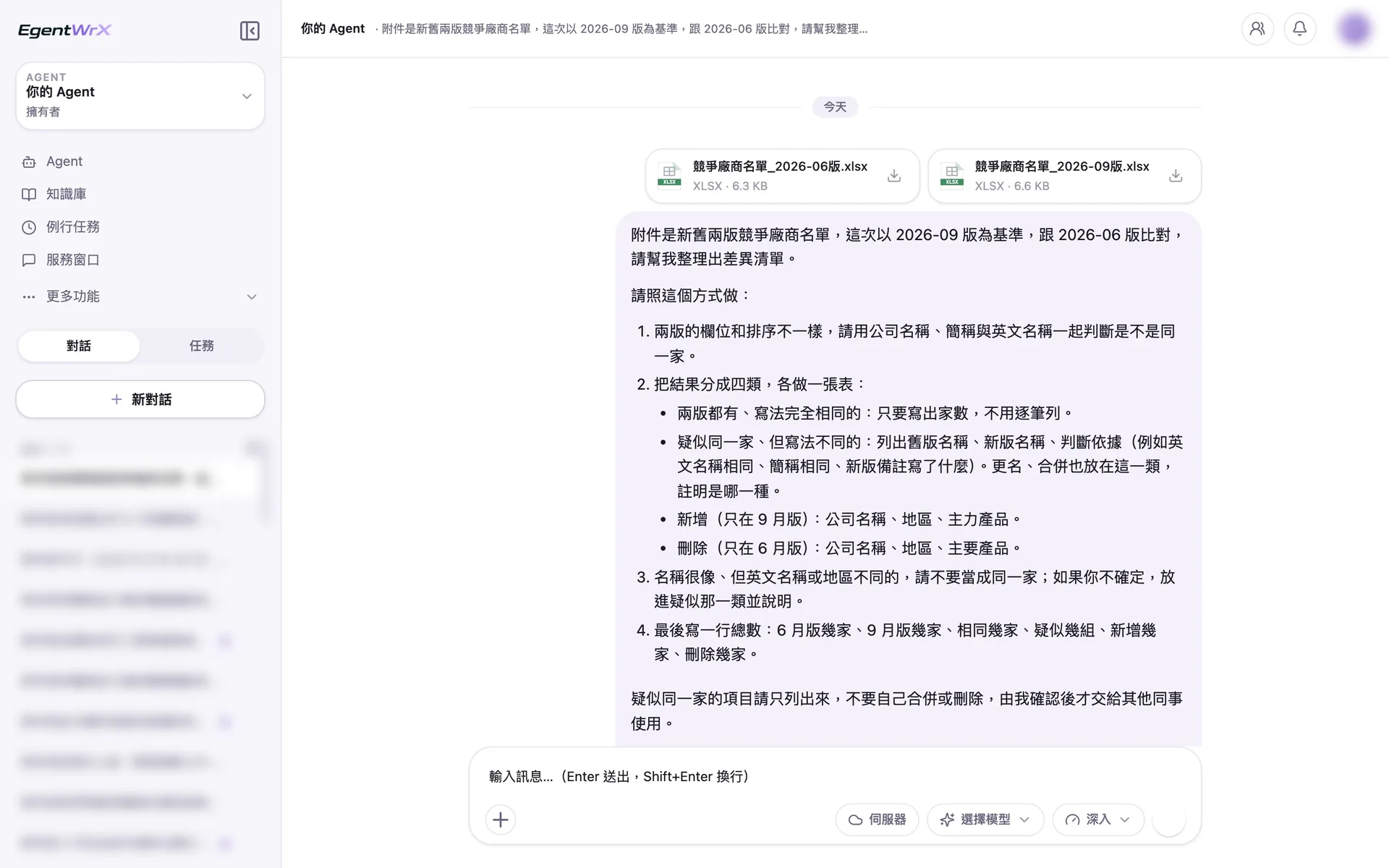
- 1Upload the June and September lists, which use different fields and sorting.
- 2Review the company name, short name, and English name together to determine whether entries refer to the same company.
- 3State the evidence for possible matches. Include name changes and mergers in this category.
- 4List possible matches without merging or removing them.
02Processing
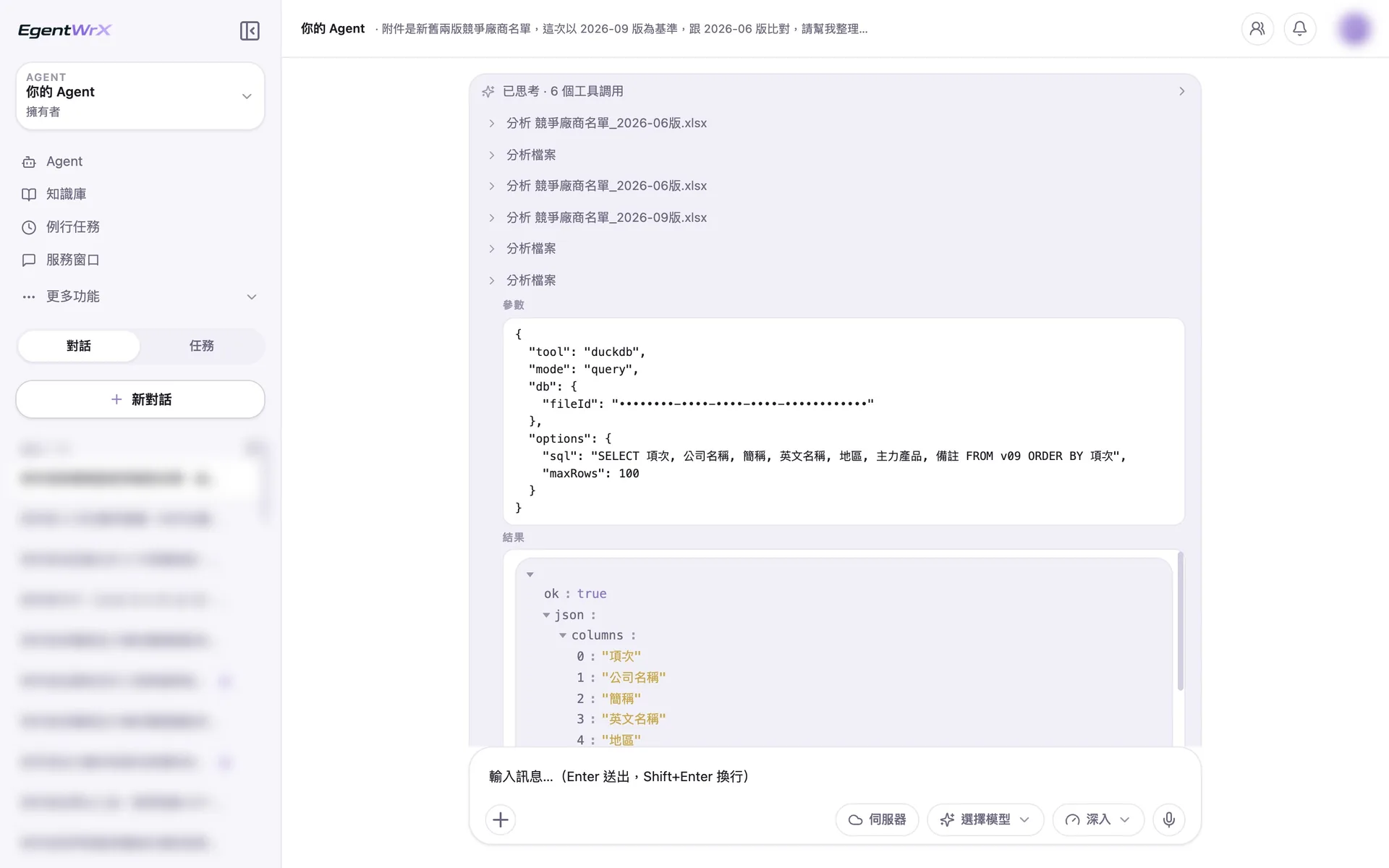
- 1Import the two lists separately.
- 2Analyze the June and September versions in sequence.
- 3Read the short name, English name, and notes fields in the new version to determine whether entries refer to the same company.
034 Possible-Match Groups
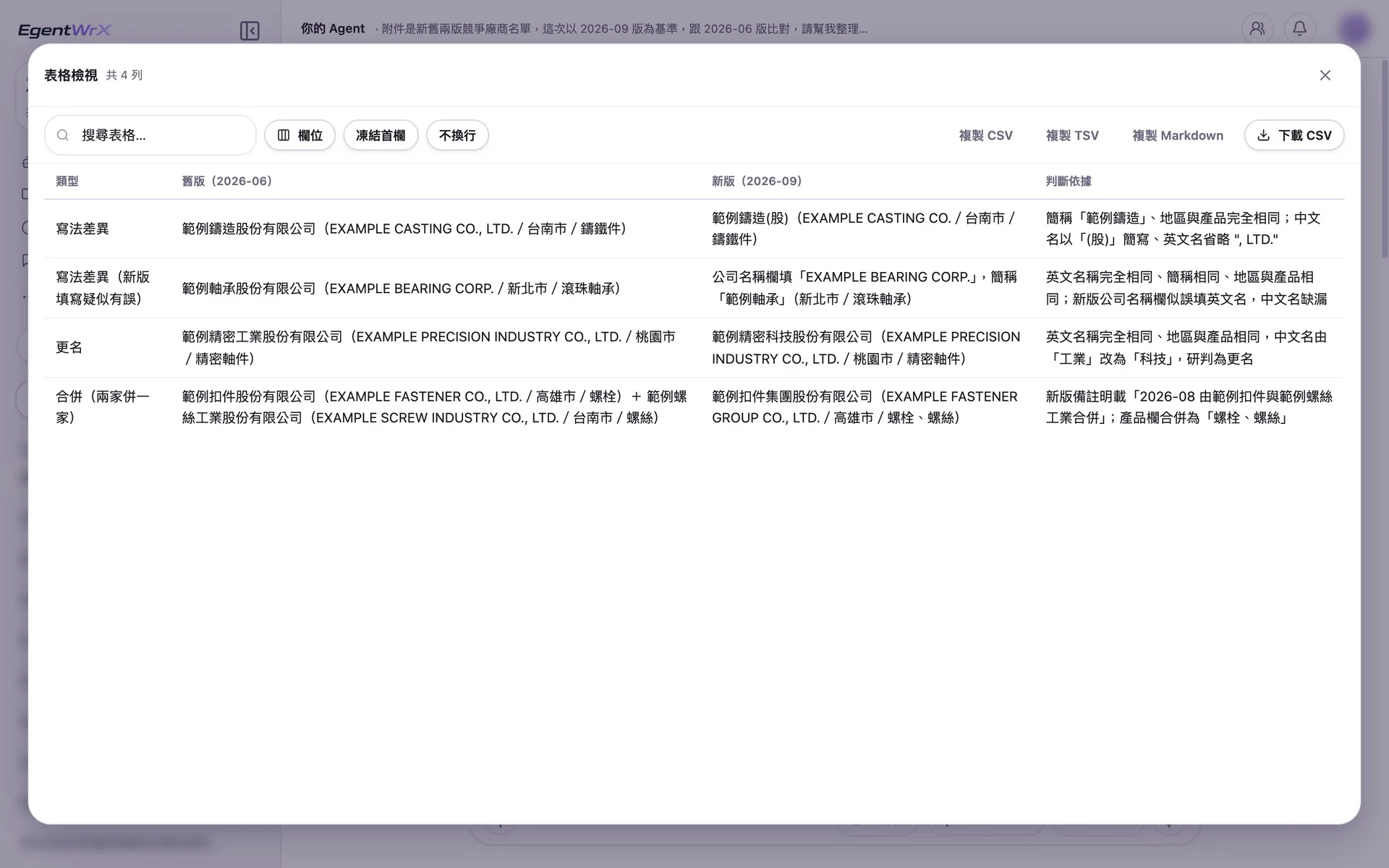
- 1Different format: "(Co.)" is an abbreviation, and the English names differ only by LTD.
- 2The company name field in the new version contains an English name. The short name and English name indicate that it is the same company.
- 3Name change: The English name is identical, while the Chinese name changed from "Industries" to "Technology."
- 4Merger: According to the new version's notes, two companies merged into one. Do not classify this as two removals and one addition.
04Additions, Removals, and Non-Matches
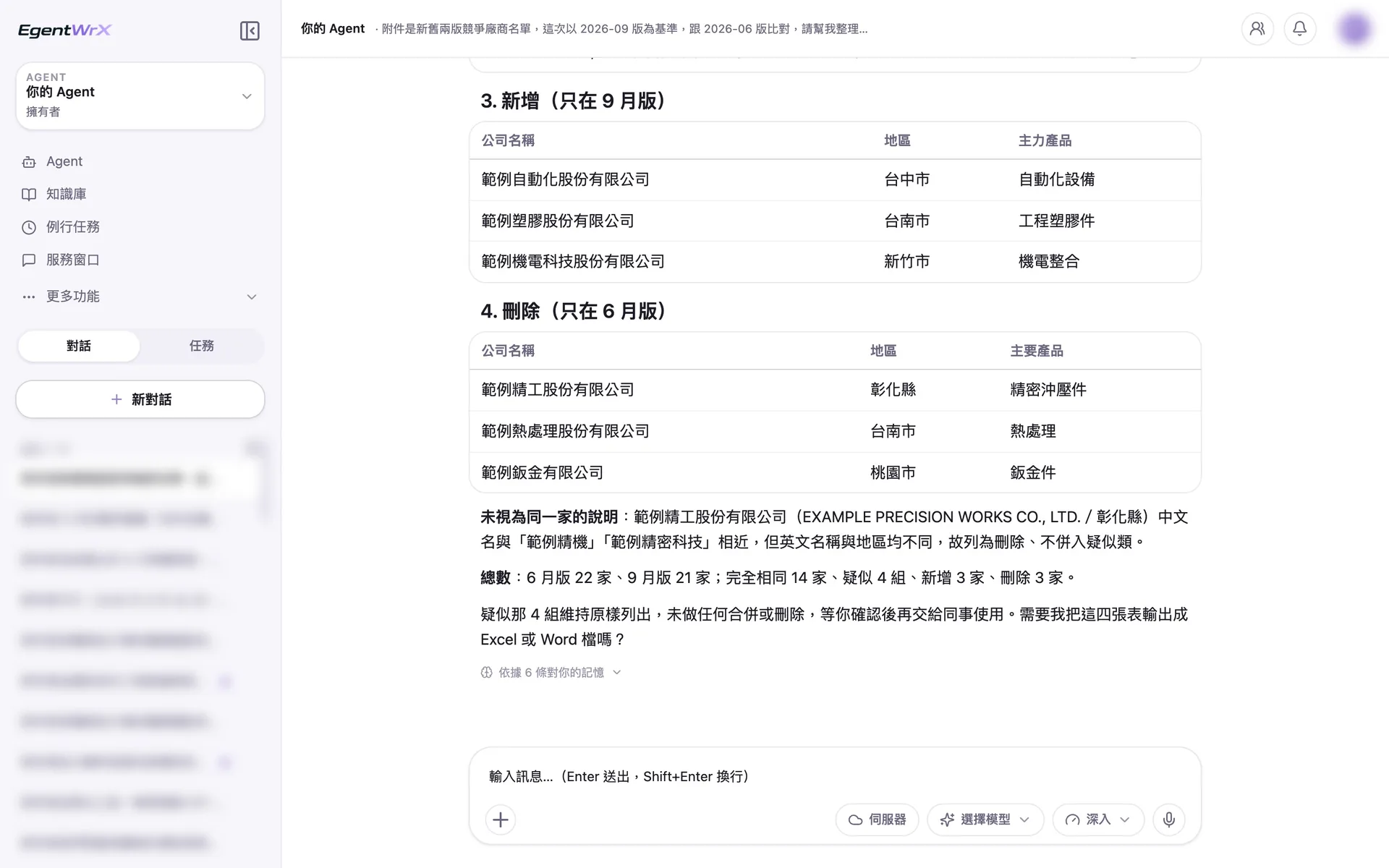
- 1List the 3 companies found only in the September version as additions.
- 2List the 3 companies found only in the June version as removals.
- 3The names differ by only one Chinese character, but the English names and locations are different. Do not merge them.
- 4Keep the 4 possible-match groups unchanged until employees confirm them, then give the list to the people who will use it.
Numbers
Estimated monthly savings of 12 to 30 hours
Source: One automotive parts manufacturer we advised; name withheld
FAQ
- Can it match a company written differently in the two lists?
- It can identify possible matches. The AI Agent lists names that may refer to the same company but are written differently and asks employees to decide. It does not merge them on its own. Common name mappings can also be added to a reference table in the AI SOP to make later comparisons more consistent.
- Can the list be updated immediately after the comparison?
- No. Employees must confirm the difference list before it is given to the people who will use it. Treating the AI's assessment as the final result is the review and comparison failure we see most often at client sites.
- Why must the baseline version be specified first?
- A comparison is reliable only when it has a clear baseline. If two versions could both serve as the baseline, a person should first confirm which one is valid before starting the comparison. Otherwise, the reported additions and removals may be reversed.
Where to go next
Want every employee to have their own AI teammate?
A consultant will be in touch shortly.