SCENARIO 17·Purchasing·Standardized process
Each Supplier Uses a Different Packing Format, Requiring Manual Consolidation into One Table
When order packing details arrive, purchasing staff must organize the items, quantities, carton counts, and weights into the company's standard table. They then compare the data with the order quantities before sending it to the receiving or shipping process.
Each supplier uses a different format. Some list one carton per row, while others list one item per row. Units also vary. Staff must interpret each document to map the fields. Most of the time is spent understanding what each field means, not entering data.
At a glance
How it was done
- Receive packing details from each supplier
- Interpret the format and identify the fields
- Enter data into the standard table and convert units
- Compare with order quantities and decide how to handle discrepancies
Where it gets stuck
Each supplier uses a different format. Some list one carton per row, while others list one item per row. Units also vary. Most of the time is spent understanding what each field means, not entering data.
With an AI Agent
- Receive packing details from each supplier
- Interpret the format and identify the fields
- Enter data into the standard table and convert units
- Compare with order quantities and decide how to handle discrepanciesHuman approval
The AI Agent interprets the formats, extracts the fields, and converts the units. It also compares the data with the order quantities and flags discrepancies and missing items. Purchasing staff decide whether to contact the supplier and how to handle each issue.
How it was done
- 01Receive the order packing details
- 02Interpret the format and identify the items, quantities, carton counts, and weights
- 03Enter the data into the company's standard table and convert the units
- 04Compare the data with the order quantities and check for missing cartons or quantity discrepancies
| PACKING LIST: Example Precision Fasteners | |||
| PO No.: PO-2609-101 | |||
| Ship Date: 2026-09-24 | |||
| C/No. | Part No. | Qty (PCS) | G.W. (kg) |
| 1 | HB-M8-30 | 2,000 | 35.2 |
| 2–8 | ⋮ | ⋮ | ⋮ |
| 9 | HB-M8-30 | 2,000 | 35.2 |
| 10 | NT-M8 | 5,000 | 26.3 |
| 11–15 | ⋮ | ⋮ | ⋮ |
| 16 | FW-M8 | 8,000 | 19.2 |
| 17 | FW-M8 | 8,000 | 19.2 |
| 18 | FW-M8 | 8,000 | 19.2 |
| 19 | FW-M8 | 8,000 | 19.2 |
| TOTAL | 551.4 | ||
| Example Steel Co., Ltd.: Shipment Details | ||||
| Customer: Example Machinery Co., Ltd. Order No.: PO-2609-102 | ||||
| Shipping Date: 2026-09-25 Vehicle No.: (omitted) | ||||
| Item and Specification | Quantity | Unit | Bundles | Weight (metric tons) |
| S45C round bar Ø50×6M | 38 | pcs | 4 | 3.515 |
| SS400 steel plate 6t×1200×2400 | 25 | sheets | 5 | 3.391 |
| Total | 9 | 6.906 | ||
| Packing Information |
|---|
| A3 five-ply cartons: 500 pcs, tied into 10 bundles, approximately 85 kg |
| !30×40cm bubble bags: 120 dozen, packed in 6 cartons, approximately 36 kg |
With an AI Agent
- 01What it doesInterpret each document formatStandard appliedFor documents with one carton per row, total the quantities by part number. For documents with one item per row, extract the data directly. Also extract items and quantities from email text.OutputReceived quantity, carton count, and weight for each item from each supplier
- 02What it doesOrganize the data into a standard table and convert unitsStandard appliedConvert quantities to the units used on the purchase order (for example, 1 dozen = 12 pcs). Convert all weights to kilograms and show the calculation.OutputOne receiving table containing the purchase order number, supplier, item, ordered quantity, received quantity, carton count, and weight
- 03What it doesCompare with order quantitiesStandard appliedCompare the received quantity with the ordered quantity for each item. Also list items that are not mentioned in the packing details.OutputA list of quantity discrepancies and missing items showing the ordered quantity, received quantity, and difference for each item
- 04What it doesSend to purchasing staff for reviewStandard appliedReport only the facts. Do not reply to suppliers on behalf of purchasing staff or decide whether to accept excess quantities.OutputAn Excel receiving comparison table. The data is sent to the receiving process only after purchasing staff approve it.
- Human approval
- Step 4 remains with purchasing staff. The AI Agent produces a draft. Purchasing staff decide whether to ask about quantity discrepancies and how to handle them.
- Platform modules used
- Skills
For standardized processes, we recommend fixed input fields, stable templates, and clearly visible errors. The AI Agent should prepare a draft, and staff should review it before submission. If one document type has more than ten formats, the first phase should cover the most common formats, while staff handle the remaining exceptions. The most common cause of failure at client sites is starting implementation without first reviewing the format differences.
Screenshots show the Traditional Chinese interface.
01Upload Shipment Data and Instructions from Three Suppliers
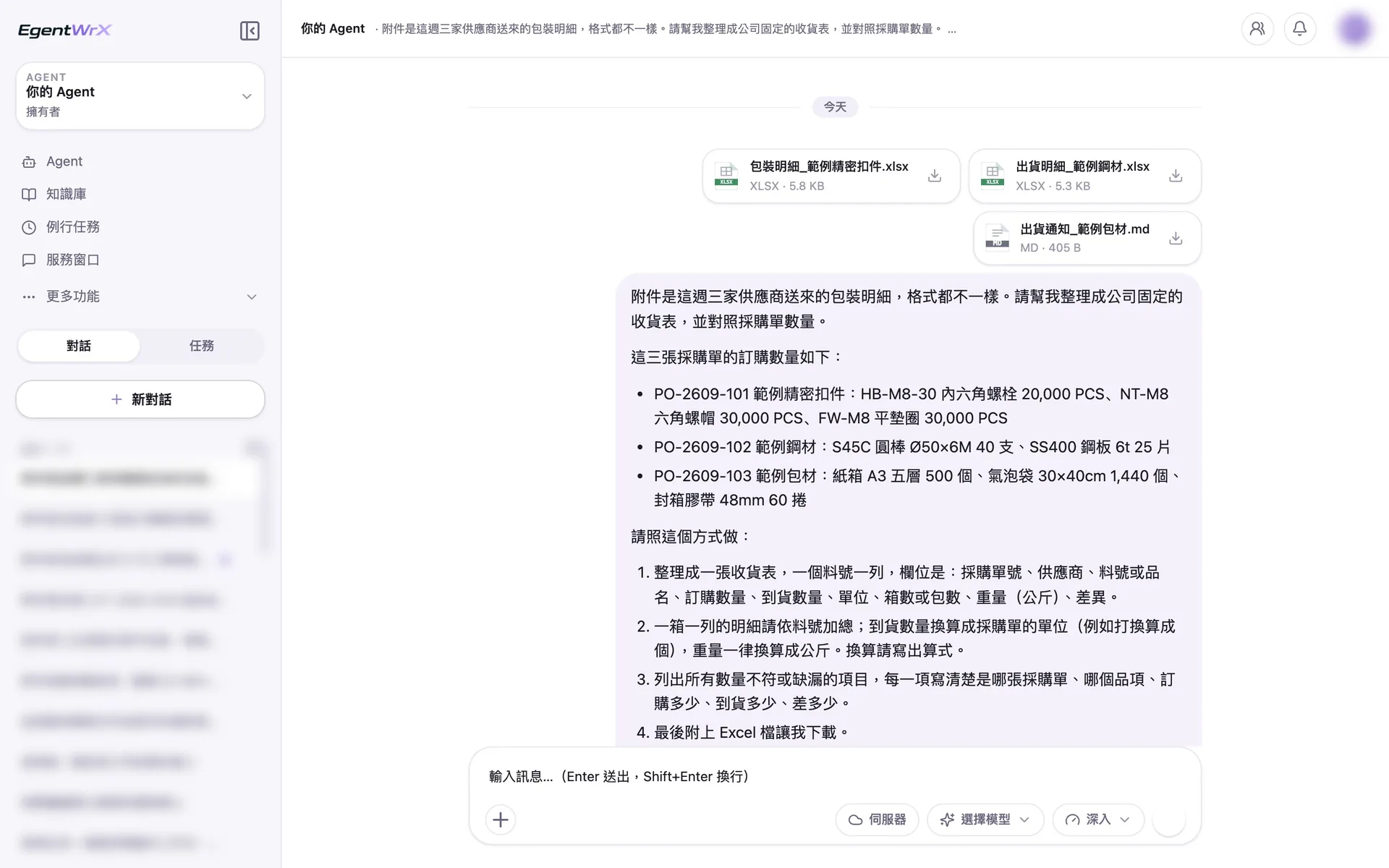
- 1Three suppliers and three formats: an English packing list, Chinese shipment details, and email text.
- 2The instructions include the ordered quantities from three purchase orders.
- 3Total quantities by part number, convert units and weights, and show the calculations.
02Processing
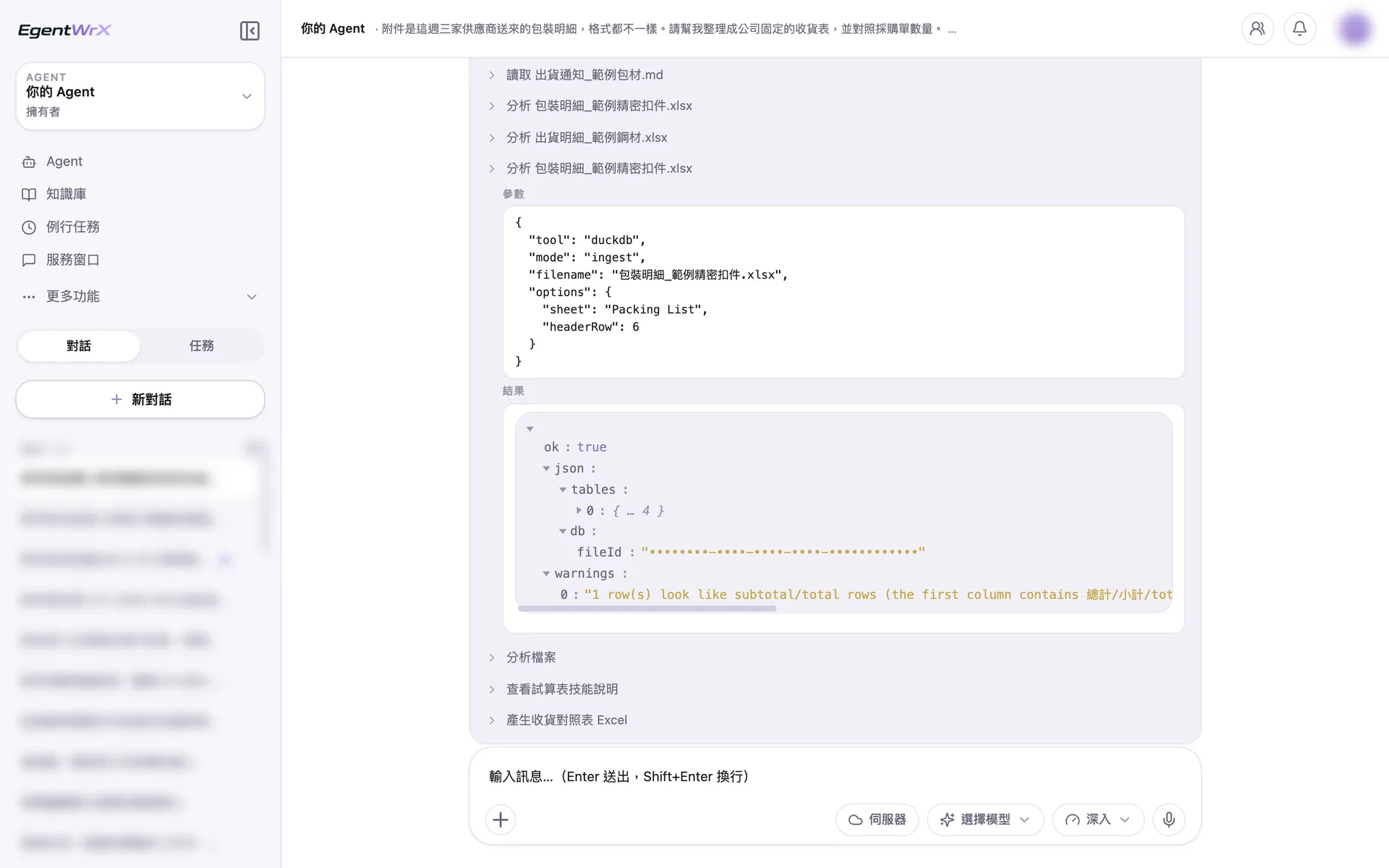
- 1Each of the three files is read separately because each has its own format.
- 2Read the English packing list, which has one carton per row, starting from the header row.
- 3Identify and exclude the total row to prevent duplicate counting.
- 4Produce the final Excel receiving comparison table.
03Receiving Table
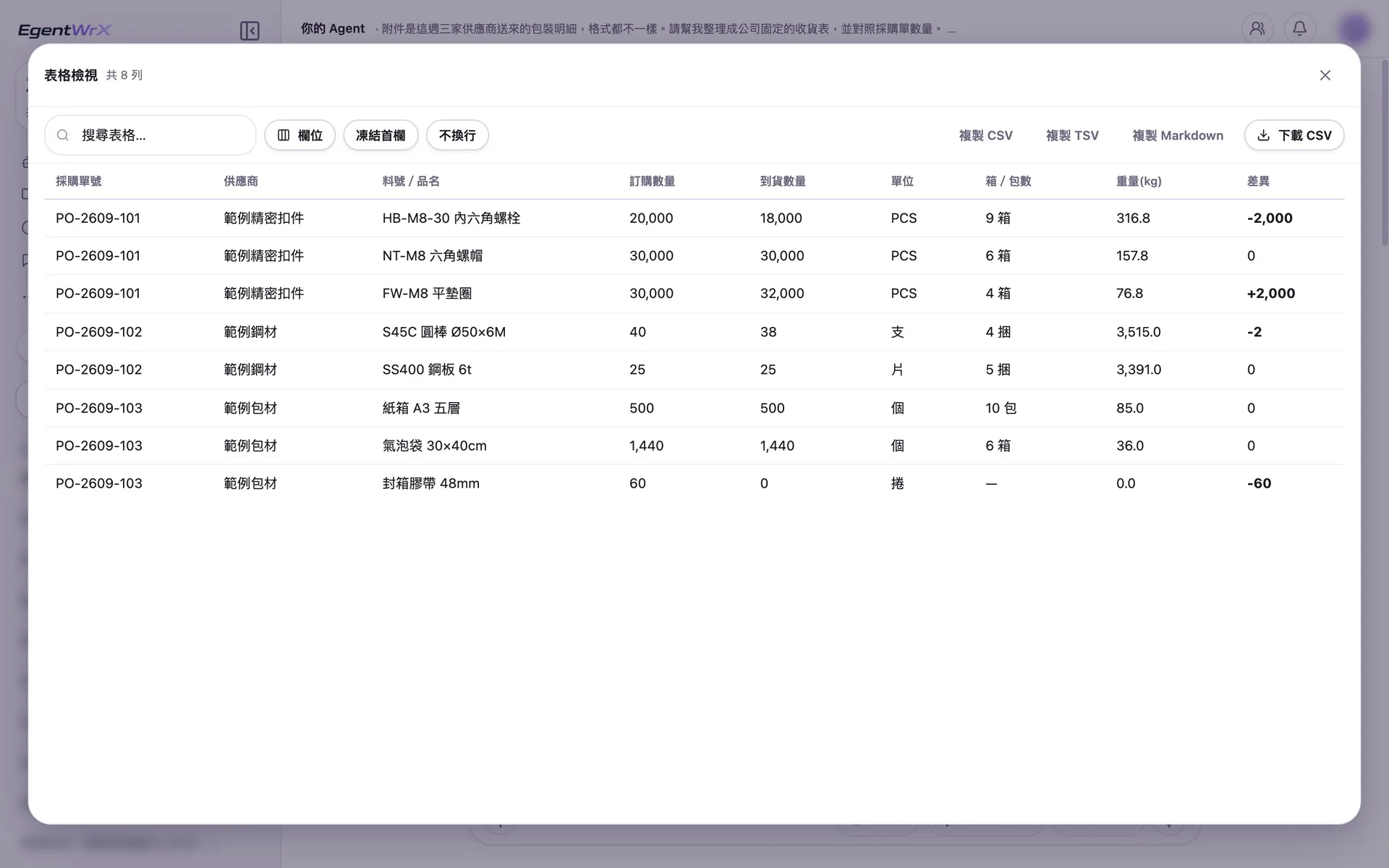
- 1Received 9 cartons and 18,000 PCS, which is 2,000 less than ordered.
- 2There are 2,000 extra. Purchasing staff decide whether to accept them.
- 3Convert 120 dozen bubble bags to 1,440 pcs, matching the ordered quantity.
- 4The shipping notice does not mention the carton sealing tape, so it is listed as missing.
04Conversion Calculations, Discrepancy List, and Notes
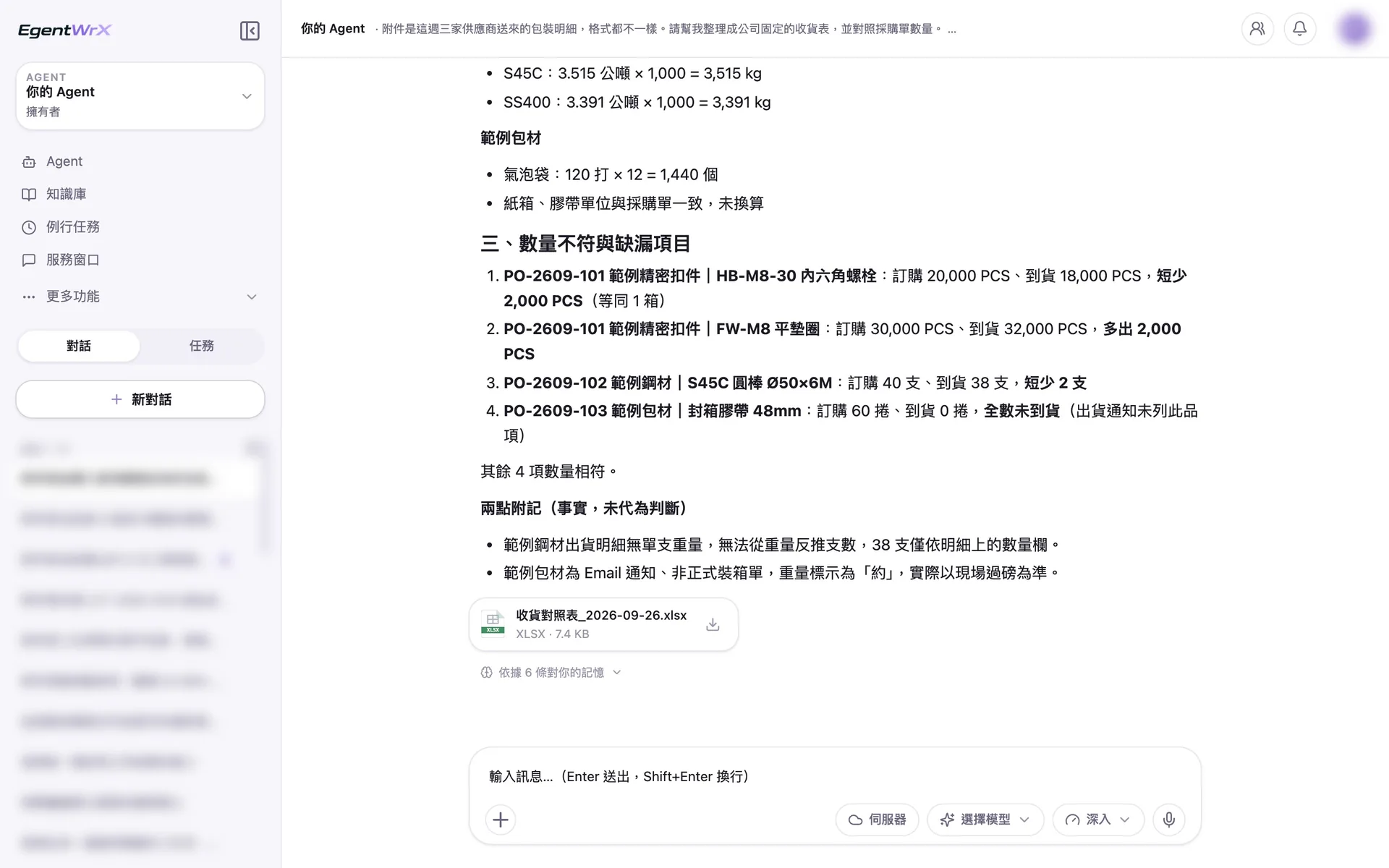
- 1Convert the steel weight from metric tons to kilograms and show the calculation.
- 2List four quantity discrepancies or missing items, showing the ordered quantity, received quantity, and difference for each.
- 3The note reports only the facts and does not make decisions for purchasing staff.
- 4The Excel receiving comparison table is available for direct download.
Numbers
Estimated monthly savings of 2 to 6 hours
Source: An unnamed automotive parts manufacturer advised by Intellicon Solutions
FAQ
- Can the AI Agent read different packing detail formats from each supplier?
- Yes, but we recommend a phased approach. Start with the most common formats and have staff handle the rest. Then gradually expand coverage. When a format changes, update the AI SOP as well.
- What happens when a quantity does not match the order?
- The AI Agent flags discrepancies or missing items for purchasing staff to review. It does not change quantities on its own. Purchasing staff decide whether to contact the supplier and how to handle the issue. The data is sent to the receiving or shipping process only after review.
- Can the consolidated data be entered directly into the system?
- Yes. We recommend exporting the data as a file in a fixed format first. Procurement can review it before importing it into the system. Once the process is stable, connect an SQL MCP Server so the AI Agent can check purchase orders or enter data directly in the system using real-time data. The connection method depends on your systems and deployment architecture. You can schedule a free consultation first.
Where to go next
Want every employee to have their own AI teammate?
A consultant will be in touch shortly.