SCENARIO 01·Finance·Review and matching
An Experienced Employee Needs 35 to 60 Minutes to Verify One Invoice With More Than 400 Lines
When a vendor submits a billing invoice, finance must match every item and document number on the invoice against the goods receipt details in ERP. Staff must confirm that every item was received and that the quantities match before clearing it in ERP to complete payment approval and sending it to accounting for payment.
The matching itself is not difficult. The problem is the number of lines. Every line must be checked, and one missed line can cause an incorrect payment. As invoice volume grows, finance spends more time reviewing details, while the differences that require judgment remain hidden among many matching items.
At a glance
How it was done
- Read invoice items and document numbers
- Look up goods receipt details in ERP
- Match each line and flag differences
- Approve payment after confirmation
Time spent
35–60minutes
An experienced employee needs this much time to verify one invoice with more than 400 lines. Every line requires review, and one missed line can cause an incorrect payment.
With an AI Agent
- Read invoice items and document numbers
- Look up goods receipt details in ERP
- Match each line and flag differences
- Approve payment after confirmationHuman approval
The AI Agent reads the invoice, looks up goods receipt details, and matches every line. Finance reviews only the listed differences and approves payment after confirmation. Each invoice takes about 5 to 10 minutes.
How it was done
- 01Receive the vendor's billing invoice and read each item and document number
- 02Look up the corresponding goods receipt details in ERP
- 03Match the item, quantity, and document number line by line and flag mismatches
- 04After confirmation, clear the matched goods receipts in ERP and send them to accounting for payment
TimeAbout 35 to 60 minutes for an experienced employee to process one invoice with more than 400 lines
- No.
- SP-INV-2609-018
- Date
- 2026-09-26
| Line | Part No. | Quantity | Unit Price | Goods Receipt No. |
|---|---|---|---|---|
| 6 | NT-M8 | 5,000 | 0.62 | RC-2609106 |
| ≠7 | NT-M10 | 4,000 | 0.95 | RC-2609107 |
| 8 | NT-M12 | 2,500 | 1.48 | RC-2609108 |
| 11 | FW-M8 | 6,000 | 0.28 | RC-2609111 |
| ≠12 | FW-M10 | 5,000 | 0.36 | RC-2609112 |
| 13 | FW-M12 | 3,000 | 0.52 | RC-2609113 |
| 20 | FN-M8 | 3,000 | 0.98 | RC-2609120 |
| ≠21 | SS-HX-M8-30 | 1,000 | 5.20 | RC-2609121 |
| !26 | TR-M10-1000 | 200 | 38.00 | RC-2609186 |
| 27 | ST-M12-80 | 600 | 9.40 | RC-2609127 |
- Subtotal
- 111,570
- Sales Tax 5%
- 5,578
- Total
- 117,148
| Goods Receipt No. | Part No. | Received Quantity | Unit Price | Receipt Date |
|---|---|---|---|---|
| RC-2609106 | NT-M8 | 5,000 | 0.62 | 2026-09-08 |
| ≠RC-2609107 | NT-M10 | 3,950 | 0.95 | 2026-09-08 |
| RC-2609108 | NT-M12 | 2,500 | 1.48 | 2026-09-09 |
| RC-2609111 | FW-M8 | 6,000 | 0.28 | 2026-09-11 |
| ≠RC-2609112 | FW-M10 | 5,000 | 0.34 | 2026-09-12 |
| RC-2609113 | FW-M12 | 3,000 | 0.52 | 2026-09-12 |
| RC-2609120 | FN-M8 | 3,000 | 0.98 | 2026-09-19 |
| ≠(RC-2609121 not found) | ||||
| !RC-2609126 | TR-M10-1000 | 200 | 38.00 | 2026-09-24 |
| RC-2609127 | ST-M12-80 | 600 | 9.40 | 2026-09-24 |
With an AI Agent
- 01What it doesRead the billing invoice and ERP goods receipt detailsStandard appliedRead the two data sources separately, then use the goods receipt number to match every invoice line to its ERP goods receipt recordOutputA comparison list merged by goods receipt number
- 02What it doesMatch each lineStandard appliedA line matches only when the part number, quantity, and unit price are all the same. If the goods receipt number has no match, search ERP for a similar goods receipt record using the part number, quantity, and unit priceOutputThree categories: matched, different, and no goods receipt record found
- 03What it doesCalculate amount differencesStandard appliedIf the quantity differs, multiply the quantity difference by the unit price. If the unit price differs, multiply the unit price difference by the quantity. Include the calculation for every line so finance can verify it directlyOutputThe amount difference for each line
- 04What it doesPrepare differences for financeStandard appliedFor every mismatch, show the invoice and ERP values, explain the difference, and recommend who to contact first. Also list goods receipts found in ERP but not referenced on the invoiceOutputA difference table and a one-sentence summary stating how many lines can proceed and how many require confirmation. Finance decides whether to pay
TimeAbout 5 to 10 minutes, including manual review
- Human approval
- The AI Agent identifies differences and indicates who should be contacted first, then stops. Finance decides whether to pay and how much to pay. After staff confirm the comparison results, only matched goods receipts are cleared for payment in ERP.
- Platform modules used
- Skills, Integrations
For review and matching tasks, we recommend defining a clear comparison source. In this case, it is the goods receipt details in ERP. The output should list only differences and exceptions, followed by a review by someone familiar with the work. One of the most common problems we see at client sites is treating the AI's assessment of a difference as an approval decision.
Screenshots show the Traditional Chinese interface.
01Upload the Invoice and Goods Receipt Details
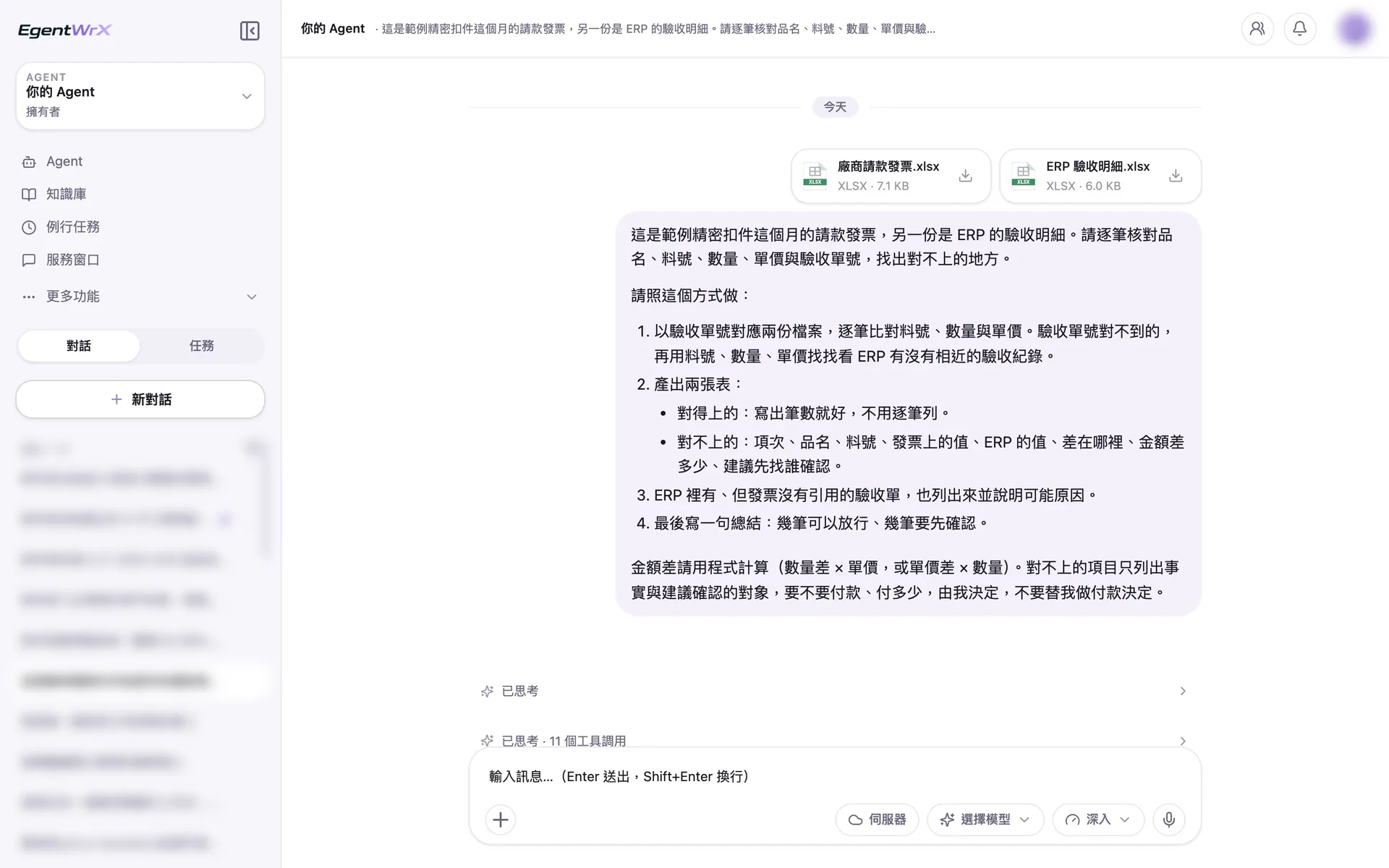
- 1Upload two files containing the vendor's billing invoice and ERP goods receipt details.
- 2The instruction specifies matching by goods receipt number and producing two tables. Amount differences include calculations for direct verification. A person decides whether to pay.
02Processing
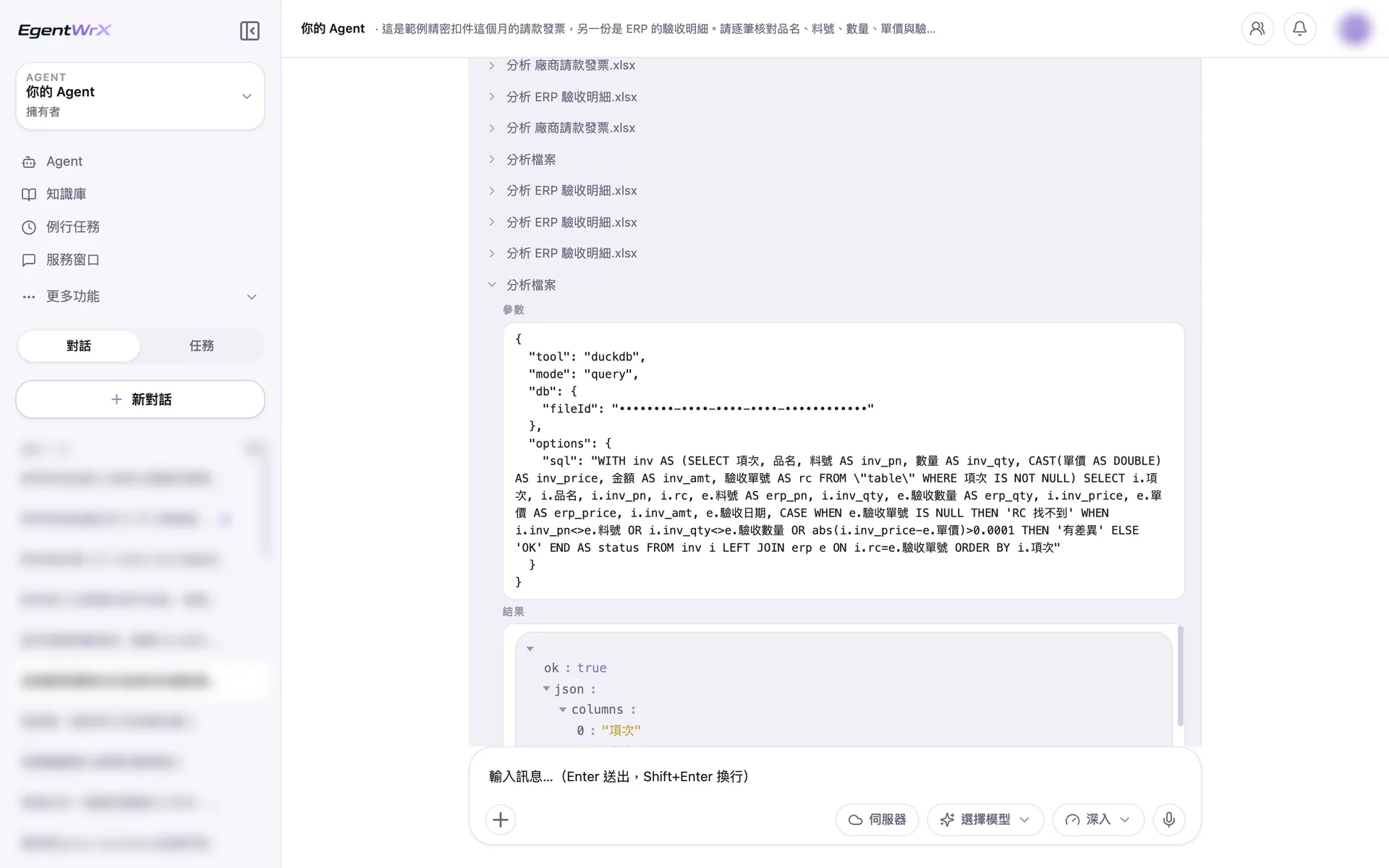
- 1Read the two files separately, then merge and compare them by goods receipt number.
- 2Compare the part number, quantity, and unit price line by line, then flag items that are not found, different, or matched.
03Difference Table
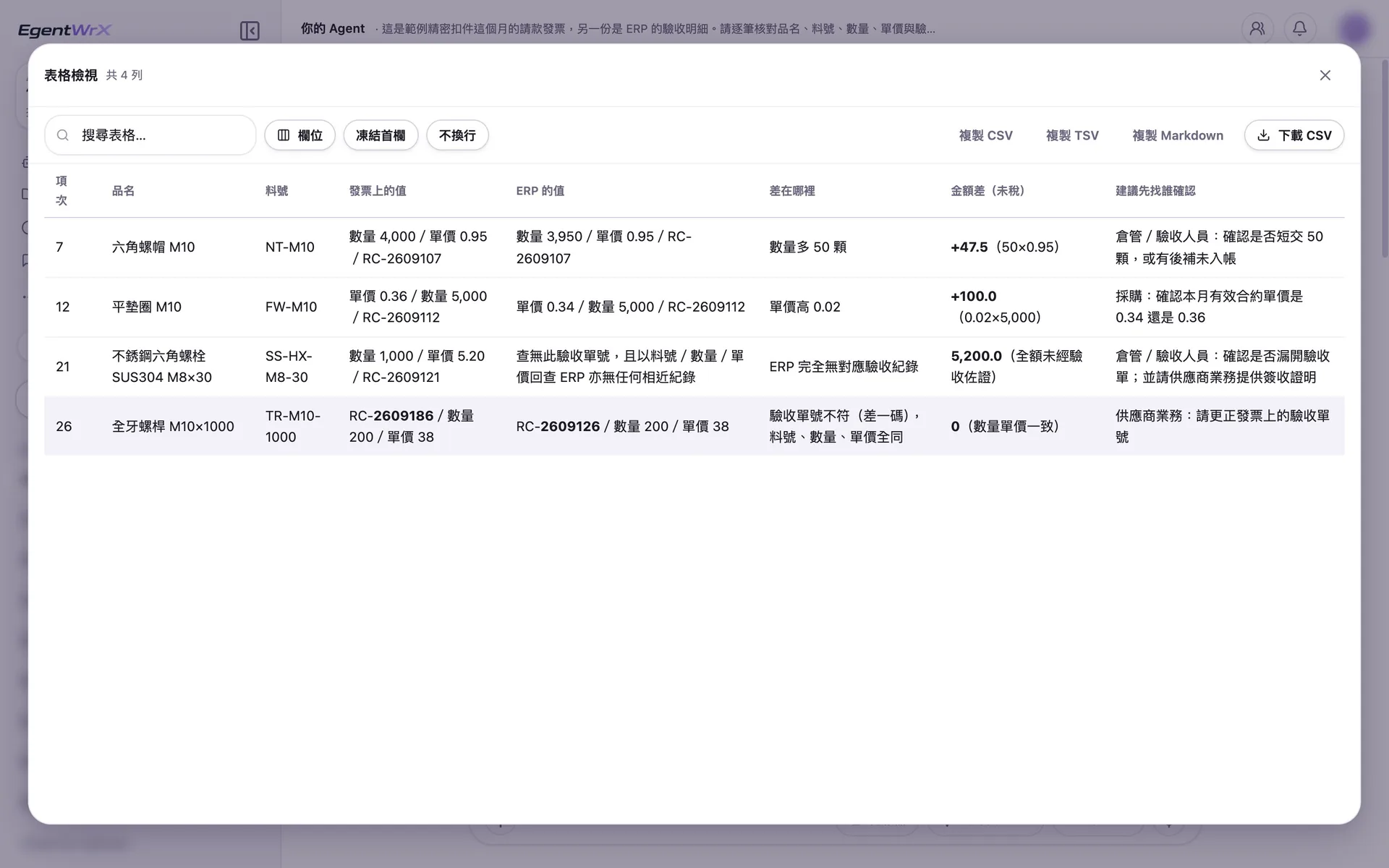
- 1The goods receipt number on invoice line 26 differs from ERP by only one character. The part number, quantity, and unit price are the same.
- 2No goods receipt record for line 21 can be found in ERP.
- 3Amount differences include calculations so finance can verify them directly.
- 4Each line indicates who should be contacted first.
04Unreferenced Goods Receipts and Summary
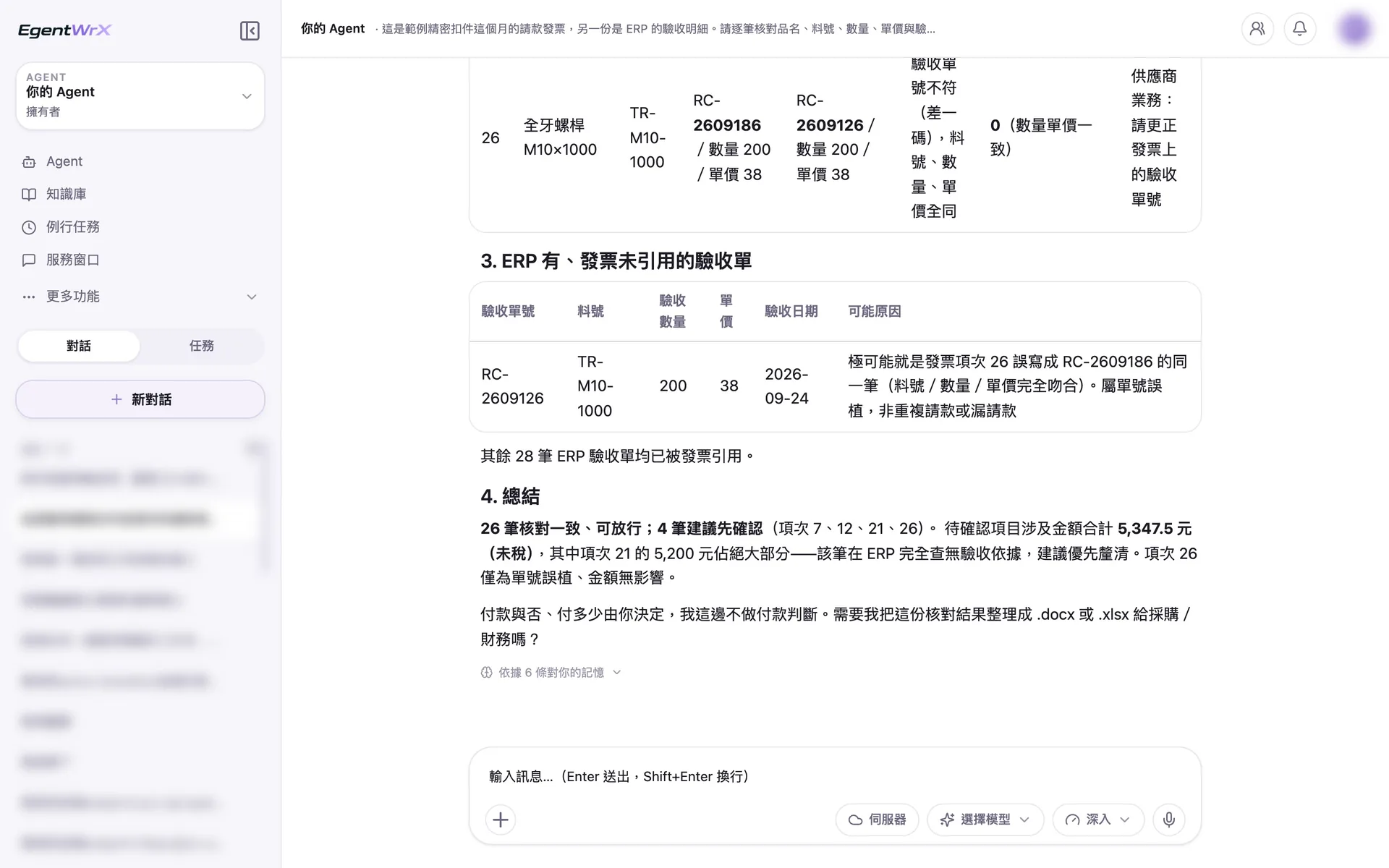
- 1Goods receipts found in ERP but not referenced on the invoice are also listed. The likely cause is a one-character error in the invoice number.
- 2The summary states that 26 lines can proceed and 4 require confirmation. The total amount pending confirmation is 5,347.5 yuan.
- 3A person decides whether to pay and how much to pay. The AI Agent does not make payment decisions.
Numbers
Estimated monthly savings of 8 to 30 hours
Source: An unnamed auto parts manufacturer advised by Intellicon Solutions
FAQ
- Can the AI Agent read invoices when every vendor uses a different format?
- Yes, but we recommend handling them in phases. If one document type has more than ten vendor formats, the first phase should cover the formats used most often. Staff can handle the remaining exceptions. Coverage can then expand gradually. We also recommend this approach for standardized operations.
- Can payment be made directly after the AI Agent completes the comparison?
- No. Staff must confirm the comparison results. Only matched goods receipts are cleared in ERP and sent to accounting for payment. The AI Agent identifies the differences so finance can focus on the few mismatched lines.
- Is an ERP connection required?
- Not necessarily. This process uses the goods receipt details in your ERP as the matching basis. We recommend connecting an SQL MCP Server so the AI Agent can query real-time data directly. Before integration, you can also run the process with an exported detail file, as shown in the demonstration above. The connection method depends on your company's ERP and deployment architecture. You can schedule a free consultation for an initial assessment.
Where to go next
Want every employee to have their own AI teammate?
A consultant will be in touch shortly.