SCENARIO 07·Customs·Standardized process
Every export shipment requires customs declaration data to be reentered from shipping documents
For an export shipment, customs staff must prepare the item names, quantities, weights, and amounts from the commercial invoice, packing list, and other shipping documents in the format required for the customs declaration, then submit the data for customs clearance.
The data is already in the documents. The workload comes from reentry and verification. The same item may have different names in different documents, and quantities and amounts must match throughout. If just one field is wrong, the shipment may require additional documents or a correction. The more frequent the shipments, the more time customs staff spend on this work.
At a glance
How it was done
- Collect the commercial invoice and packing list
- Enter each field into the declaration format
- Check quantities, weights, and amounts
- Confirm and submit for customs clearance
Where it gets stuck
The same item has different names in the two documents. Quantities, weights, and amounts must match throughout. If just one field is wrong, the shipment may require additional documents or a correction.
With an AI Agent
- Collect the commercial invoice and packing list
- Enter each field into the declaration format
- Check quantities, weights, and amounts
- Confirm and submit for customs clearanceHuman approval
The AI Agent extracts fields, prepares the declaration data, and checks the two documents. It flags mismatched or missing fields. Customs staff review the full dataset before submitting it for customs clearance.
How it was done
- 01Collect the commercial invoice, packing list, and other shipping documents for the shipment
- 02Enter the item names, quantities, weights, and amounts field by field into the declaration format
- 03Check that quantities and amounts match across the documents
- 04After verification, submit the data for customs clearance
| Part No. | Description | Quantity | Amount (USD) |
|---|---|---|---|
| HB-M8-30 | CAP SCREW M8x30 | 20,000 | 1,840.00 |
| HB-M10-40 | CAP SCREW M10x40 | 15,000 | 2,220.00 |
| HX-M12-50 | HEX BOLT M12x50 | 8,000 | 2,040.00 |
| ≠HX-M16-60 | HEX BOLT M16x60 | 12,000 | 6,360.00 |
| NT-M10 | HEX NUT M10 | 40,000 | 1,240.00 |
| NT-M12 | HEX NUT M12 | 25,000 | 1,200.00 |
| FW-M10 | FLAT WASHER M10 | 50,000 | 600.00 |
| FB-M10-30 | FLG BOLT M10x30 | 15,000 | 1,770.00 |
| ≠SS-HX-M8-30 | SS BOLT M8x30 | 10,000 | 1,680.00 |
| TR-M10-1000 | THREADED ROD M10x1000 | 2,000 | 2,520.00 |
| ≠TOTAL | 21,407.00 |
| Part No. | Description | Quantity (PCS) | G.W. (kg) |
|---|---|---|---|
| HB-M8-30 | Cap Screw M8*30 | 20,000 | 352.0 |
| HB-M10-40 | Cap Screw M10*40 | 15,000 | 525.5 |
| HX-M12-50 | Hex Bolt M12*50 | 8,000 | 472.0 |
| ≠HX-M16-60 | Hex Bolt M16*60 | 10,000 | 1,300.0 |
| NT-M10 | Hex Nut M10 | 40,000 | 438.4 |
| NT-M12 | Hex Nut M12 | 25,000 | 404.0 |
| FW-M10 | Flat Washer M10 | 50,000 | 219.0 |
| FB-M10-30 | Flg Bolt M10*30 | 15,000 | 473.0 |
| ≠(This item is not listed) | |||
| TR-M10-1000 | Threaded Rod M10*1000 | 2,000 | 1,056.0 |
| ≠TOTAL | 5,249.9 | ||
With an AI Agent
- 01What it doesExtract fields from both documentsStandard appliedRead the part number, item name, quantity, weight, and amount for each item. Different item names are acceptable. Matching part numbers indicate the same itemOutputLine items from both documents
- 02What it doesPrepare the declaration dataStandard appliedUse one row per part number. Use amounts from the commercial invoice and net and gross weights from the packing list. If the quantities do not match between the two documents, enter "Pending confirmation" in the quantity field. Leave missing fields blank and do not estimate themOutputDeclaration data table
- 03What it doesCompare and recalculate totalsStandard appliedCompare the quantities in the two documents item by item. Recalculate the invoice amount and the packing list carton count and weights, then compare them with the totals shown in the documentsOutputA list of mismatches and omissions. For each item, show the values in both documents and the difference. For all three totals, show "Stated in document" and "Recalculated" side by side
- 04What it doesSend to customs staff for reviewStandard appliedWhen quantities do not match, do not choose which document to use or change any numbers in the original documents. List the items that must be confirmed before sending the data to the customs brokerOutputThe data is submitted for customs clearance only after customs staff confirm it
- Human approval
- Step 4 remains with customs staff. The declaration data is submitted only after they confirm it. The AI Agent produces a draft and does not file the declaration directly.
- Platform modules used
- Skills
Preparing customs clearance documents is a typical standardized process. It works well when input fields are fixed, templates are stable, and errors are easy to identify. AI first produces a draft, and staff review it before submission. At customer sites, the most common causes of failure are not reviewing format differences among document providers in advance or assigning recognition, calculation, and approval to the model all at once.
Screenshots show the Traditional Chinese interface.
01Upload Shipping Documents and Instructions
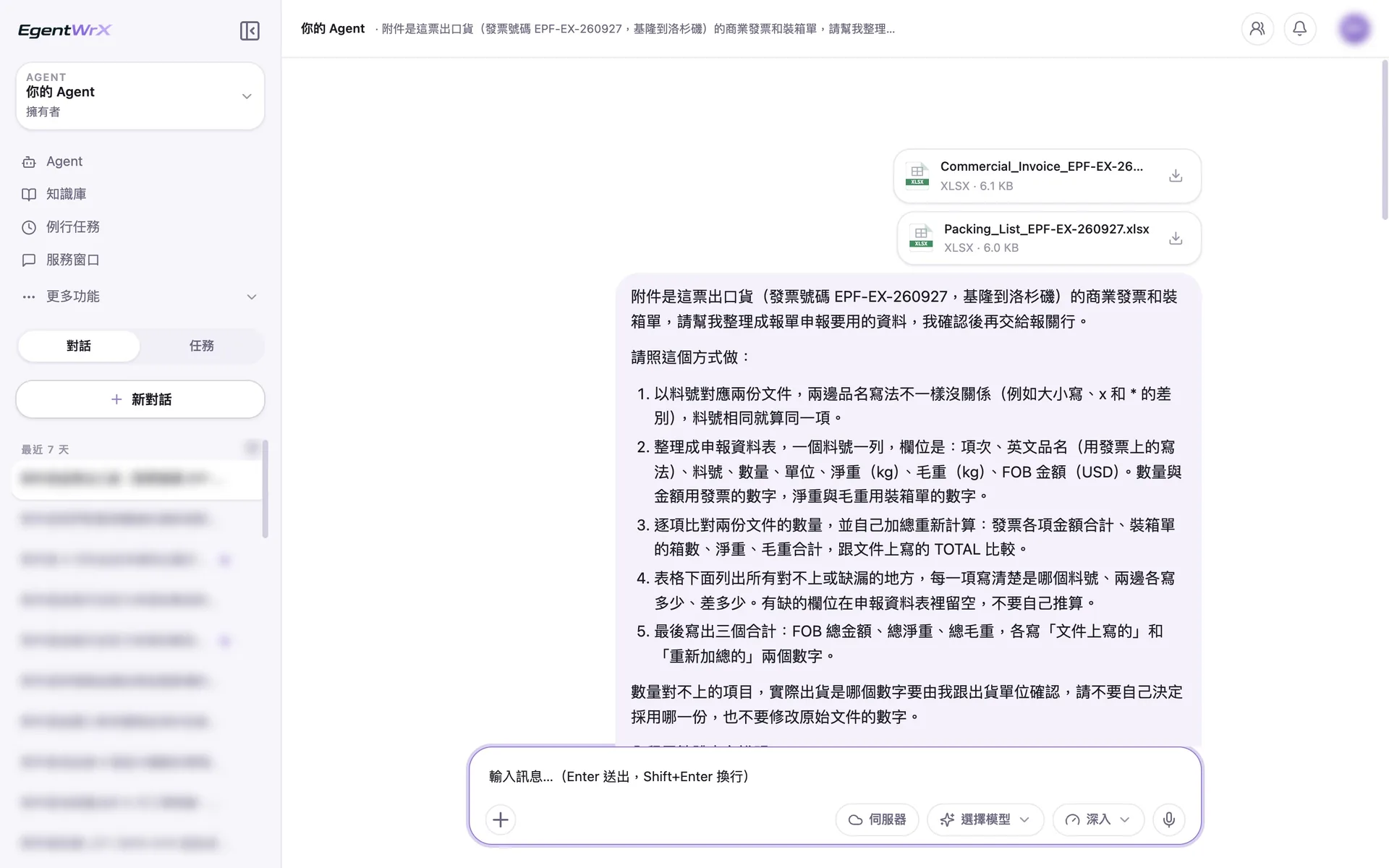
- 1Upload the commercial invoice and packing list for this export shipment.
- 2Match the two documents by part number. Different item names are acceptable.
- 3List mismatches, leave missing fields blank, and do not estimate.
- 4When quantities do not match, do not choose which document to use.
02Processing
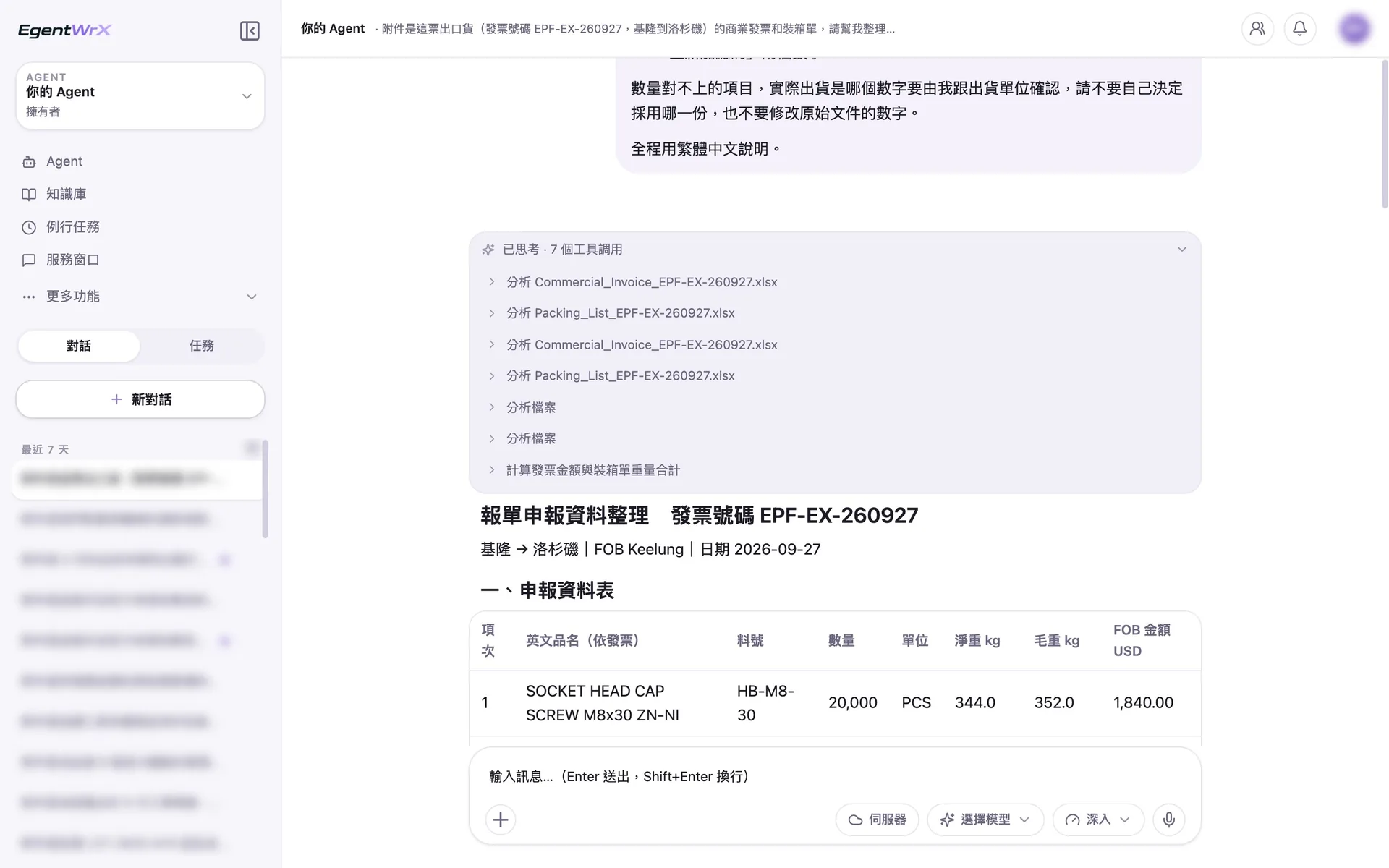
- 1Read and analyze the commercial invoice and packing list separately.
- 2Recalculate the invoice amount and the packing list weight totals.
- 3Prepare the customs declaration data table.
03Mismatches and Missing Data
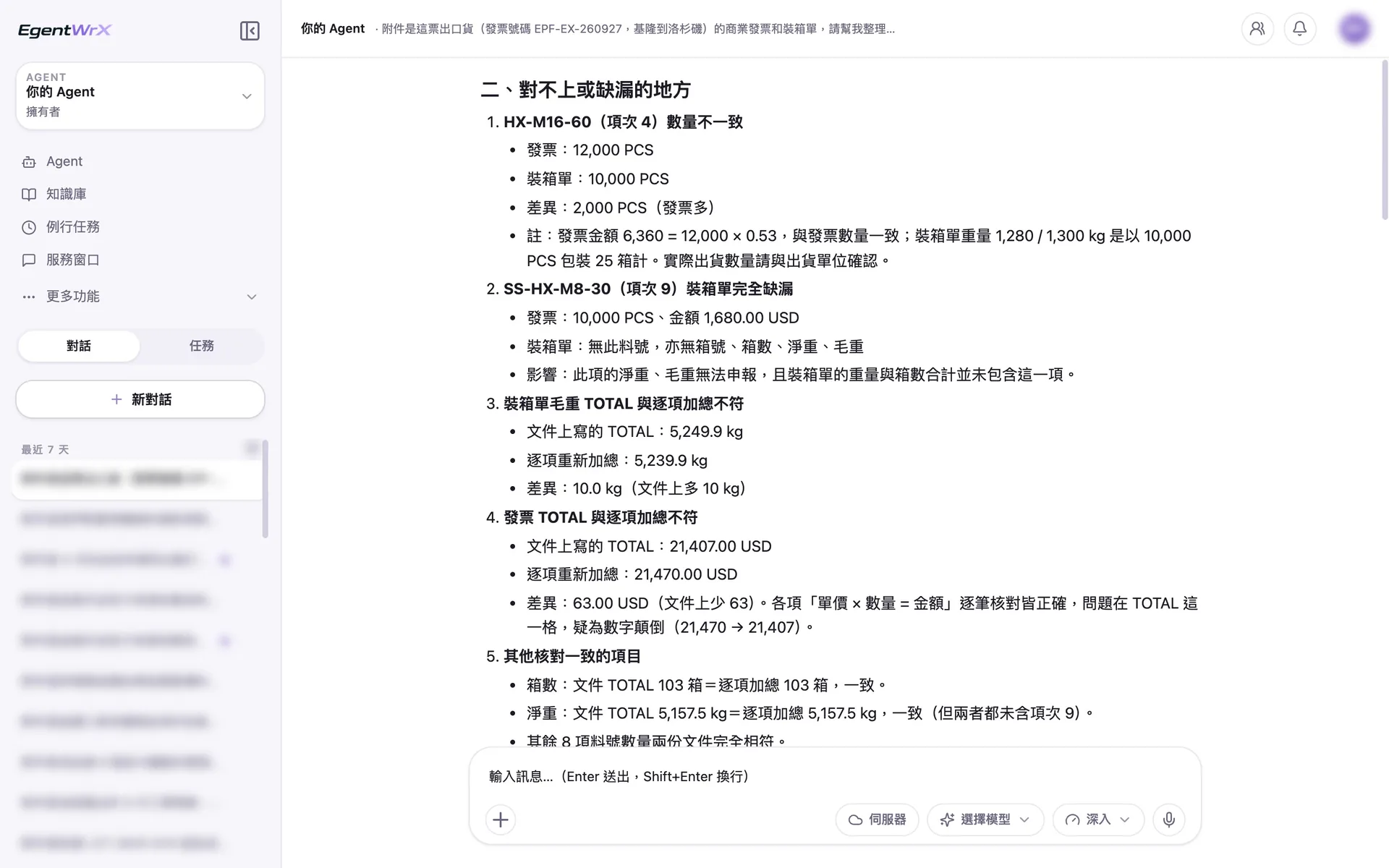
- 1For the same part number, the invoice shows 12,000 and the packing list shows 10,000, a difference of 2,000 PCS. Confirm with the shipping department.
- 2A complete item is missing from the packing list, so its weight cannot be declared.
- 3The gross weight total on the packing list is 10 kg higher than the itemized total.
- 4The invoice total of 21,407 does not match the calculated total of 21,470. The digits appear to be reversed.
04Three Totals and Pre-Submission Review
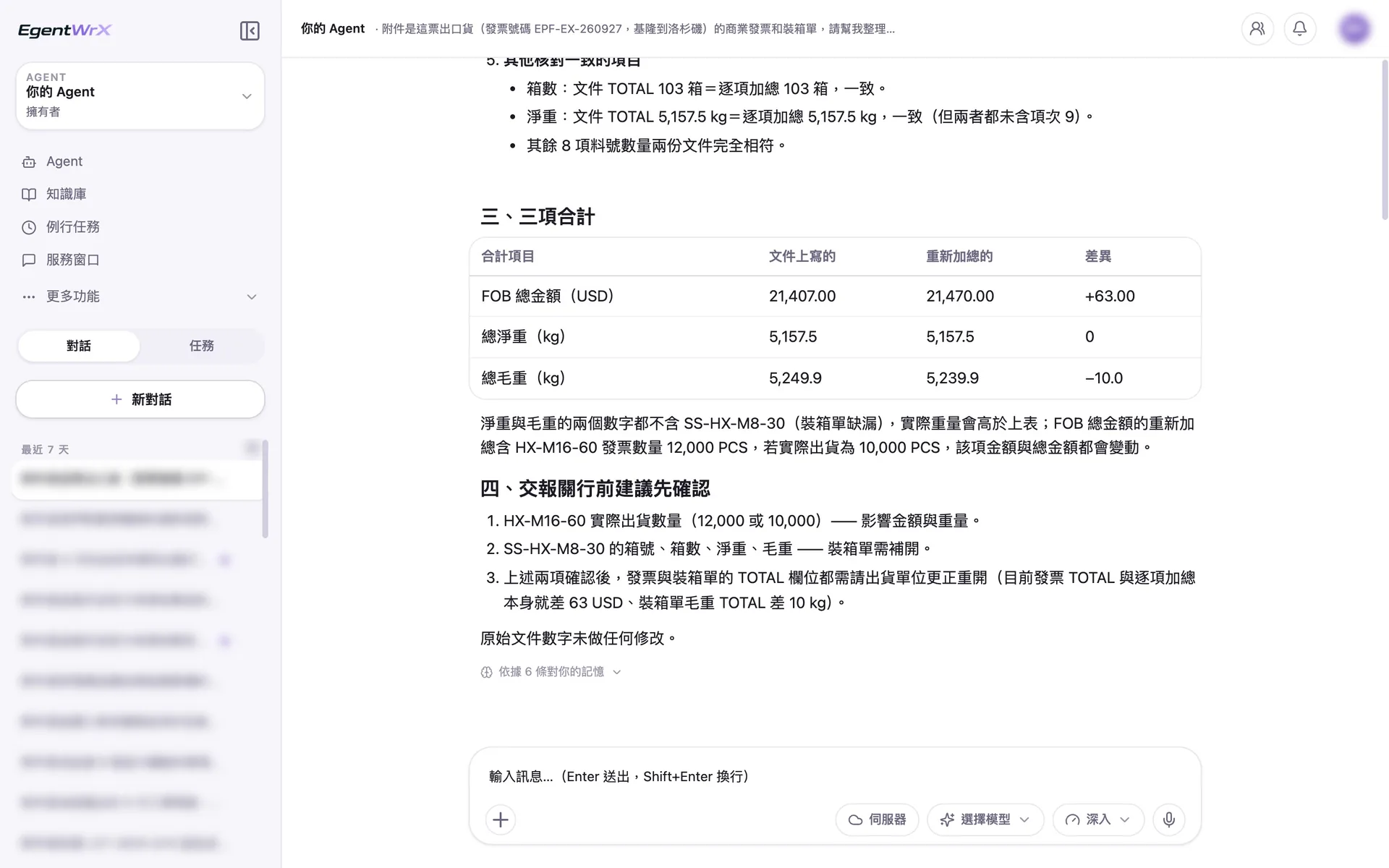
- 1For all three totals, show "Stated in document" and "Recalculated".
- 2Explain that the net and gross weights exclude the missing item, so the actual weights will be higher.
- 3Two items should be confirmed before sending the data to the customs broker.
- 4No numbers in the original documents were changed.
Numbers
Estimated savings of 15 to 40 hours per month
Source: An automotive parts manufacturer supported by Intellicon Solutions, not named
FAQ
- Will the AI Agent file the declaration for us directly?
- No. The AI Agent only prepares the shipping documents as declaration data and lists mismatched fields. Customs staff review the data before submitting it for customs clearance.
- What if customers and freight forwarders use different document formats?
- First, review the format differences. If one document type has more than ten versions, cover the most common versions in the first phase. Staff can handle the remaining exceptions, and the scope can expand gradually. This is our standard approach when implementing standardized processes at customer sites.
- Can export documents remain inside the company?
- Yes. EgentWrX supports cloud, on-premises, and hybrid cloud and on-premises deployment architectures. With an on-premises or hybrid deployment, shipping and customs clearance data can remain inside the company. The storage location depends on the company's data policy.
Where to go next
Want every employee to have their own AI teammate?
A consultant will be in touch shortly.