SCENARIO 15·Finance·Data analysis
Compare Actual Expenses with Budget Each Month and Identify the Cause of Each Account Variance
After the monthly close, finance must combine actual expenses and budgets by department and account, calculate variances, identify major overspending or deviations, and ask department managers for explanations.
Calculating the variance is straightforward. Aligning and tracing the data takes time. Actuals and budgets may use different account structures, and the periods must also match. After identifying a variance, staff must review the details to find the transactions that caused it. If the structures are not aligned, the variance is unreliable, and the explanation will also be inaccurate.
At a glance
How it was done
- Export actual expenses and budget
- Align accounts and calculate variances
- Trace sources in voucher details
- Ask department managers to explain causes
Where it gets stuck
Actuals and budgets may use different account structures. Without alignment, the calculated variances are unreliable. After finding a variance, staff must review vouchers one by one to identify the transactions that caused it.
With an AI Agent
- Export actual expenses and budget
- Align accounts and calculate variances
- Trace sources in voucher details
- Ask department managers to explain causesHuman approval
The AI Agent aligns accounts, calculates variances, and traces the main sources in the vouchers. It shows the budget and actual amount for every account. Finance and department managers assess the causes and decide whether adjustments are needed.
How it was done
- 01Export actual expenses and budget data for the month
- 02Align accounts and periods, then calculate each account variance
- 03Identify major overspending or deviations and review the details to find the transactions that caused them
- 04Prepare the variance analysis and ask department managers to explain the causes
| Department | Accounting Account | Actual Amount |
|---|---|---|
| ≠Production | Repairs and Maintenance | 128,000 |
| Production | Utilities | 197,000 |
| !Sales | Travel | 71,000 |
| !Sales | Transportation | 23,000 |
| ≠Sales | Advertising | 96,000 |
| Sales | Business Entertainment | 40,800 |
| ≠Administration | Training | 45,000 |
| Administration | Office Supplies | 9,500 |
| Department | Budget Account | September Budget |
|---|---|---|
| ≠Production | Repairs and Maintenance | 60,000 |
| Production | Utilities | 180,000 |
| !Sales | Travel | 80,000 |
| !Sales | (The budget has no transportation account; the note assigns it to the travel row above) | |
| ≠Sales | Advertising | 150,000 |
| Sales | Business Entertainment | 45,000 |
| ≠Administration | Training | 30,000 |
| Administration | Office Supplies | 8,000 |
With an AI Agent
- 01What it doesAlign accountsStandard appliedMap the accounting accounts in the actuals to the budget accounts. Where names or coverage differ, document the mapping method and basisOutputAccount mapping notes
- 02What it doesCalculate variancesStandard appliedList the budget, actual amount, variance amount, and variance percentage by department and account. Show both amounts for direct verificationOutputActual-versus-budget table for all accounts
- 03What it doesIdentify items requiring explanationStandard appliedInclude an item only when the variance exceeds both the percentage and amount thresholds defined by the company. Add a separate note for items that meet only one conditionOutputList of items requiring explanation
- 04What it doesTrace the main sources in vouchersStandard appliedFor each item, identify the one or two largest vouchers and show the voucher number, date, description, and amount. State only facts shown in the vouchers and do not infer causesOutputDraft variance explanation for finance and department managers to assess causes and follow-up actions
- Human approval
- The draft variance explanation goes to finance and department managers. The AI Agent aligns accounts, calculates variances, and identifies their sources. Finance and department managers assess the causes and decide on follow-up actions.
- Platform modules used
- Skills, Integrations
For data analysis tasks, we recommend using consistent data field definitions and making every number traceable to the source data for verification. AI should understand the question, classify the data, and prepare explanations. At client sites, the most common causes of failure are misaligned dates, currencies, or accounts across reports and failure to verify the analysis against the original details.
Screenshots show the Traditional Chinese interface.
01Upload Actual Expenses and Budget
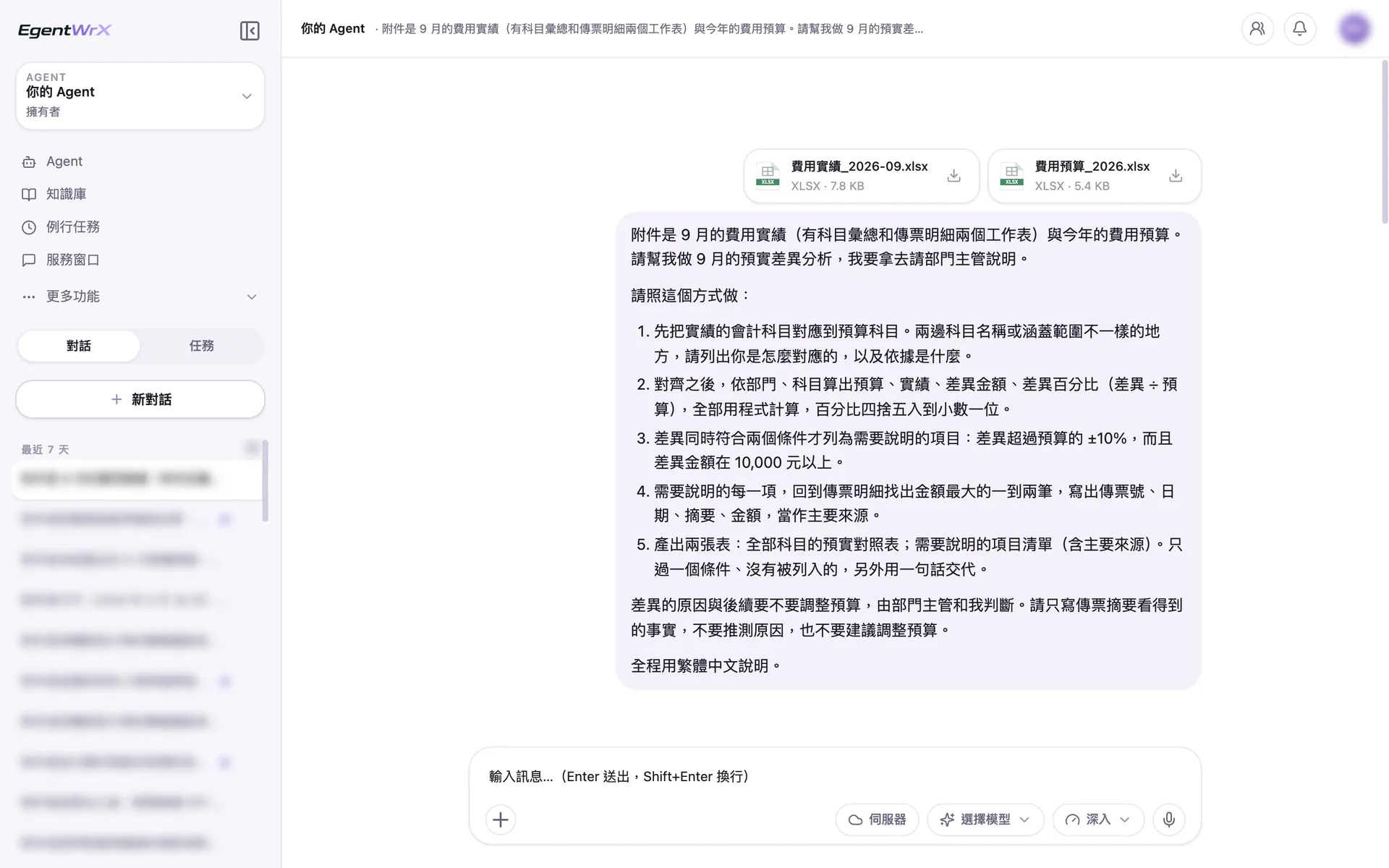
- 1Upload September actual expenses, including the summary and voucher details, and the annual expense budget.
- 2Map the accounting accounts to the budget accounts first and explain the basis.
- 3An explanation is required only when the variance exceeds ±10% and the amount is at least 10,000.
- 4Do not infer causes or recommend budget adjustments.
02Execution Process
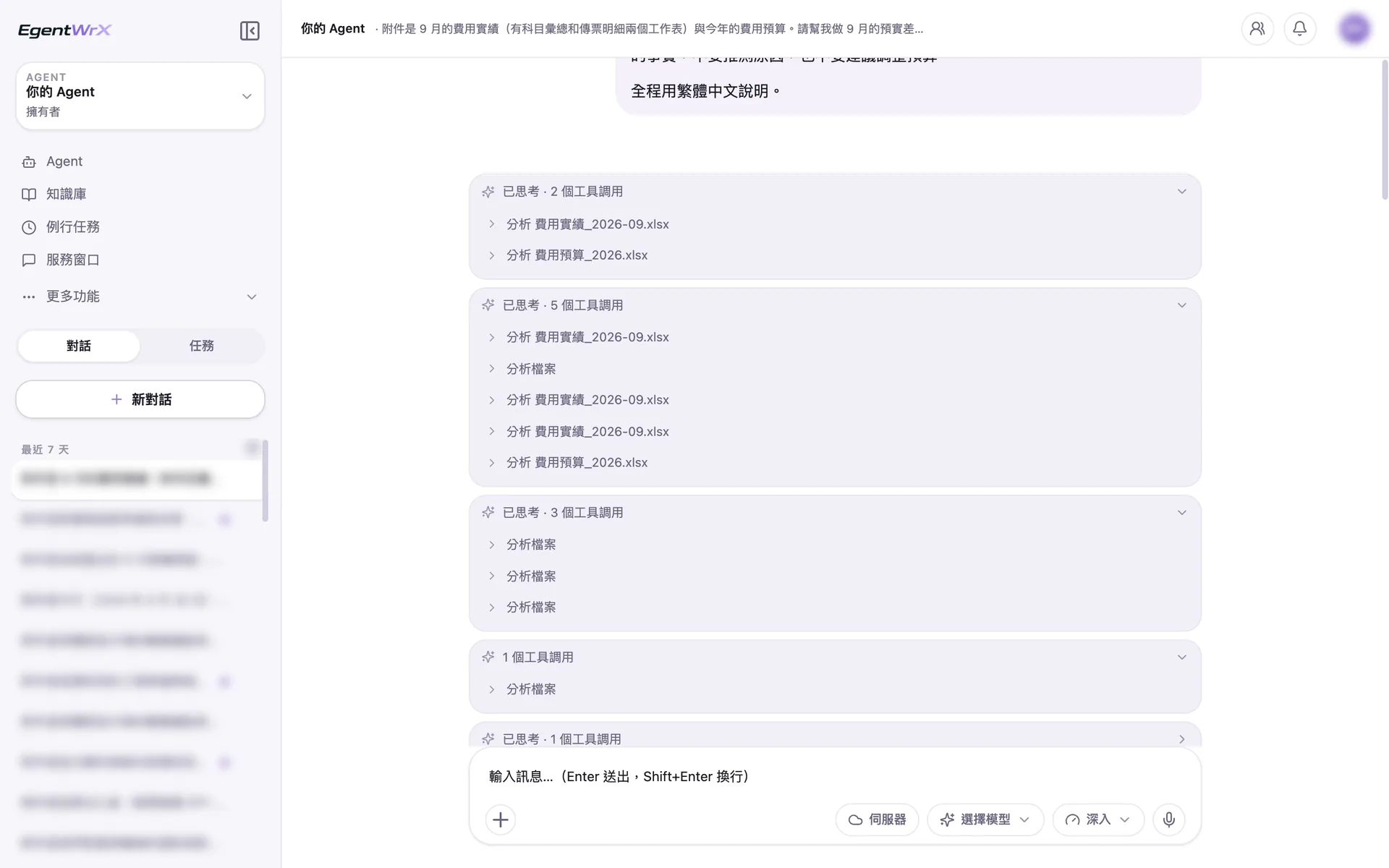
- 1Analyze the actuals and budget files first.
- 2Read each worksheet and compare the account names in both files.
- 3Apply the account mappings, calculate variances, and then trace the main sources in the vouchers.
03Account Mapping and Budget Comparison
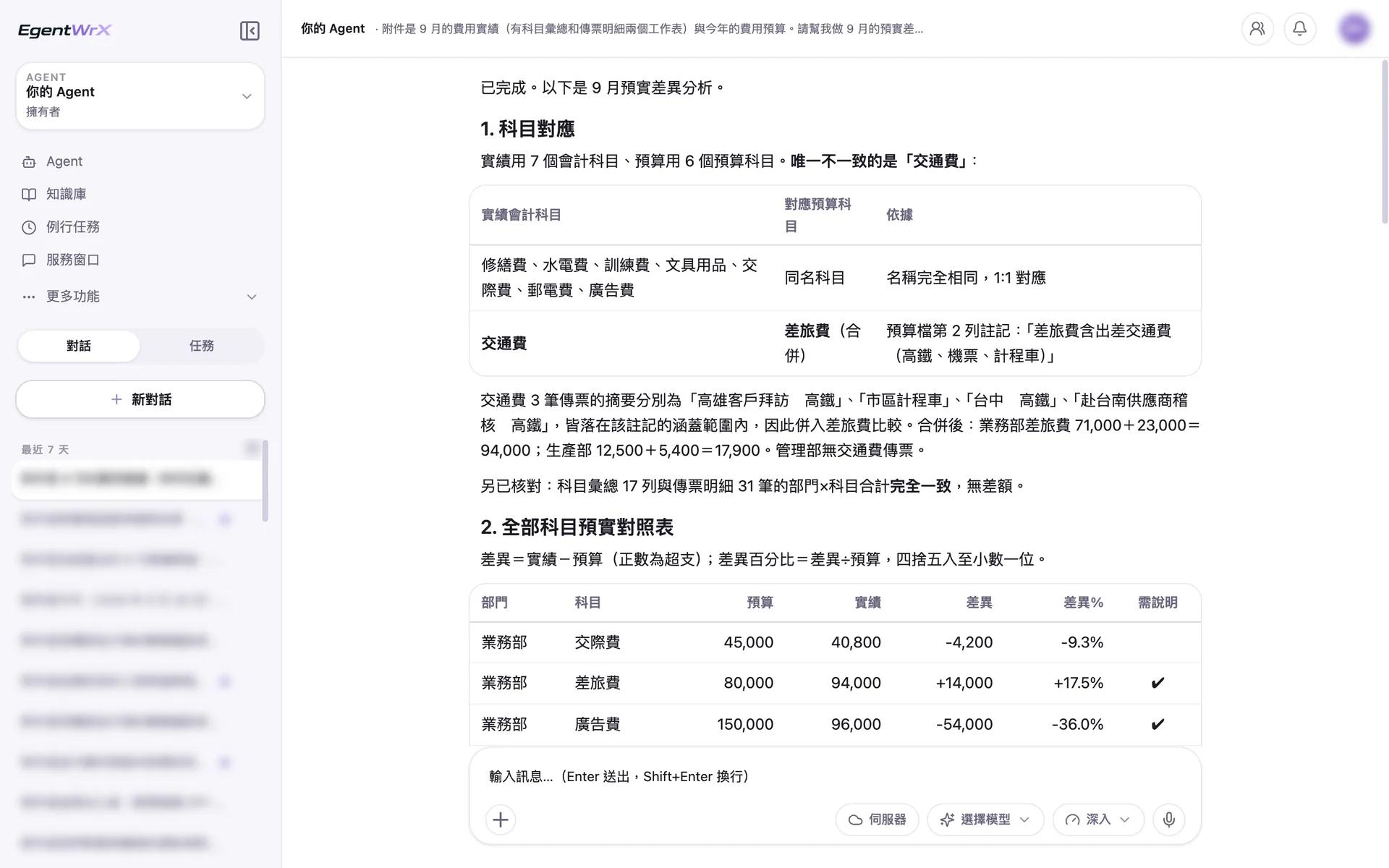
- 1Transportation is the only account that differs between the two files.
- 2Based on the note in the budget file, transportation is combined with travel for comparison.
- 3After combining the accounts, the Sales Department's travel expenses are 94,000.
- 4The actual-versus-budget table marks the accounts requiring explanation.
044 Items Requiring Explanation
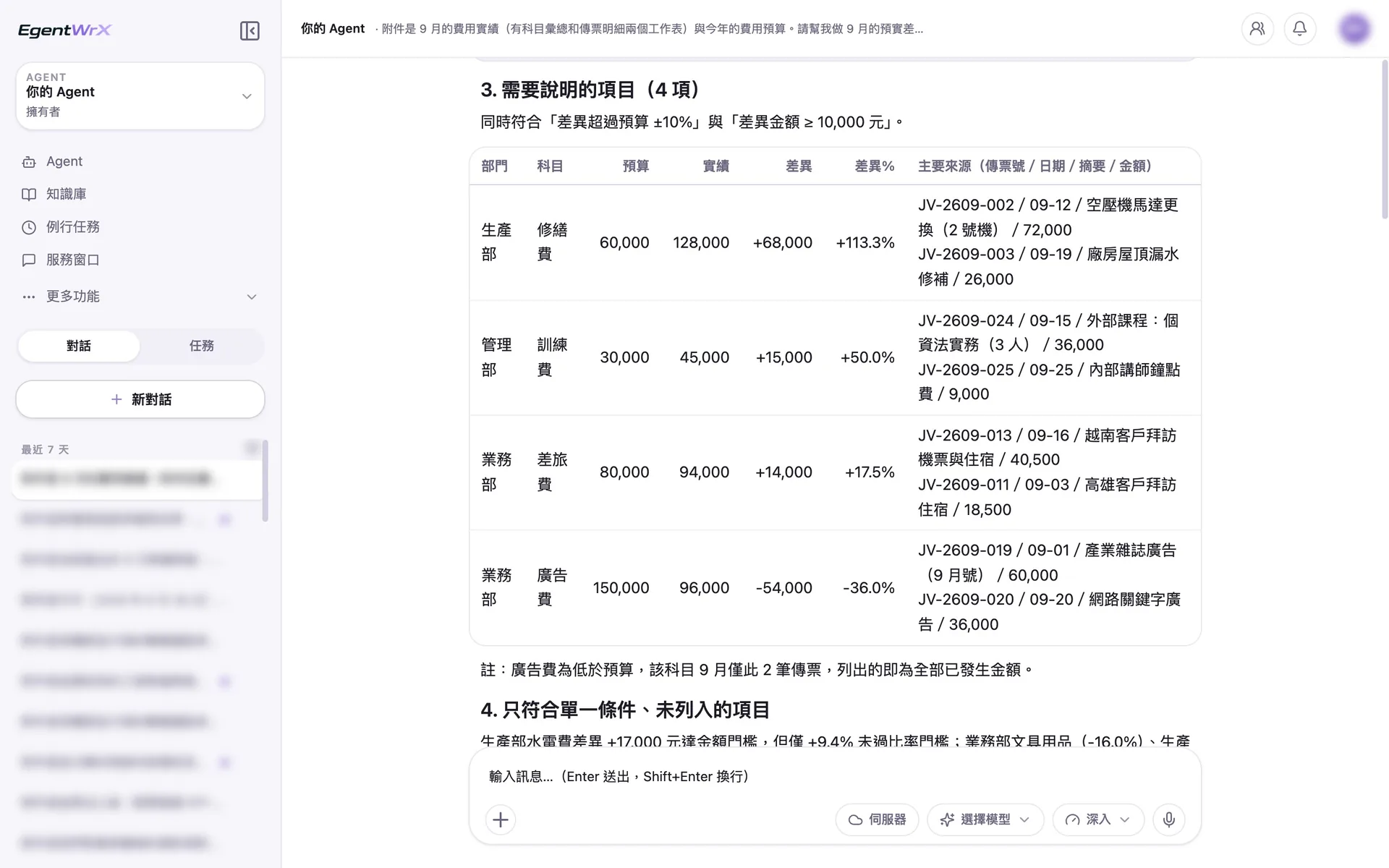
- 1Add an item to the explanation list only when it meets both conditions.
- 2For each item, review the vouchers and list the one or two largest as the main sources.
- 3After transportation is combined with travel, the variance exceeds the threshold.
- 4Advertising is 36% below budget, so it is also included. State only facts shown in the vouchers and do not infer causes.
Numbers
Estimated monthly savings of 2 to 6 hours
Source: An unnamed auto parts manufacturer supported by Intellicon Solutions
FAQ
- How do you align different accounts in actuals and budgets?
- First, define the mapping rules between the two sets of accounts and add them to the AI SOP. Use these rules for alignment instead of letting AI decide each time. Once the account structure is consistent, monthly variances can be compared reliably.
- Will the AI Agent explain the causes of variances?
- It prepares a draft explanation. The AI Agent reviews the details and identifies the main items causing each variance. Finance and department managers still assess the underlying causes and decide whether action is needed. The draft is only a starting point for discussion.
- Can we set our own overspending thresholds?
- Yes. Set thresholds based on the company's management needs, such as a specific amount or percentage. After the rules are defined, the AI Agent applies the same thresholds each month to identify items. Update the rules whenever the thresholds change.
Where to go next
Want every employee to have their own AI teammate?
A consultant will be in touch shortly.