SCENARIO 09·Finance·Standardized Process
Every Paper and Scanned Document Must Be Manually Entered into the System
When documents and invoices arrive, the finance team must enter each date, party, item, amount, and other field into the system and create records. This provides the data needed for later verification and posting.
This work requires little judgment, but the volume is high and the formats vary widely. Documents may be on paper, scanned, or handwritten. A single incorrect number may not be found until reconciliation, and tracing it back takes more time. At an auto parts manufacturer we advised, the first tasks to become stable focused on document recognition, data entry, and verification because these tasks have clear inputs and outputs, and errors are easy to identify.
At a glance
How it was done
- Receive paper and scanned documents
- Read each date, item, and amount field
- Enter data and create records
- Spot-check incorrectly entered fields
Where it gets stuck
Documents may be printed, scanned, or handwritten, and their formats vary widely. A single incorrect number may not be found until reconciliation, and tracing it back takes more time.
With an AI Agent
- Receive paper and scanned documents
- Read each date, item, and amount field
- Enter data and create records
- Spot-check incorrectly entered fieldsHuman approval
The AI Agent recognizes fields, organizes them into a standard format, and verifies amounts. It separately flags documents with unclear recognition, missing fields, or amounts that cannot be calculated. The data enters the system only after staff review the full data set.
How it was done
- 01Receive paper or scanned documents and invoices
- 02Read each date, party, item, and amount field
- 03Enter the data into the system and create records
- 04Spot-check or trace back incorrectly entered fields
| Item | Product | Quantity | Unit Price | Amount |
|---|---|---|---|---|
| 1 | Hex socket bolt M8×30 | 2,000 | 2.85 | 5,700 |
| 2 | Hex nut M8 | 5,000 | 0.62 | 3,100 |
| 3 | Flat washer M8 | 6,000 | 0.28 | 1,680 |
| Subtotal | 10,480 | |||
| ! | Business tax 5% | |||
| Total | 11,004 |
| Product | Quantity | Unit | Unit Price | Amount |
|---|---|---|---|---|
| A4 copy paper | 5 | Box | 300 | 1,500 |
| Toner cartridge | 1 | Cartridge | 360 | 360 |
| ≠Total in New Taiwan dollars (in words) | One thousand six hundred eighty dollars only | |||
| ≠In figures: NT$ | 1,860 |
| Item | Quantity | Unit | Unit Price | Amount |
|---|---|---|---|---|
| ≠Pallet freight Taichung→Kaohsiung | 3 | Pallet | 450 | 1,530 |
| Remote area surcharge | 1 | Trip | 200 | 200 |
| Total | 1,730 |
With an AI Agent
- 01What it doesRecognize document fieldsStandard appliedRead the document type, issuer, recipient, document number, date, items, quantities, unit prices, amounts, tax, and total from each document. Convert ROC calendar years to Gregorian yearsOutputData for record creation, with one item per row
- 02What it doesVerify each document's amountsStandard appliedCheck whether quantity multiplied by unit price equals the amount on each line, whether the line totals equal the subtotal or total, and whether the receipt amount in words matches the amount in figuresOutputAmount verification results
- 03What it doesFlag items that require human reviewStandard appliedLeave unclear or blank fields empty. Do not fill them using the document number or context. If amounts do not match, transcribe the amount exactly as shown instead of replacing it with the calculated amountOutputA review list stating the document, field, value shown, and mismatch
- 04What it doesSend for staff review before system entryStandard appliedInclude an Excel file. Staff decide whether to ask the issuer to reissue a documentOutputEnter the data into the accounting system only after staff review the full data set
- Human approval
- Step 4 remains with staff. The AI Agent produces a draft for data entry, and the data enters the system only after staff confirm it.
- Platform modules used
- Skills, Integrations
Before launch, this client tested handwritten documents, scans, and unusual fields. It then launched the process and assigned a maintainer. This step is worth following because nonstandard documents are the most likely to cause recognition errors. This use case covers only recognition and data entry. Matching invoices against goods receipt details in the ERP is a separate invoice verification use case.
Screenshots show the Traditional Chinese interface.
01Upload Documents and Instructions
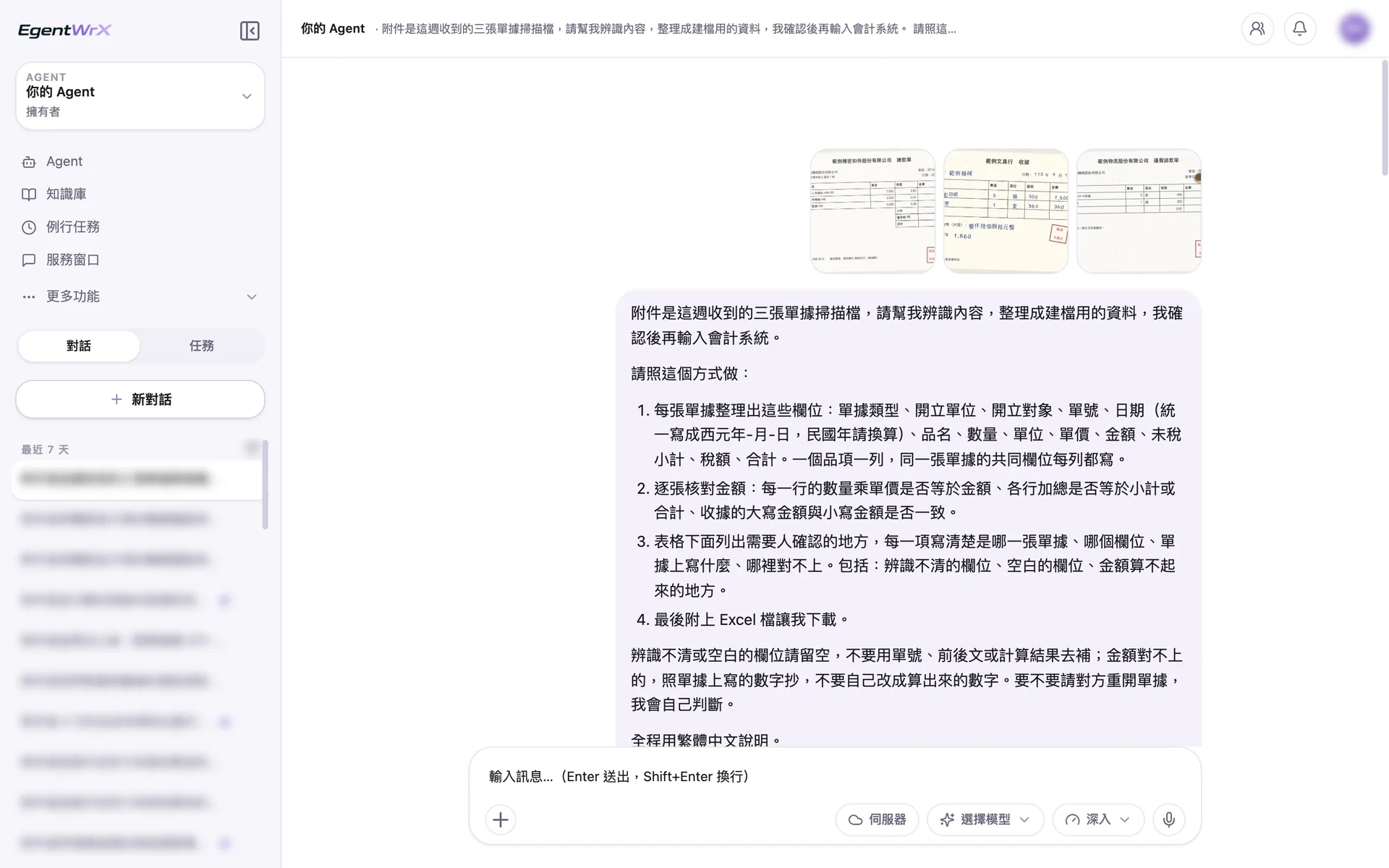
- 1Upload scans of three documents: a billing request, receipt, and freight billing request.
- 2Use Gregorian years for all dates and convert ROC calendar years.
- 3Verify each document's amounts and check whether receipt amounts in words and figures match.
- 4Leave unclear or blank fields empty. Transcribe amounts as shown without changing them.
02Processing
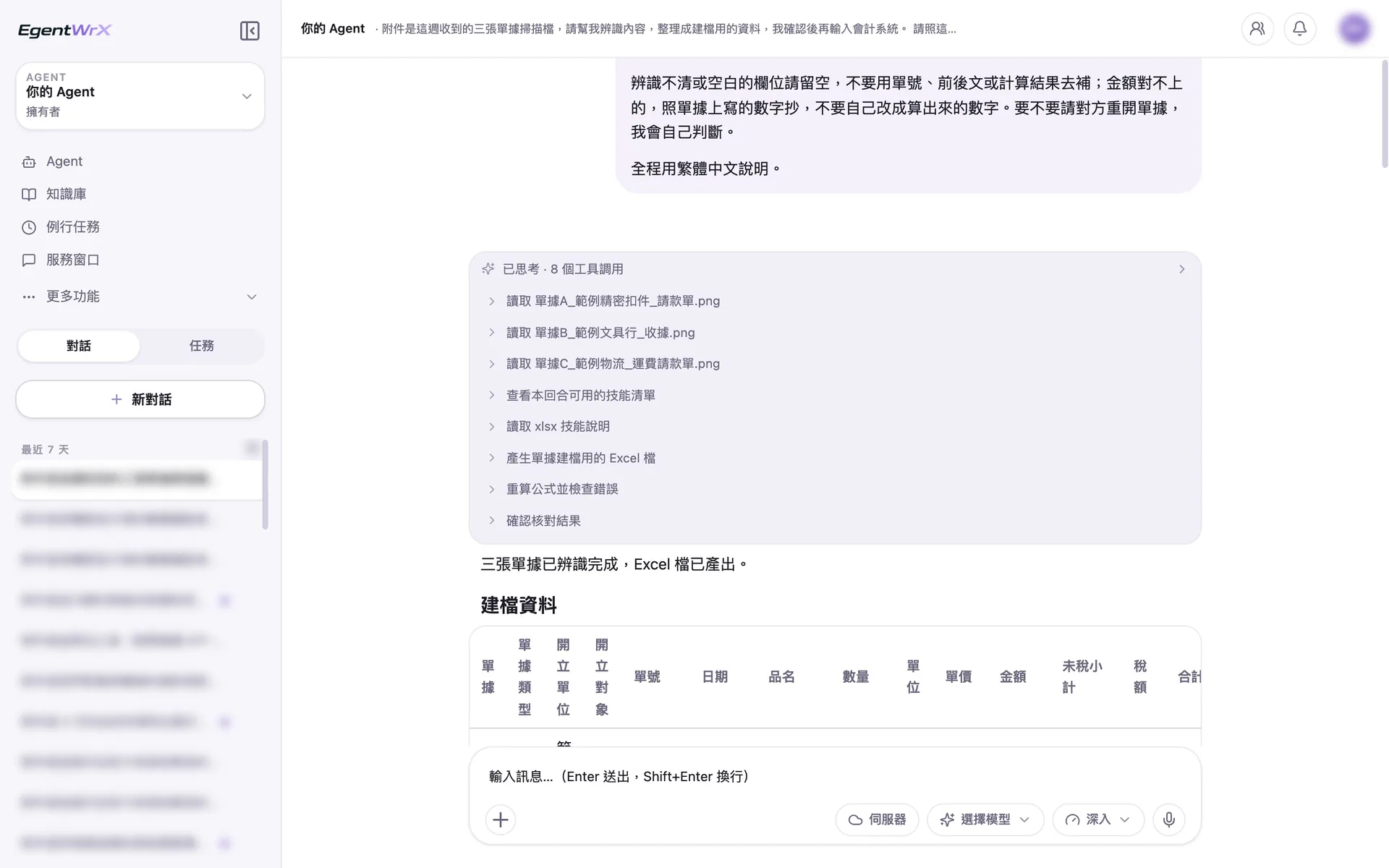
- 1Read the three documents one by one.
- 2Create an Excel file for data entry and recalculate formulas to check for errors.
03Items Requiring Human Review
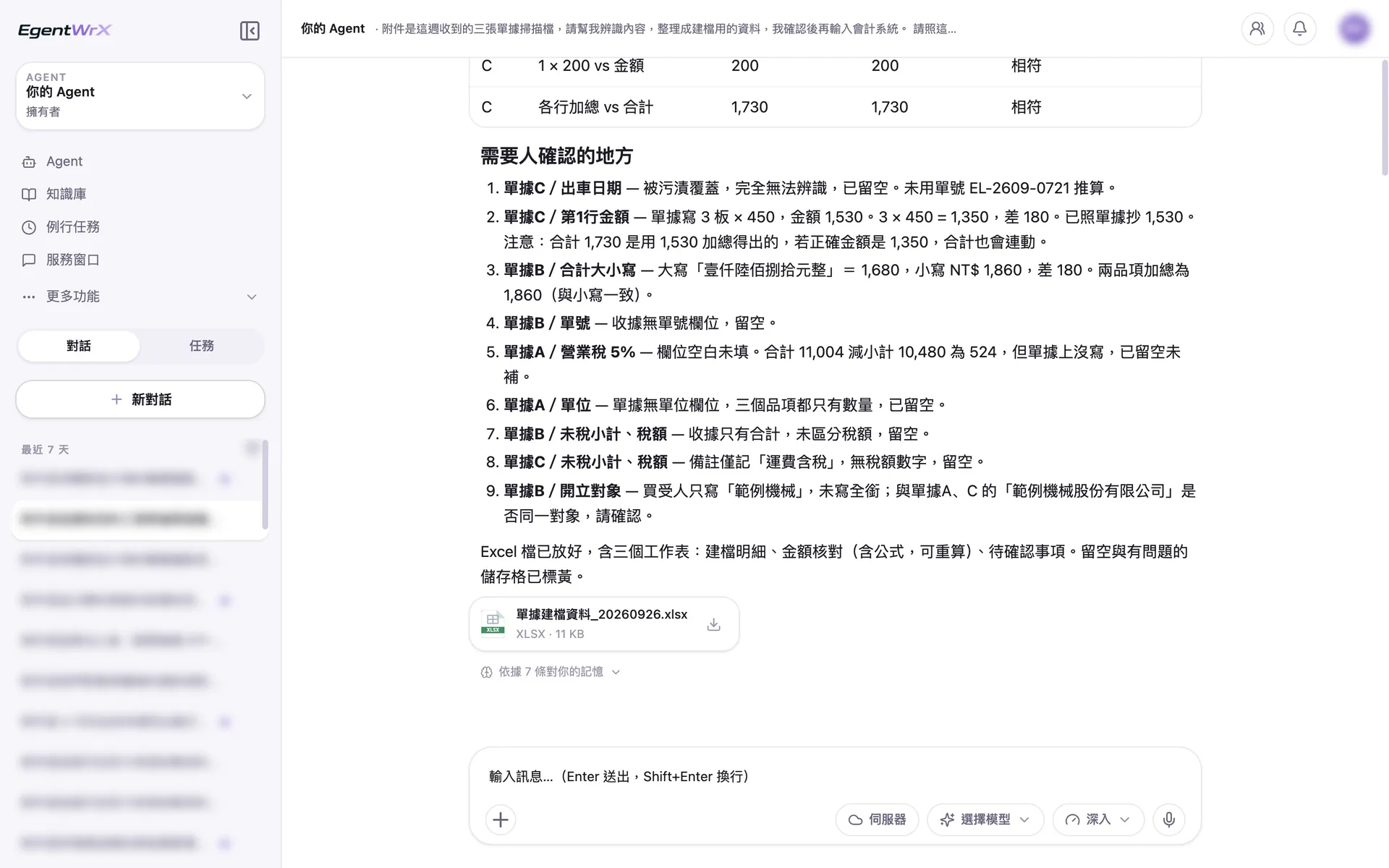
- 1The dispatch date is covered by a stain. It remains blank and is not inferred from the document number.
- 23 × 450 should be 1,350, but the document shows 1,530. Transcribe it as shown and flag the difference.
- 3The receipt amount in words, 1,680, does not match the amount in figures, 1,860.
- 4The tax field is blank. Only state that the difference is 524; do not enter it into the field.
04Amount Verification Table
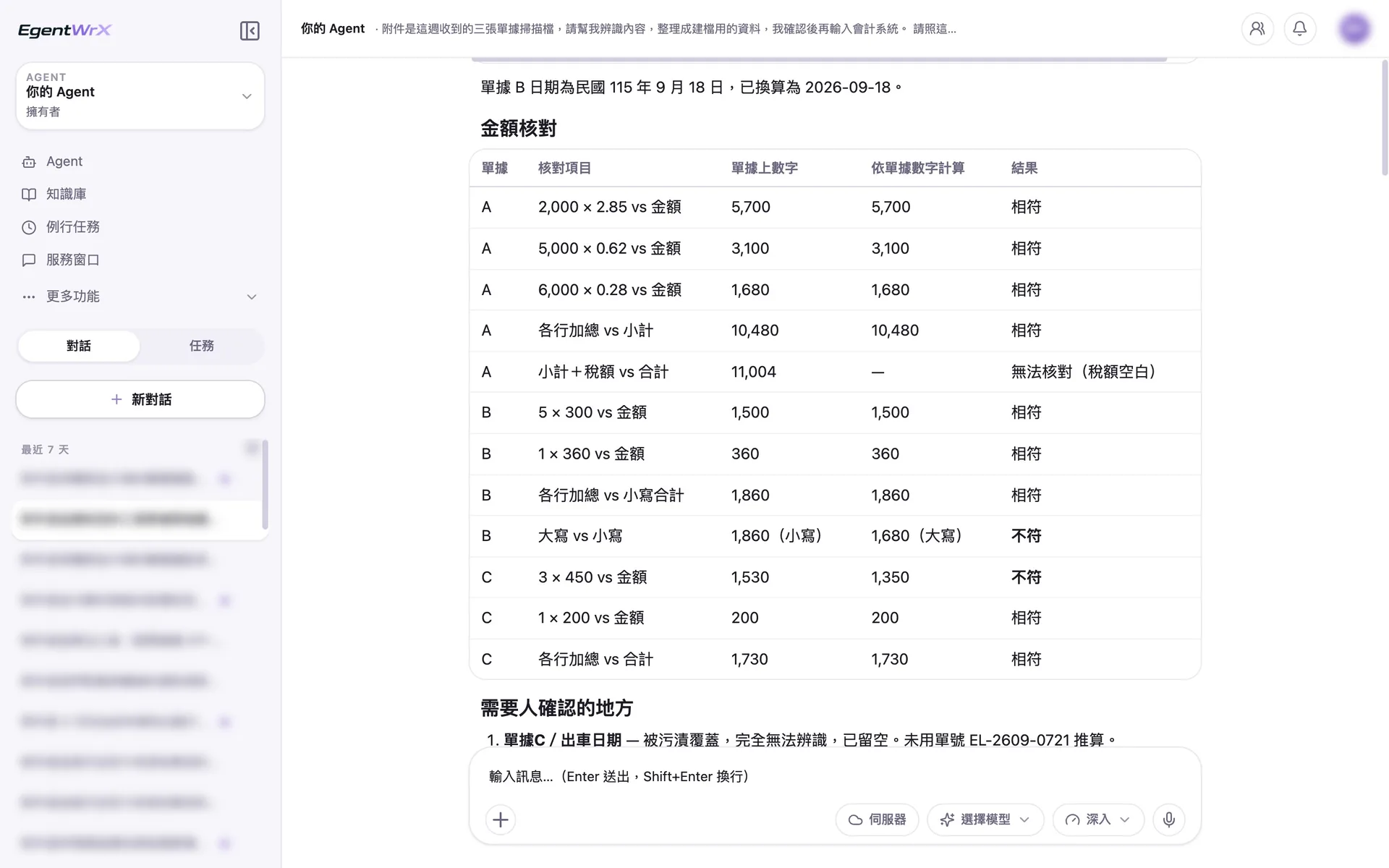
- 1ROC calendar dates have been converted to Gregorian dates.
- 2The tax field is blank, so this item is marked "Unable to verify."
- 3The receipt amounts in words and figures do not match.
- 4The quantity multiplied by the unit price does not match the amount on the document.
Numbers
"Document data recognition" saves an estimated 4 to 12 hours per month, and "invoice data entry" saves 4 to 10 hours per month
Source: An unnamed auto parts manufacturer advised by Intellicon Solutions
FAQ
- How is this different from invoice verification?
- Invoice verification matches each invoice against goods receipt details in the ERP and identifies differences. This use case recognizes data on documents and enters it into the system without matching. The two processes can run in sequence: create the records first, then perform verification.
- How are handwritten or unclear documents handled?
- Unclear fields are flagged separately for human review. The AI Agent does not fill in values on its own. Before launch, we also recommend testing handwritten documents, scans, and unusual fields. Begin formal use only after the recognition results are stable.
- Does this require integration with an accounting or ERP system?
- Not necessarily. The recognized data must ultimately be entered into an accounting or ERP system. We recommend connecting to a SQL MCP Server so the AI Agent can check real-time system data and create records directly. Before integration, you can also follow the demonstration above: export a file in a fixed format, then have staff import it into the system. The connection method depends on your accounting or ERP system and deployment architecture. You can schedule a free consultation for an initial assessment.
Where to go next
Want every employee to have their own AI teammate?
A consultant will be in touch shortly.