SCENARIO 10·Finance·Standardized Task
Every customer check requires manual entry of the check number, bank, amount, and date
Customers pay by check. After receiving a check, finance must record the check number, paying bank, amount, and check date. They must then match it to the customer and the relevant receivable before tracking collection.
There are few fields, but every field must be correct. A wrong amount prevents reconciliation, and a wrong date can cause the collection follow-up to be missed. This work is repetitive and follows clear rules, so AI Agent can organize the data first and a person can review it.
At a glance
How it was done
- Read each check field
- Find the customer and receivable
- Enter the payment record
- Verify the amount and date, then post
Where it gets stuck
There are few fields, but every field must be correct. A wrong amount prevents reconciliation, and a wrong check date can cause the collection follow-up to be missed. Staff must also investigate when the drawer name differs from the customer master record.
With an AI Agent
- Read each check field
- Find the customer and receivable
- Enter the payment record
- Verify the amount and date, then postHuman approval
AI Agent reads the checks, matches each drawer to a customer and receivable, and prepares payment records. Finance confirms the customer and the receivables to apply before posting.
How it was done
- 01Receive customer checks and read the check number, paying bank, amount, and check date from each one
- 02Identify the customer and the related receivable
- 03Enter the data into the system or tracking sheet
- 04Review the amount and date to confirm there are no entry errors
| Field | Check |
|---|---|
| Pay to the order of | Example Machinery Co., Ltd. |
| New Taiwan dollars | Ninety-two thousand four hundred dollars only |
| Numerals | NT$ 92,400 |
| Date | ROC year 115, September 25 |
| !Drawer's seal (company seal) | Example Electric Industries Co., Ltd. |
| ≠Drawer's seal (responsible person's seal) | (None) |
| Crossing | This check is crossed and may only be deposited into the payee's account |
| Field | Check |
|---|---|
| Pay to the order of | Example Machinery Co., Ltd. |
| New Taiwan dollars | One hundred thirty-five thousand dollars only |
| Numerals | NT$ 135,000 |
| !Date | ROC year 115, November 30 |
| Drawer's seal (company seal) | Example Hardware Store |
| Drawer's seal (responsible person's seal) | Responsible person's seal |
| Crossing | This check is crossed and may only be deposited into the payee's account |
| Customer Name | Receivable No. | Invoice Date | Receivable Amount | Due Date |
|---|---|---|---|---|
| Example Precision Engineering Co., Ltd. | AR-2608-012 | 2026-08-05 | 186,000 | 2026-10-04 |
| !Example Electric Co., Ltd. | AR-2608-031 | 2026-08-18 | 92,400 | 2026-10-17 |
| Example Electric Co., Ltd. | AR-2609-022 | 2026-09-12 | 48,600 | 2026-11-11 |
| !Example Hardware Store | AR-2608-044 | 2026-08-25 | 86,000 | 2026-10-24 |
| !Example Hardware Store | AR-2609-007 | 2026-09-03 | 49,000 | 2026-11-02 |
| ≠Example Plastics Co., Ltd. | AR-2609-015 | 2026-09-08 | 135,000 | 2026-11-07 |
| Example Molds Co., Ltd. | AR-2609-018 | 2026-09-10 | 64,500 | 2026-11-09 |
| Example Auto Parts Co., Ltd. | AR-2609-026 | 2026-09-15 | 73,200 | 2026-11-14 |
| Example Valves Co., Ltd. | AR-2609-031 | 2026-09-19 | 48,000 | 2026-11-18 |
| Example Gears Co., Ltd. | AR-2609-035 | 2026-09-22 | 25,800 | 2026-11-21 |
With an AI Agent
- 01What it doesRead check fieldsStandard appliedRead the check number, paying bank and branch, account number, drawer, amount in words and numerals, and check date, converting the ROC year to the Gregorian year. Also identify whether the company seal and responsible person's seal are presentOutputField data for each check
- 02What it doesVerify the amount and match the customerStandard appliedFirst confirm that the amount in words matches the amount in numerals. Then match the drawer to the customer instead of relying only on the amount. If the names are not identical, list the closest customer and mark it for confirmation. One check may match several receivables whose total equals the check amountOutputCandidate customers and receivable numbers for each check
- 03What it doesFlag items that need attentionStandard appliedFlag differences between drawer and customer names, incomplete seals, one check matched to multiple receivables, postdated checks with a check date later than the receipt date, including the collection follow-up date, and cases where another customer has a receivable for the same amount. Warn staff not to apply payments based only on the amountOutputAttention items
- 04What it doesPrepare payment records for financeStandard appliedUse only two statuses: Ready to Post and Pending Confirmation. Do not mark a payment as already appliedOutputCreate the record and post it only after finance confirms the customer match and amount
- Human approval
- Step 4 remains with finance. Finance confirms which customer issued the check and which receivable it applies to before posting. AI Agent does not apply the payment directly.
- Platform modules used
- Skills, Integrations
For standardized tasks, we recommend using fixed input fields and stable templates where errors are easy to identify. AI produces a draft, and staff confirm it before posting. Check fields are few and consistent, so they meet these conditions. The customer match and amount require review and remain with staff.
Screenshots show the Traditional Chinese interface.
01Upload Checks and Receivable Details
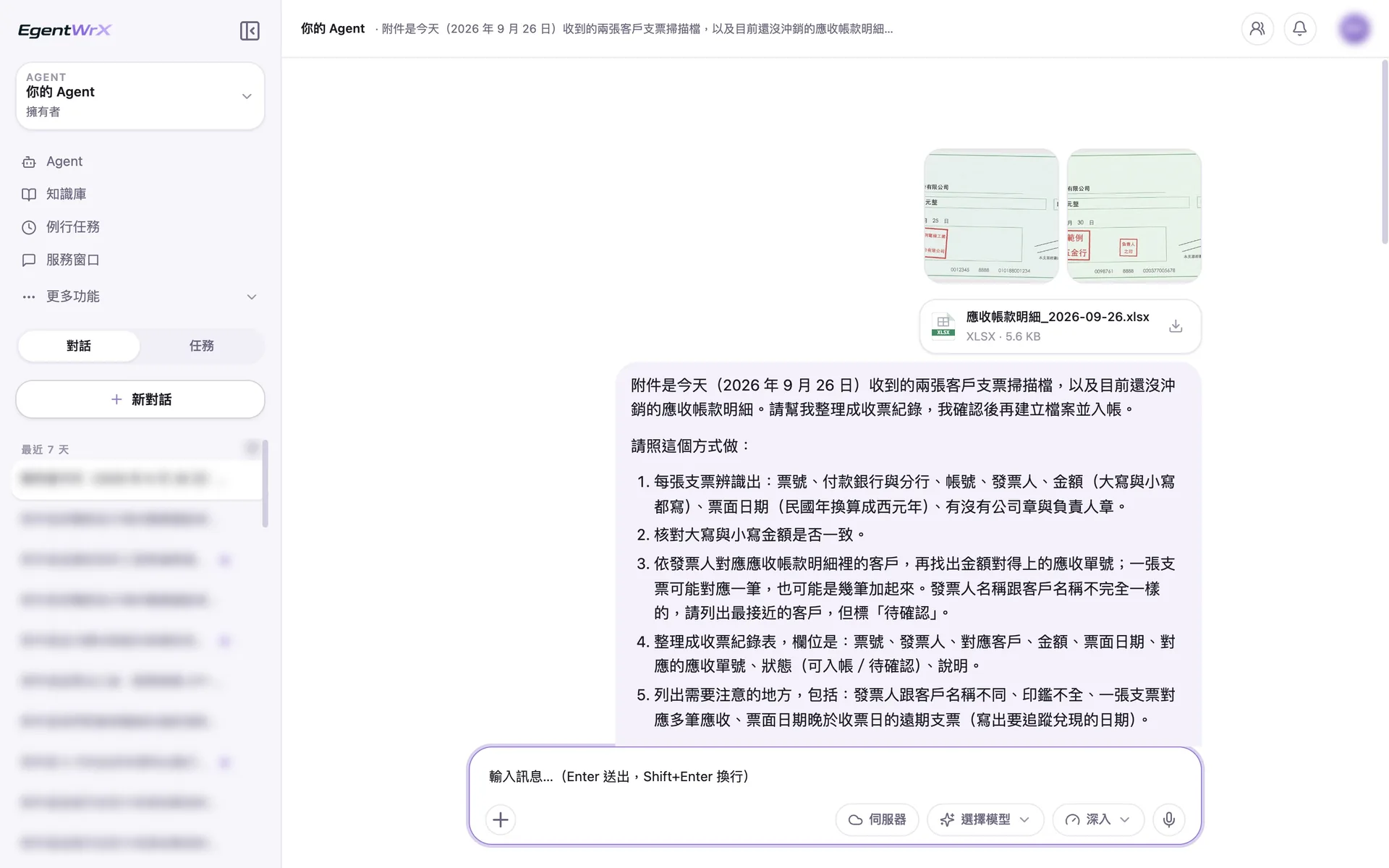
- 1Scans of two customer checks received today.
- 2Details of open receivables.
- 3If the drawer name does not exactly match the customer, list the closest customer and mark it "Pending Confirmation."
- 4List name differences, incomplete seals, one check applied to multiple receivables, and postdated checks.
02Processing
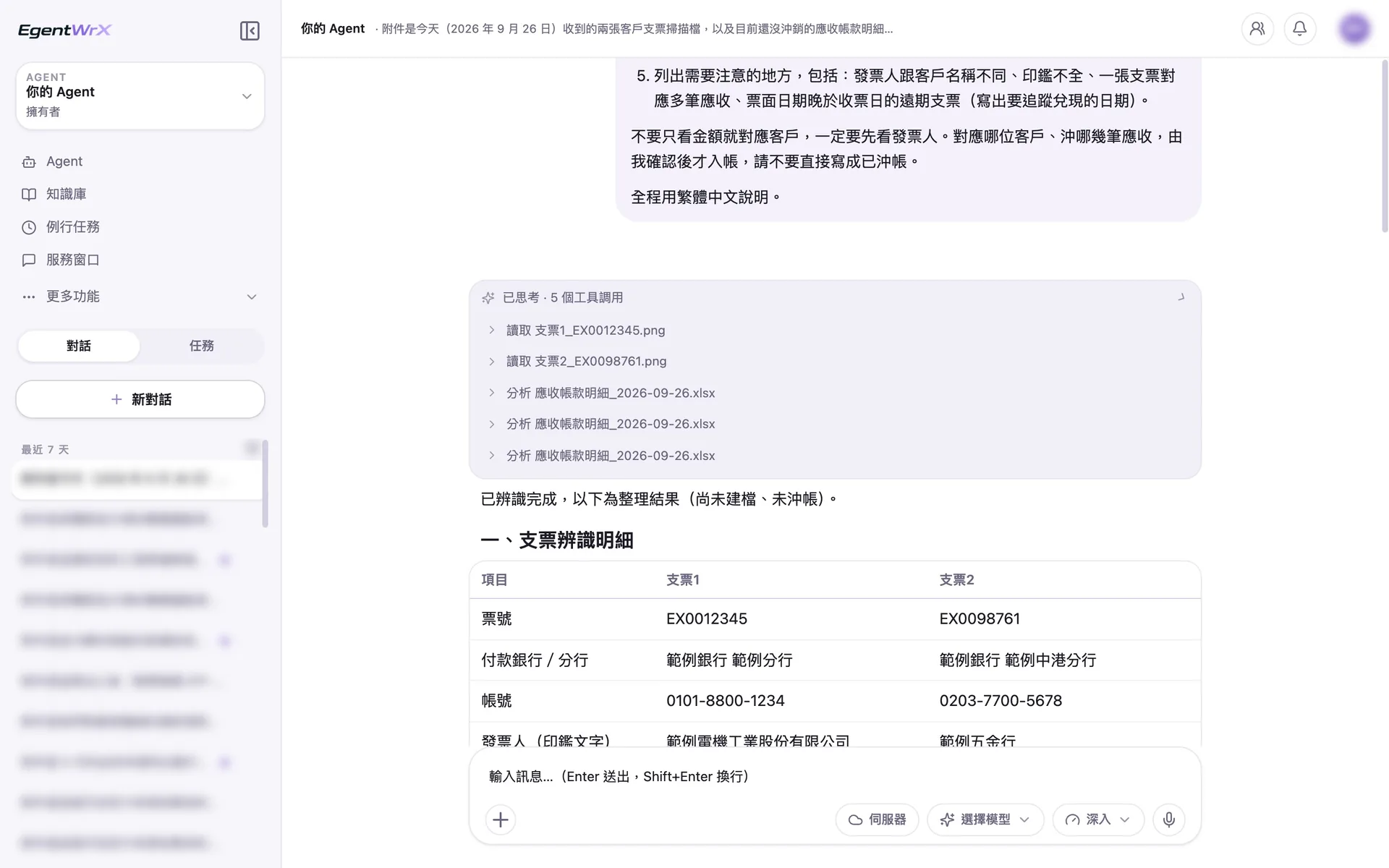
- 1Read the two check images one at a time.
- 2Analyze the receivable details and identify the matching receivables.
- 3Organize the fields from both checks side by side, including amounts in words and numerals and the seals.
03Check Receipt Record
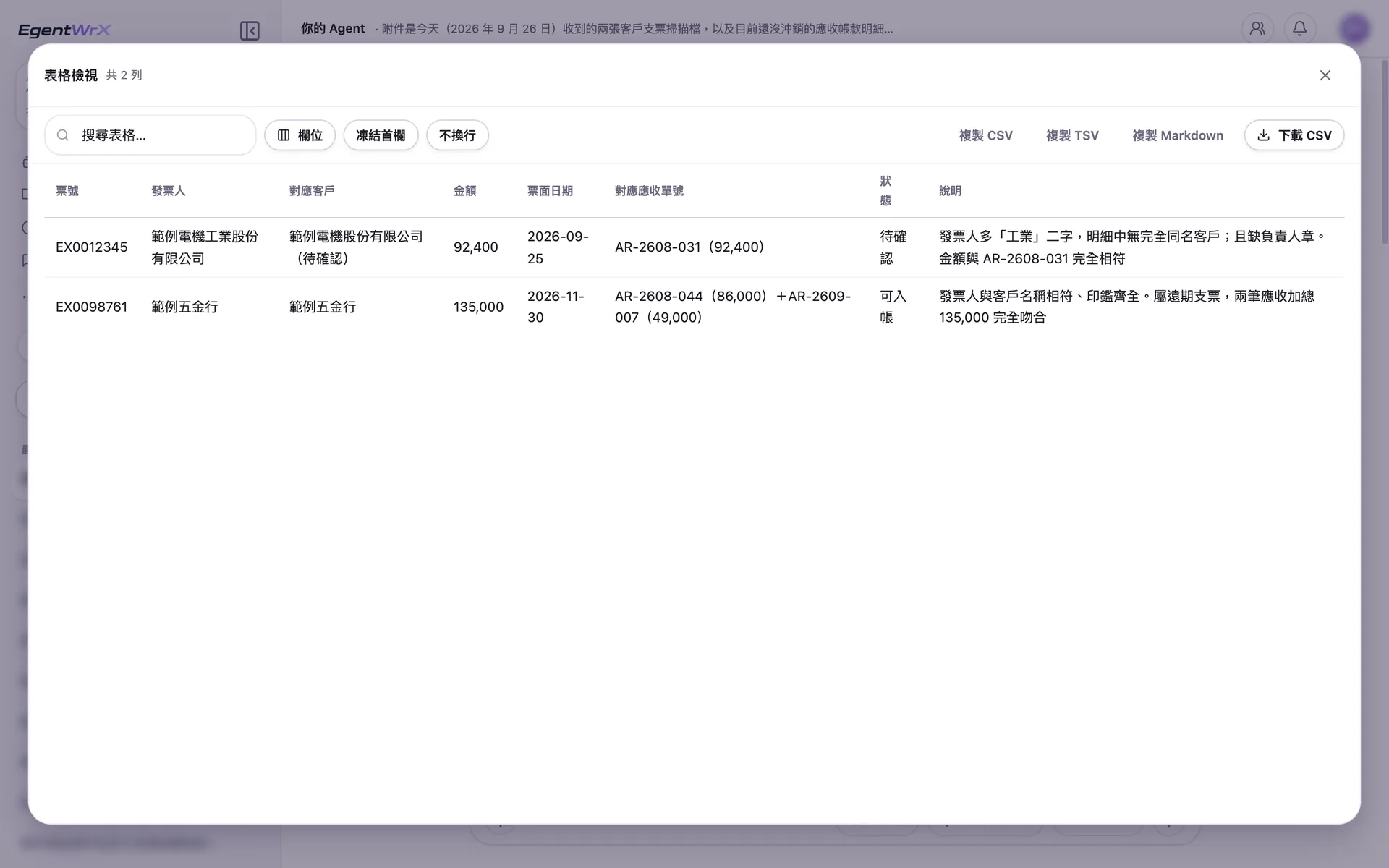
- 1The drawer name differs from the customer name, and the responsible person's seal is missing. The status is "Pending Confirmation."
- 2One check matches two receivables totaling exactly 135,000. The name matches and both seals are present, so the status is "Ready to Post."
04Items That Need Attention
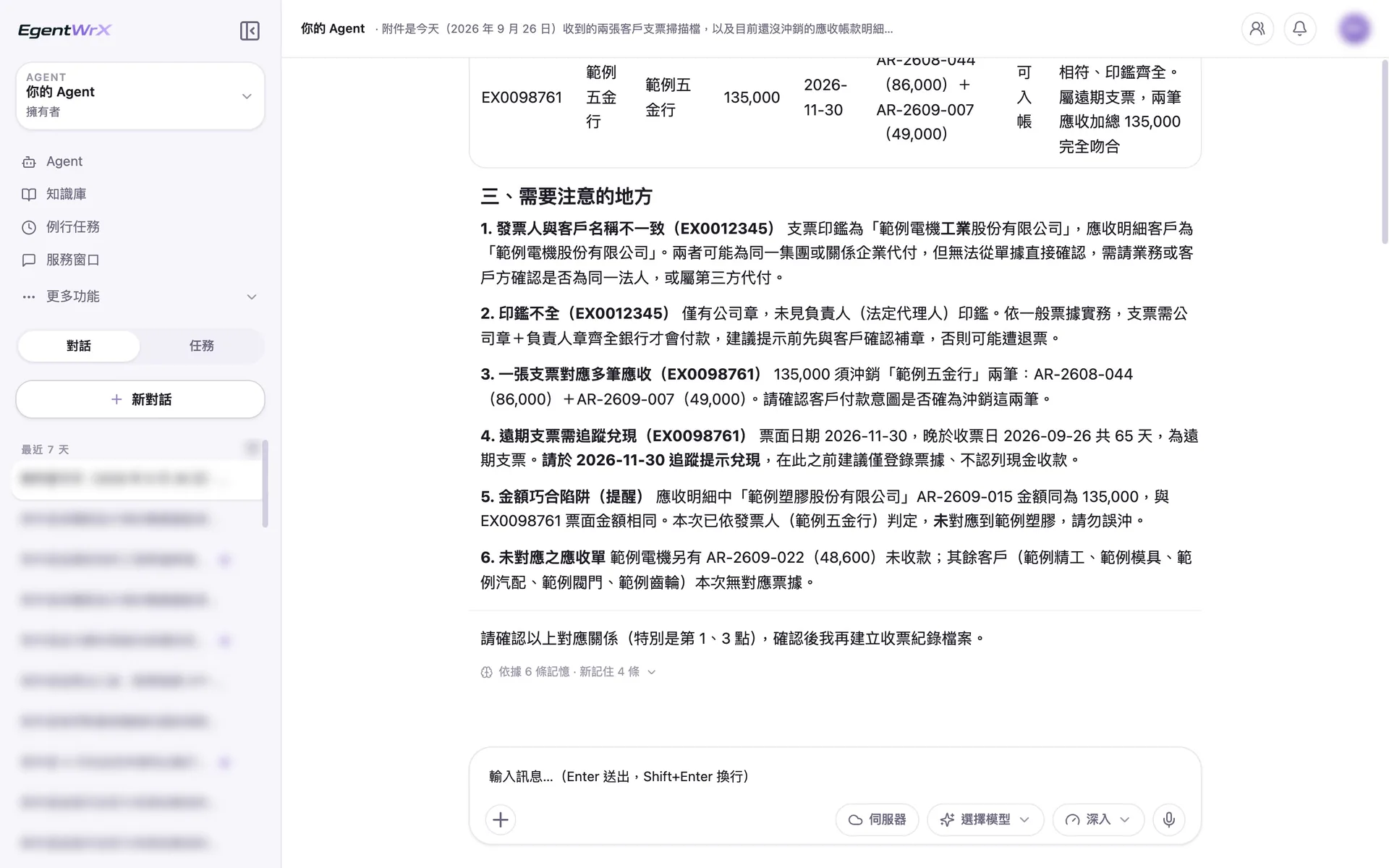
- 1The drawer and customer names do not match. A related company may have paid on the customer's behalf. Ask sales to confirm.
- 2The postdated check has a collection follow-up date of 2026-11-30. Record only the check before that date.
- 3Another customer also has a receivable for 135,000. The match was based on the drawer, so the payment was not applied incorrectly.
- 4Create the check receipt record only after finance confirms the matches.
Numbers
Estimated monthly savings of 4 to 15 hours
Source: An unnamed auto parts manufacturer advised by Intellicon Solutions
FAQ
- Will AI Agent apply payments directly to accounts receivable?
- No. AI Agent only reads the check data and matches it to a customer. Finance confirms the match and amount before posting and still applies the payment. Every accounting entry is reviewed by a person.
- Can it match the correct customer when the payer name differs from the customer name?
- Yes, but AI Agent does not make the final decision. It separately flags checks with mismatched names or no matching customer for finance to confirm. Common relationships, such as a related company paying on a customer's behalf, can be added to a reference table in the AI SOP. This makes matching more consistent over time.
- Where are sensitive check images stored?
- With an on-premises or hybrid deployment, check images can remain inside the company. EgentWrX supports cloud, on-premises, and hybrid deployment architectures. Access can also be restricted to the finance department.
Where to go next
Want every employee to have their own AI teammate?
A consultant will be in touch shortly.